Search Perform an advanced search query SOFTPEDIA
 
SOFTPEDIA
Updated one minute ago
HomeSubmit a program for being reviewedAdvertise on our websiteGet help on surfing our websitesSend us your feedbackGet information about our XML/RSS backend and how to use itBrowse the news archiveVisit our discussion forumVizitati forumul in limba romana


Program Finder NormalFreeware onlyShareware only

3D Color Changer 4.00.2050.0 Report spyware 

Click to download 3D Color Changer
View more 3D Color Changer screenshots (1)
 Downloads: 946
Rating: Good (3.4/5) | Rated by: 24 user(s)
Add to download basket     Send us update information
 Developer: team jotenet | More programs by this producer
 License: Shareware , 10 $ to buy 
 Size / OS: 597 KB, Windows All
 Last Updated: March 15th, 2006, 10:24 GMT
 Category: C: \ System \ OS Enhancements
 Read user reviews (0) Add a review Refer to friend Subscribe
    Download 3D Color Changer

3D Color Changer description
3D Color Changer is a simple yet powerful utility aimed at UI color customization

3D Color Changer is a simple yet powerful utility aimed at UI color customization.

Here are some key features of "3D Color Changer":

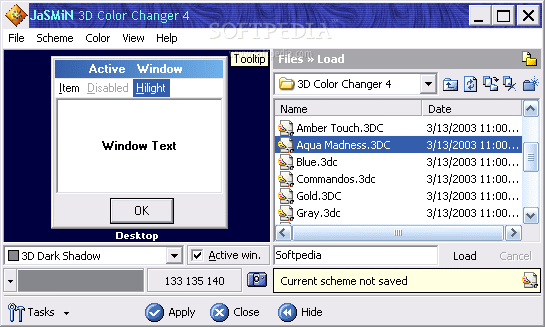
· Advanced color selections - With 3D Color Changer you get access to every window element, which is impossible in Display-Appearance. You can customize the look of 3D frames, mouse highlight and much more.
· Color Capture - is one of the most exciting 3D Color Changer 4 features. With this feature you can capture color of any single pixel of your desktop. Useful when selecting a desktop background color suitable for your favorite wallpaper.
· Color Palette - Get quick access
to 40 predefined colors, 31 scheme colors, 31 system scheme colors and more!
· Color Copy/Paste - Want desktop to have the exact same color as the menu? Right-click, "Copy", Right-click, "Paste"... Done! Couldn't be easier.
· Color Box - Quickly enter color value, hit Enter and done! Something for real RGB freaks!
· Improved element list - Thanks to the color squares next to the element name you get a visual hint! Also, when you pick Active/Inactive Window specific element, the preview window will automatically switch mode.
· Scheme Load/Save support - makes it easy to store, manage and exchange your schemes over the Internet. Scheme files are extremely small (up to 300 bytes). You can even import color schemes from Desktop Themes!
· Scheme Library support - Keep many schemes in one single file! Keep your schemes intact and save wasted disk space: even though scheme rarely exceeds 300 bytes, it will still take up 2KB or more of disk space. Merging into single file eliminates this issue.
· Panel system - No more separate dialog windows - integrated 3DCC4 panels make your workspace less crowded.
· File Panel - Load/Save/Copy/Delete schemes using integrated Files panel. Couldn't be quicker! And because the panel is always there (unlike the "Open" window) you can browse schemes faster than ever.


Softpedia guarantees that 3D Color Changer 4.00.2050.0 is 100% CLEAN, which means it does not contain any form of malware, including but not limited to: spyware, viruses, trojans and backdoors.

This software product was tested thoroughly and was found absolutely clean, therefore it can be installed with no concern by any computer user.

However, it should be noted that this product will be retested periodically and the award may be withdrawn, so you should check back on this page from time to time. (click here for more information)


Related downloads IT News Popular downloads New additions   Latest reviews  
MSN Color Changer 2.0
MSN Color Changer - Change the font color in MSN Messenger
TakeColor 8.0
TakeColor gets a color of any pixel in one of three formats you need: HTML, RGB and HEX
Word Syntax Highlight Addin 1.2
Syntax highlight addin is a free and useful COM addin for Microsoft Word
Color Picker Pro 1.0
Color Picker Pro will let you pick one or several colors anywhere on your screen with a single mouse click
ITC Color Spy 1.0
ITC Color Spy - A small but useful color capture
Color Capture 1.0.2
Color Capture allows you to capture the color of every pixel on the screen and get it's delphi/html code
EclipsePalette 2.0.20
EclipsePalette - Color palette and screen color capture program for webdesign, Visual Basic, C++, C#, and Java
Console Palette Changer 1.03
Customize color palette for Windows consoles (DOS prompts)
OverCAD XPMenu 1.00
OverCAD XPMenu allows you to custom your AutoCAD menu color
ColorCastFX 1.0
Changes and Enhances the color cast of your digital images.

go to top Use the following code to link to this page:


Welcome!
Hello, Guest

Login if you have a Softpedia.com account.

Otherwise, register for one.

Main categories:
  • Antivirus
  • Compression tools
  • CD/DVD Tools
  • Office tools
  • Programming
  • Authoring tools
  • File managers
  • Desktop Enhancements
  • Internet
  • Network Tools
  • IPOD TOOLS
  • Mobile Phone Tools
  • Multimedia
  • Tweak
  • System
  • Security
  • Others
  • Science / CAD
  • UNIX
  • Windows Widgets
  • PORTABLE SOFTWARE

  • Week's best:
  • Maxthon 2.1.3.2418 F...
  • FFDShow MPEG-4 Video...
  • FileZilla 3.1.1 RC1 ...
  • Winamp 5 Full 5.541 ...
  • TopSpyAdware Remover
  • GX::Transcoder 5.0.2...
  • AIM 6.8.12.4
  • VirtualBox 1.6.4
  • EF Commander 6.62
  • Camfrog Video Chat 5...
  • xpy 0.10.8
  • Total Commander 7.04
  • Driver Genius Profes...
  • NVIDIA BIOS Editor (...
  • CCleaner 2.10.618
  • Adobe Photoshop Ligh...
  • K-Lite Mega Codec Pa...
  • DVDFab Platinum 5.0....
  • Adobe Media Player 1...
  • Registry Mechanic 8....
  • BitSpirit 3.3.2.272
  • AnyDVD 6.4.5.9 Beta ...
  • Firefox 3.1 Alpha 1 ...
  • AutoCAD 2009
  • Norton AntiVirus 200...
  • Norton Internet Secu...
  • The Bat! Professiona...
  • WinRAR 3.80 Beta 4 /...
  • GMail Drive shell ex...
  • DAEMON Tools Lite 4....
  • © 2001 - 2008 Softpedia. All rights reserved.
    Softpedia™ and Softpedia™ logo are registered trademarks of SoftNews NET SRL.
    Copyright Information | Privacy Policy | Terms of Use | Contact Softpedia | Update your software | Archive