
This application helps you work with large monitors by dividing them into sections where you can place your windows, while offering support for different grid types. #Screen splitter #Window manager #Window arranger #Grid #Screen #Split
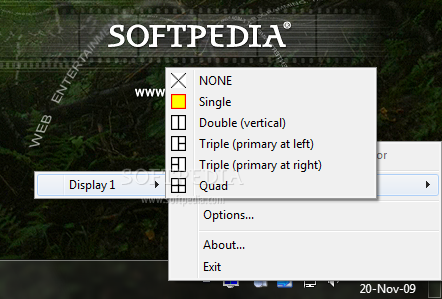
Working with multiple monitors and desktops is not unusual these days and applications that act like extenders for the screen are quite sought after. Such a tool that can split the screen into several workspaces is Acer Gridvista.
The software program installs in a jiffy and becomes available via the system tray where it keeps its icon while running. Operating this utility is pretty straightforward and doesn't require advanced knowledge or complex customizations.
You can easily choose a grid configuration for any of the connected monitors and extend the desktop to an external screen, if one is available. Acer Gridvista supports single, double, triple and even quad grids, so you can divide the available space in up to 4 views.
It's worth mentioning that the 'Double' setting is only for vertical layouts, while the triple grid positioning allows you to specify where the primary display is placed, at left or at right.
Moving windows among the different spaces you created is as easy as drag and drop. You simply grab the application's main frame and put it in the desired spot.
Acer Gridvista adds three buttons on top of each window in order to provide supplemental controls and functions. Thus, you can make the entire app transparent, move it to any position on the grid, set it to be always on top and even lock its position.
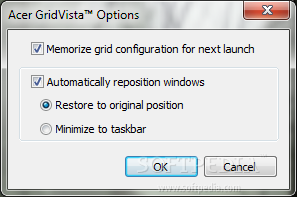
A rather useful feature you can activate from the 'Options' menu is the one allowing you to save the grid configuration and have it automatically loaded the next time the program is launched.
You can also set the software app to re-arrange windows in two ways: either restore them to the original position or minimize them to taskbar.
Acer Gridvista can certainly bring a plus or two on any computer it is installed on. With a good set of features and ease of use, this application deserves a spot among the best tools in its category.
Acer Gridvista 2.72.317
add to watchlist add to download basket send us an update REPORT- runs on:
- Windows All
- file size:
- 1.8 MB
- filename:
- GridVista_2.72.317.zip
- main category:
- System
- developer:
- visit homepage
Zoom Client

Bitdefender Antivirus Free

Microsoft Teams

paint.net

IrfanView

7-Zip

calibre

Windows Sandbox Launcher

ShareX

4k Video Downloader

- Windows Sandbox Launcher
- ShareX
- 4k Video Downloader
- Zoom Client
- Bitdefender Antivirus Free
- Microsoft Teams
- paint.net
- IrfanView
- 7-Zip
- calibre