
Control which items are displayed on your context menu by using this user-friendly and straightforward software solution that supports numerous formats. #Context menu manager #Shell extension #Control menu #Organize #Control #Manage

The Windows context menu may become choked by numerous entries in case you install lots of new applications and since sometimes the removal process isn't quite efficient, you might end up with many invalid entries.
Adding context menu options for every extension, on the other hand, is a bit more difficult, especially for less experienced users. This is true because it requires some advanced computer knowledge and a bunch of steps that, if not followed correctly, could result in a break down of the operating system.
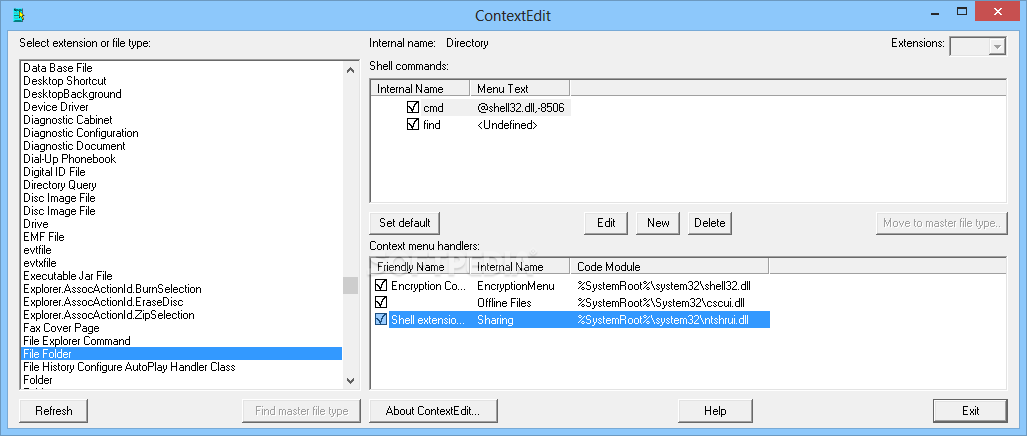
To assist you with those tasks, ContextEdit comes as a simple yet very handy application that enables you to edit the context menu entries easier than before, sporting a simple and clean interface. The program allows you to remove and add new entries, with just a few clicks.
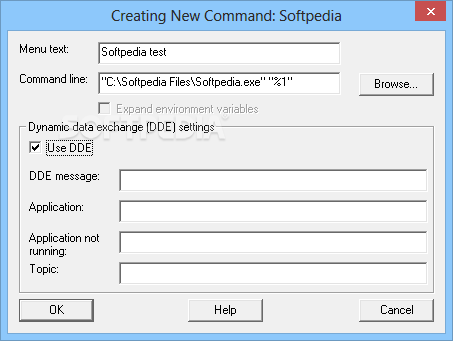
You can check out the current file associations and view the shell commands as well as the handlers in the same window. Tweaking a command is a pretty straightforward process: simply highlight the entry and enter the editing form to assign a new command-line parameter or customize the dynamic data exchange (DDE) settings.
With ContextEdit you can work with both file types and extensions. Selecting a certain extension from the list will activate the command for finding the master file type which, in turn, can control more than one extension.
All things considered, this application remains one of the most advanced tools of its kind and getting used to its apparently complicated features is just a matter of time. ContextEdit offers you the possibility to make changes in sensitive areas this is why you should be careful when using it so as to avoid damage to the system.
What's new in ContextEdit 1.2:
- Fixed a bug that caused the program to get stuck in an endless loop when reading the registry if it encountered a circular reference (specifically, an extension key whose default value contains the name of the same key). The program also presents a warning message when you select such a key in the master list. This rare situation doesn't cause any problems for Windows itself, so ContextEdit doesn't offer to repair it.
ContextEdit 1.2
add to watchlist add to download basket send us an update REPORT- runs on:
- Windows All
- file size:
- 487 KB
- filename:
- cnxtedit.zip
- main category:
- System
- developer:
Bitdefender Antivirus Free

ShareX

IrfanView

4k Video Downloader

Microsoft Teams

calibre

Windows Sandbox Launcher

7-Zip

Context Menu Manager

Zoom Client

- 7-Zip
- Context Menu Manager
- Zoom Client
- Bitdefender Antivirus Free
- ShareX
- IrfanView
- 4k Video Downloader
- Microsoft Teams
- calibre
- Windows Sandbox Launcher