
Copy File Path and Name using Windows Explorer Context Menu Extensions. #Copy File Name #Copy Folder Name #Copy File Path #Context menu #File Name #Folder Name
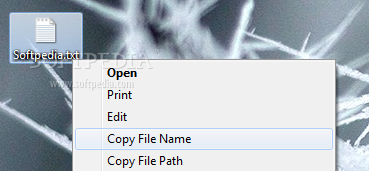
The Copy File Name Utility package contains two folders. Each folder contains a small application written in Visual Basic 6, a .reg installer file, a .reg uninstaller file, and a readme text file.
The first utility is simply called Copy Pathname (arg2cp.exe). It copies path of the selected file or folder to clipboard. The second utility is called Copy Filename (arg2cn.exe). It copies the name of the selected file or folder to the clipboard. These applications are meant to be invoked by Windows Explorer. If you try to invoke them independently, you will get nothing but an error message.
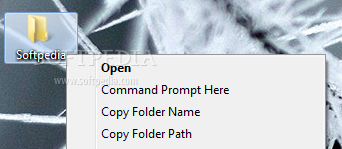
The .reg files are used in place of regular installation and uninstallation programs. The registry files create certain entries in the Windows Registry store. These entries cause Windows Explorer to provide the custom context menu options displayed above. When a user right-clicks a file or folder and selects one of the menu options, Windows Explorer will send the full path of the file or folder to the application (either arg2cp.exe or arg2cn.exe) specified by the relevant registry entry. The application processes the file/folder path information and copies the processed information to the clipboard.
Copy File Name Utility 1.0
add to watchlist add to download basket send us an update REPORT- runs on:
-
Windows 8 32/64 bit
Windows 7 32/64 bit
Windows Vista 32/64 bit
Windows XP 32/64 bit
Windows 2K - file size:
- 11 KB
- filename:
- CopyFileFolderPathNameUtilities.zip
- main category:
- System
- developer:
- visit homepage
Zoom Client

7-Zip

IrfanView

Windows Sandbox Launcher

ShareX

Microsoft Teams

paint.net

Bitdefender Antivirus Free

4k Video Downloader

calibre

- Bitdefender Antivirus Free
- 4k Video Downloader
- calibre
- Zoom Client
- 7-Zip
- IrfanView
- Windows Sandbox Launcher
- ShareX
- Microsoft Teams
- paint.net