
Simple-to-configure program that helps you delete files that are difficult to remove via DOS short name or UNC name or wipe them on system restart. #Delete file #File cleaner #Internet history #Delete #Remove #Cleaner

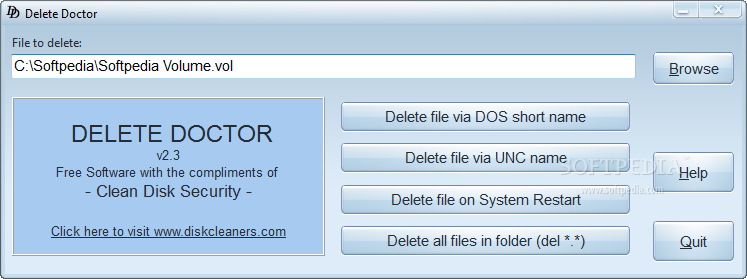
Many users encounter, even though not on a regular basis, some files that simply won't leave off the system unless being forced to do so by specialized software.
Although there are multiple solutions out there that could help you get rid of these annoying files, Delete Doctor is one of the easiest to use.
The ace up its sleeve is not the way it works, there are already several apps out there doing the same thing, but its interface, which is very simple and user friendly.
Delete Doctor offers you two ways to delete files, via DOS short name or via UNC name and in case none of these two work, there's always the option to remove it on system restart.
There's nothing too complicated about Delete Doctor, however you should note that you won't be able to erase several files at once. This means that you have to use the browse for file button and individually remove items.
In case you wish to delete a folder once and for all, Delete Doctor does that too and the only thing you have to do is to choose the target folder. There's no drag and drop support to let you drag the locked file or directory straight into the interface for quick deletion.
All things considered, Delete Doctor works very well and will enable you to get rid of unwanted files that refuse to leave the system. It is very easy to use so you can take it for a test drive to see just how useful it can be when it comes to removing locked items from your PC.
What's new in Delete Doctor 2.3:
- Better file browser and error reporting
Delete Doctor 2.3
add to watchlist add to download basket send us an update REPORT- runs on:
- Windows All
- file size:
- 1.1 MB
- filename:
- deletedr.exe
- main category:
- System
- developer:
- visit homepage
IrfanView

Windows Sandbox Launcher

calibre

Bitdefender Antivirus Free

7-Zip

paint.net

Zoom Client

ShareX

4k Video Downloader

Microsoft Teams

- ShareX
- 4k Video Downloader
- Microsoft Teams
- IrfanView
- Windows Sandbox Launcher
- calibre
- Bitdefender Antivirus Free
- 7-Zip
- paint.net
- Zoom Client