
Update your Windows XP with Longhorn GUI by adding some themes and patch system files in order to alter pictures, screensaver, sidebar, visual styles, wallpapers, and more. #Transformation Pack #Longhorn Transformation #Microsoft Longhorn #Longhorn #Transformation #Pack

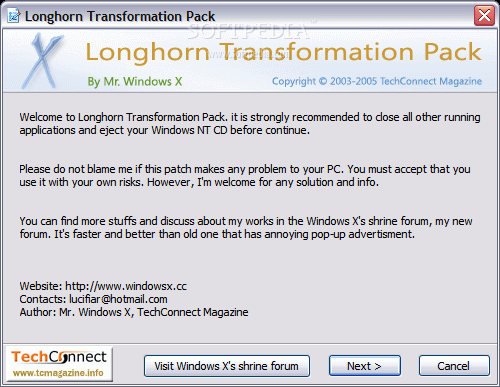
Before Windows Vista got to be known and marketed as Vista, its codename was "Longhorn" and developers used this moniker when creating software that would recreate the visual appearance of this OS.
Longhorn Transformation Pack is meant to allow Windows XP and Server 2003 users to revamp the look of their computers, and give it a fresh makeover by making them resemble Vista.
Since Longhorn was tweaked and optimized before turning into Vista, this software does not transform the host PC into Vista per-se, but into a variant of it that was the initial take Microsoft took on the OS.
Before applying the transformation though, it is highly recommended to backup the original files, just to be on the safe side of things and make sure restoration is possible in case anything goes wrong.
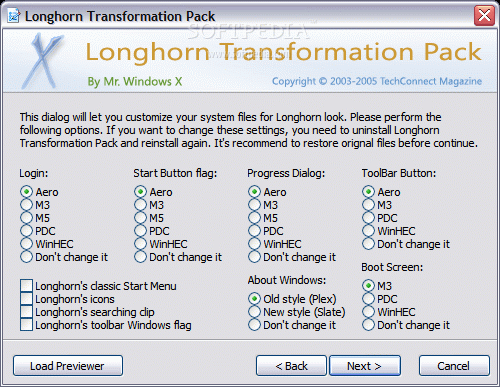
This software does not change only the wallpaper or the taskbar skin, it completely replaces the login screen, the Start button icon, progress dialogs, toolbar buttons, or boot screen.
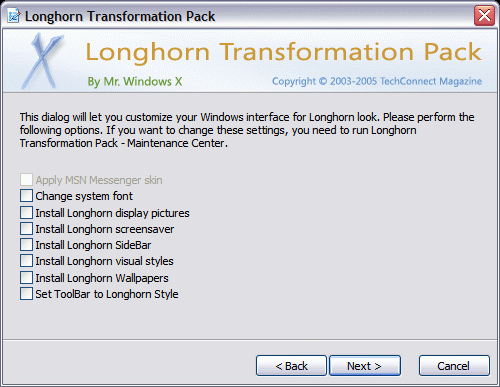
Users also get the chance to modify the system font, set toolbar to Longhorn style, and install Longhorn display pictures, screensaver, sidebar, visual styles, and wallpapers.
After restarting their computer, users are met with a complete overhaul in terms of visual experience for XP or Server 2003, and it might even take users some time to get accustomed to the bright colors, animations and new icons it includes, especially since the sidebar is a completely new addition.
Longhorn Transformation Pack brings some important changes in order to give your system a major facelift. The PC's look can be further tweaked and refined, and users are encouraged to play around with the software's settings until they are completely pleased with the outcome.
Longhorn Transformation Pack 10.5
 Softpedia Editor's Pick
add to watchlist
add to download basket
send us an update
REPORT
Softpedia Editor's Pick
add to watchlist
add to download basket
send us an update
REPORT
- runs on:
-
Windows 2003
Windows XP - file size:
- 20.6 MB
- filename:
- lhtrans105.zip
- main category:
- System
- developer:
- visit homepage
7-Zip

4k Video Downloader

Context Menu Manager

IrfanView

Microsoft Teams

calibre

ShareX

Windows Sandbox Launcher

Zoom Client

Bitdefender Antivirus Free

- Windows Sandbox Launcher
- Zoom Client
- Bitdefender Antivirus Free
- 7-Zip
- 4k Video Downloader
- Context Menu Manager
- IrfanView
- Microsoft Teams
- calibre
- ShareX