
Adds Always On Top, Minimize To Tray, Priority and Transparency sub menus to all top level system menus. #Always On Top #Minimize To Tray #Window Transparency #PowerMenu #Transparency #Always On Top

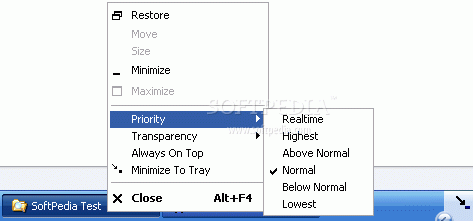
If you're still looking for a simple way to add transparency to your windows without spending too much time with configuration of complex applications, here's PowerMenu, a simple tool that does that and even more.
The ace up its sleeve is definitely the way it manages to tackle this issue, offering users not only the possibility to add transparency to each window of the operating system, but also a couple of other handy tools.
PowerMenu will be ready to run in a minute, placing a stylish icon in the System Tray that does nothing more than to show you the program is up and running.
In case you're wondering where's the interface, simply click on the top level system menu and you will see four new options brought to you by PowerMenu.
Basically, you can now add transparency to the desired level just by clicking on it, but you can also set process priority without going to Task Manager or using another application for this purpose.
Plus, you can also set the window to remain always on top even if the program doesn't include this option, but there's also a tool to minimize it to tray and thus organize your working space a little bit better.
If you wish to close the app and thus get rid of the new options, it's enough to right click the Tray icon and hit exit.
You won't feel a major slowdown after installing PowerMenu, but it's reported that on older computers there might be minor differences in terms of performance when using it.
All things considered, PowerMenu is quite an interesting software solution, and since it's quite easy to use and may very well deserve a try.
PowerMenu 1.5.1
add to watchlist add to download basket send us an update REPORT- portable version
- This is the portable version of the application. An installable version is also available: Portable PowerMenu
- runs on:
- Windows All
- file size:
- 109 KB
- filename:
- PowerMenuSetup_1_5_1.exe
- main category:
- System
- developer:
- visit homepage
4k Video Downloader

calibre

Bitdefender Antivirus Free

ShareX

Zoom Client

Windows Sandbox Launcher

Microsoft Teams

IrfanView

Context Menu Manager

7-Zip

- IrfanView
- Context Menu Manager
- 7-Zip
- 4k Video Downloader
- calibre
- Bitdefender Antivirus Free
- ShareX
- Zoom Client
- Windows Sandbox Launcher
- Microsoft Teams