
Improves system performance and makes your Windows to run faster, more secure and more stable. #System settings #Security settings #Performance settings #System #Safe #Xp
System performance is what makes users happy. This usually means quick response to user input on behalf of the computer at hand, backed up by security and last, but not least, stability. Many think that Windows installations are at their best on every fresh install - if anything breaks down or fails to run, then there is nothing a re-installation of the OS can't fix.
That's where a certain software category comes into play. It's the Windows tweaking category and it doesn't intend on approaching a certain bunch of users – both beginners and experts can make use of such tools in order to raise the bar regarding their system performance. Safe XP promises not only a boost in this field, but higher security and greater stability as well.
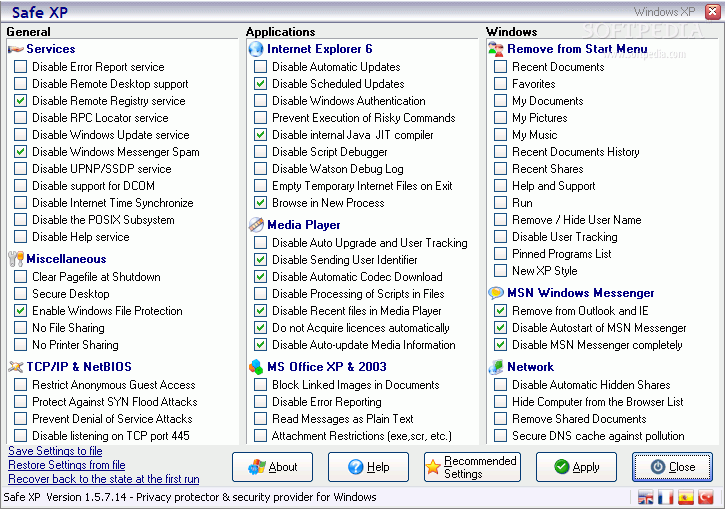
Safe XP is one simple Windows tweaker – from its no-installation-needed EXE file to its one-window-only interface. The GUI is divided in three main categories with three sub-categories each. These start with the `General` tweaks category and its `Services`, `Miscellaneous`, `TCP/IP & NetBIOS` subordinates.
It would be a mistake to point every available option here, thus only the recommended settings are provided. They consist in disabling error reporting, remote desktop/registry, Windows Messenger Spam or the POSIX Subsystem. You can also enable Windows File Protection and disable the printer sharing. Safe XP is able to protect your computer against SYN Flood as well as Denial of Service Attacks.
The second category includes Internet Explorer, Media Player and Microsoft Office tweaks that, among other things, refer to disabling of `Automatic/Scheduled Updates`, `Codec Download` or `Recent files`, prevention of `Risky Commands` execution and `Attachment Restriction`. Users can also remove items from the Start Menu, remove Windows Messenger from Outlook and IE, disable the autostart of Windows Messenger or Remove Shared Documents.
Safe XP packs some of the best choice of safe-indeed tweaks that can only keep your system running smoothly while browsing the Internet securely and customizing the overall Windows experience to fit everyone's needs. The application does not leave backup and restoration out of the equation, as it provides `Save Settings`, `Restore Settings` and `Recover back to the state at the first run` options. Safe XP is your app when it comes to quick yet comprehensive system tweaking.
Safe XP 1.5.7.14
 Softpedia Editor's Pick
add to watchlist
add to download basket
send us an update
REPORT
Softpedia Editor's Pick
add to watchlist
add to download basket
send us an update
REPORT
- runs on:
- Windows All
- file size:
- 351 KB
- filename:
- SafeXP.zip
- main category:
- System
- developer:
- visit homepage
calibre

4k Video Downloader

Windows Sandbox Launcher

Microsoft Teams

7-Zip

IrfanView

Bitdefender Antivirus Free

paint.net

ShareX

Zoom Client

- paint.net
- ShareX
- Zoom Client
- calibre
- 4k Video Downloader
- Windows Sandbox Launcher
- Microsoft Teams
- 7-Zip
- IrfanView
- Bitdefender Antivirus Free