
A shell extension allowing to preview many image formats as well as quickly and easily convert them to popular types such as JPG, GIF, BMP or PNG. #Image Thumbnail Preview #Image Preview #Preview Image #Preview #Thumbnail #Viewer

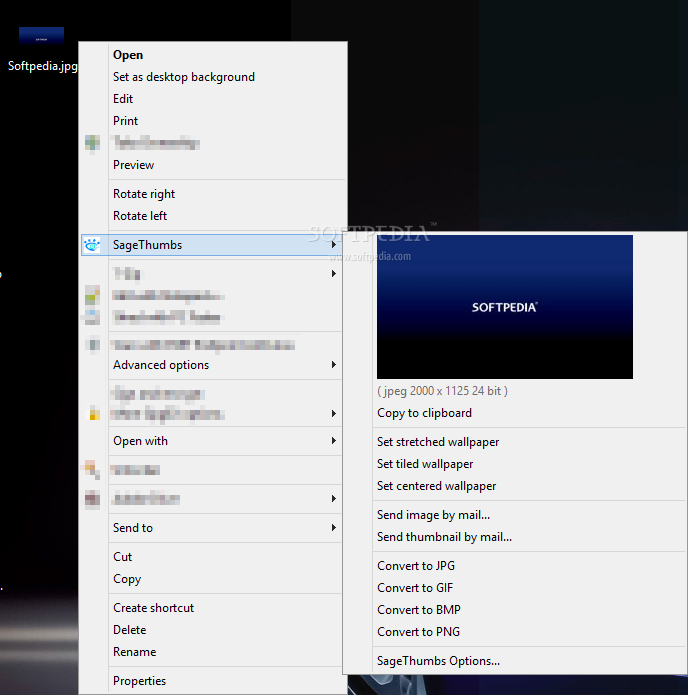
SageThumbs is a shell extension that you can use to preview image files and perform several operations on them. It can be easily installed and configured, even by beginners.
After the installation procedure is done, you are required to restart the computer, in order for the changes to take effect.
You can open the right-click menu on image files, in order to copy a picture to the Clipboard, set it as a stretched, tiled or centered wallpaper, send it or its thumbnail to someone else via email, as well as to convert it to pictures with the JPG, GIF or BMP extension.
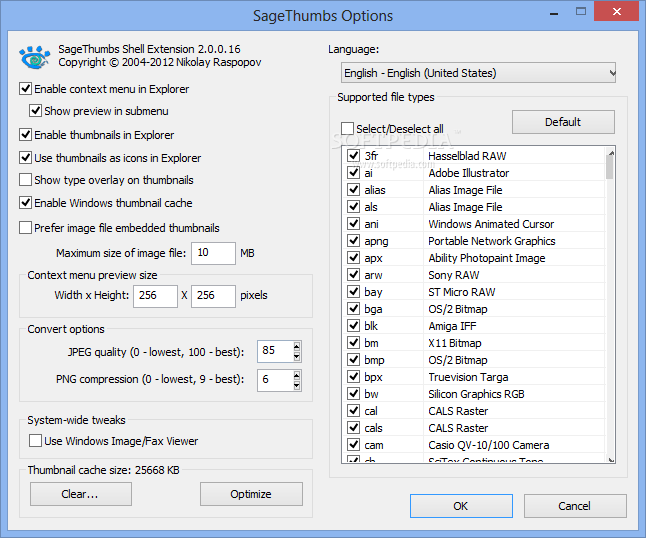
The app includes several customization preferences which you can access from the 'SageThumbs Options' entry. Thus, you can disable the context menu or thumbnail in Windows Explorer, use the thumbnails as icons in Explorer, and disable Windows thumbnail cache.
But you can also set the maximum size of image files to preview, make file associations (e.g. JPG, BMP, 3FR, ANI, AI, APNG), switch to a different language for the interface, as well as enable SageThumbs to use Windows Image/Fax Viewer.
The program needs a small amount of CPU and system memory, and has a good response time. We have not experienced any problems during our testing; SageThumbs did not freeze, crash or pop up error dialogs during our tests. SageThumbs provides a straightforward solution for viewing and converting image files.
What's new in SageThumbs 2.0.0.23:
- Added Finnish translation (by Ropsi)
- Project converted to MS VS2017
SageThumbs 2.0.0.23
add to watchlist add to download basket send us an update REPORT- runs on:
-
Windows 10 32/64 bit
Windows 2008 R2
Windows 2008 32/64 bit
Windows 2003
Windows 8 32/64 bit
Windows 7 32/64 bit
Windows Vista 32/64 bit
Windows XP 32/64 bit
Windows 2K - file size:
- 2.1 MB
- main category:
- System
- developer:
- visit homepage
Windows Sandbox Launcher

calibre

IrfanView

4k Video Downloader

7-Zip

Context Menu Manager

ShareX

Bitdefender Antivirus Free

Zoom Client

Microsoft Teams

- Bitdefender Antivirus Free
- Zoom Client
- Microsoft Teams
- Windows Sandbox Launcher
- calibre
- IrfanView
- 4k Video Downloader
- 7-Zip
- Context Menu Manager
- ShareX