
Have your PC ready for use by waking it from stand-by mode with the possibility to trigger various actions afterwards thanks to this application. #Wake-up PC #Recover Stand-by #Wake up computer #Wake-up #Alarm #Stand-by

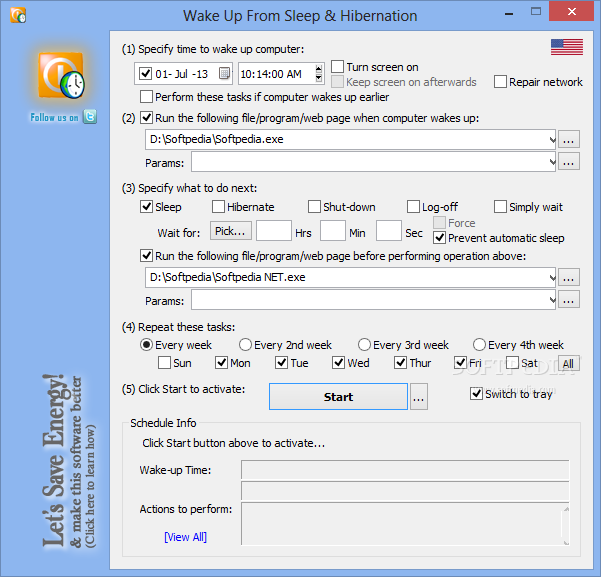
WakeupOnStandBy is a small Windows software utility developed to wake up the computer from standby without any user input.
The application is capable of restoring the system from the sleep mode based on user-defined parameters, with dedicated options to re-enable a network connection and launch a file, a program or a website.
WakeupOnStandBy's main GUI is the one that takes care of everything, with a straightforward configuration process that shouldn't raise too many problems to rookies.
First, you are prompted to select the time to wake up the computer and choose whether you want to turn on the monitor and resume from screensaver, repair network or keep screen on afterwards.
As said, you are allowed to choose a program or webpage to be launched after the system is restored from sleep or even pick an action to be performed, including sleep, hibernate, shutdown or log-off.
Besides the fact that it can repeat the configured task at a defined interval, WakeupOnStandBy also allows its users to create batch files able to use the same settings to wake up the system from standby.
A cluttered settings menu is also available, enabling users to configure the network repairing process and event logs. Advanced computer knowledge is however necessary, so the online help manual could help you a lot.
All things considered, WakeupOnStandBy is a handy project that could become one of the top products in this particular software category with a few improvements here and there. A more user-friendly approach and a redesigned interface are clearly needed.
What's new in WakeupOnStandBy 1.7.20.6:
- Made fully compatible with Windows 10, added user-requested features, fixed bugs.
WakeupOnStandBy 1.7.20.6
add to watchlist add to download basket send us an update REPORT- PRICE: Free
- runs on:
-
Windows 10 32/64 bit
Windows 8 32/64 bit
Windows 7 32/64 bit
Windows Vista 32/64 bit
Windows XP 32/64 bit - file size:
- 1.3 MB
- filename:
- WakeupOnStandBy.zip
- main category:
- System
- developer:
- visit homepage
Microsoft Teams

ShareX

Bitdefender Antivirus Free

Zoom Client

4k Video Downloader

calibre

Windows Sandbox Launcher

IrfanView

7-Zip

paint.net

- IrfanView
- 7-Zip
- paint.net
- Microsoft Teams
- ShareX
- Bitdefender Antivirus Free
- Zoom Client
- 4k Video Downloader
- calibre
- Windows Sandbox Launcher