Search Perform an advanced search query SOFTPEDIA
 
SOFTPEDIA
Updated one minute ago
HomeSubmit a program for being reviewedAdvertise on our websiteGet help on surfing our websitesSend us your feedbackGet information about our XML/RSS backend and how to use itBrowse the news archiveVisit our discussion forumVizitati forumul in limba romana


Program Finder NormalFreeware onlyShareware only

BGInfo 4.13 Report spyware 

Click to download BGInfo
View more BGInfo screenshots (5)
 Downloads: 12,016
Rating: Good (3.9/5) | Rated by: 38 user(s)
Add to download basket     Send us update information
 Developer: Sysinternals | More programs by this producer
 License: Freeware  
 Size / OS: 388 KB, Windows All
 Last Updated: June 25th, 2008, 09:39 GMT
 Category: C: \ System \ System Info
 Read user reviews (0) Add a review Refer to friend Subscribe
    Download BGInfo

BGInfo description
Automatically generates desktop backgrounds that include important information about the system including IP addresses...

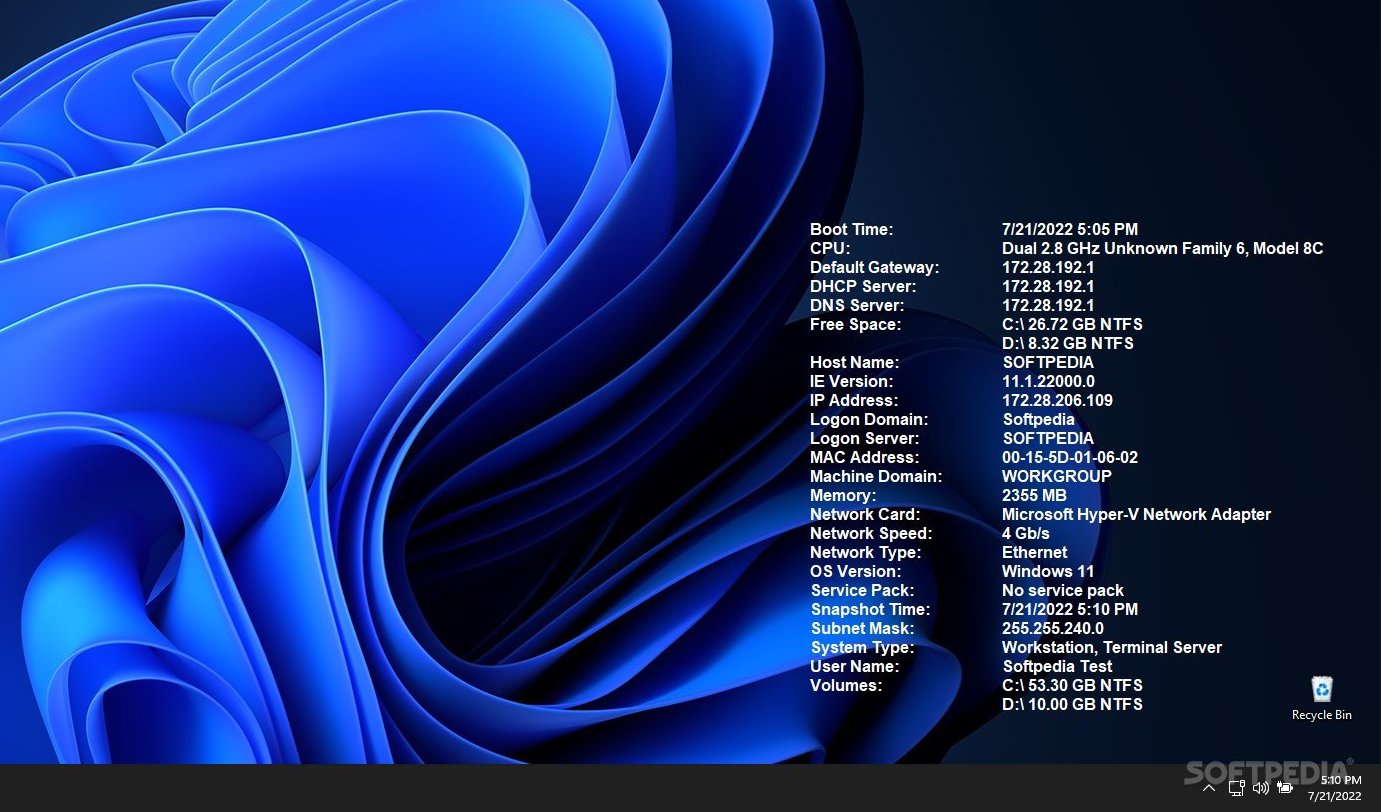
BGInfo automatically generates desktop backgrounds that include important information about the system including IP addresses, computer name, network adapters, and more.

How many times have you walked up to a system in your office and needed to click through several diagnostic windows to remind yourself of important aspects of its configuration, such as its name, IP address, or operating system version?

If you manage multiple computers you probably need BGInfo. It automatically displays relevant information about a Windows computer on the desktop's background, such as the computer name, IP address, service pack version, and more.

You can edit any field as well as the font and background colors, and can place it in your startup folder so that it runs every boot, or even configure it to display as the background for the logon screen.

Because all BGInfo does is to simply write a new desktop bitmap and exit, you don't have to worry about it consuming your system resources or interfering with other programs.

By placing BGInfo in your Startup folder you can ensure that the system information being displayed is up to date each time you boot. Once you've settled on the information to be displayed use the command line option /timer:0 to update the display without showing the dialog box.

You can also use the Windows Scheduler to run BGInfo on a regular basis to ensure long-running systems are kept up to date.

If you create a BGInfo configuration file (using the File|Save Settings menu item) you can automatically import and use those settings on other systems by adding the /I or /iq command line option.

Here are some key features of "BGInfo":

Appearance Buttons

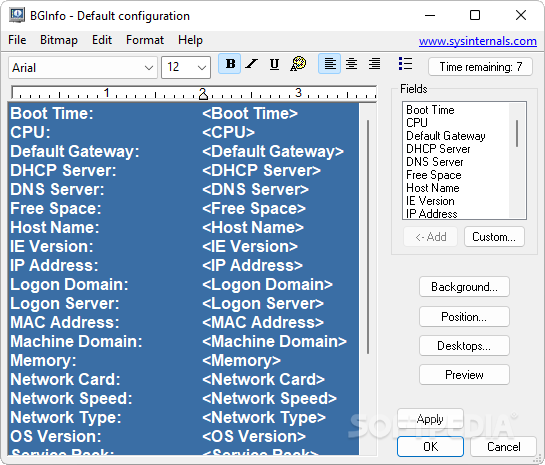
· Fields: Selects what information appears on the desktop, and the order in which it is displayed. For networking fields (NIC, IP, MAC, etc.) a separate entry is created
for each network card on the system. Use the Custom button to add special information you define yourself.
· Background: Selects the color and/or wallpaper to use for the background. If you select the Copy existing settings option then BGInfo will use whatever information is currently selected by the logged on user. This option allows end users to personalize their desktop while still displaying the BGInfo information.
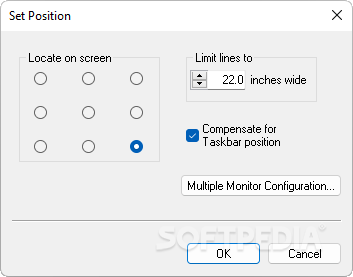
· Position: Selects the location on the screen at which to place the text. If some items are very long (for example some network card names) you can use the Limit Lines to item to wrap them. The Compensate for Taskbar position checkbox adjusts the position of the text to ensure that it is not covered by the Taskbar. The Multiple Monitor Configuration button allows you to specify how multiple monitors attached to a single console should be handled.
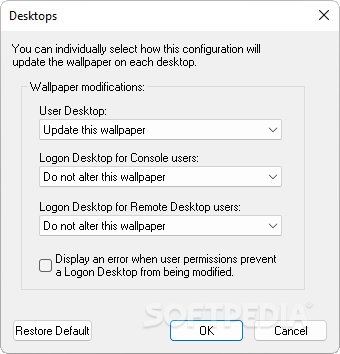
· Desktops: Selects which desktops are updated when the configuration is applied. By default only the User Desktop wallpaper is changed. Enabling the Logon Desktop for Console users option specifies that the wallpaper should be displayed on the logon desktop that is presented before anyone has logged onto the system. On Windows 95/98/ME systems the same desktop is used for users and the login screen, so this option has no effect. Enabling the Logon Desktop for Terminal Services users option specifies that the wallpaper should be displayed on the Terminal Services login screen. This option is useful only on servers running Terminal Services.
· Preview: Displays the background as it will appear when applied to your system.

Configuration Menu Items

These are options that control how the bitmap is produced, where it is located and how to import/export settings.
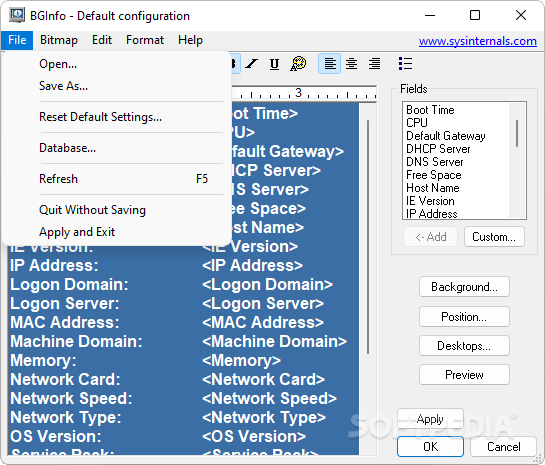
· File | Open: Opens a BGInfo configuration file.
· File | Save As: Saves a copy of the current BGInfo configuration to a new file. Once created, you can have BGInfo use the file later by simply specifying it on the command line, or by using File|Open menu option.
· File|Reset Default Settings: Removes all configuration information and resets BGInfo to its default (install-time) state. Use this if you can't determine how to undo a change, or if BGInfo becomes confused about the current state of the bitmap.
· File|Database: Specifies a .XLS, .MDB or .TXT file or a connection string to an SQL database that BGInfo should use to store the information it generates. Use this to collect a history of one or more systems on your network. You must ensure that all systems that access the file have the same version of MDAC and JET database support installed. It is recommended you use at least MDAC 2.5 and JET 4.0. If specifying an XLS file the file must already exist.
If you prefer to have BGInfo update the database without modifying the user's wallpaper you can unselect all desktops in the Desktops dialog; BGInfo will still update the database.
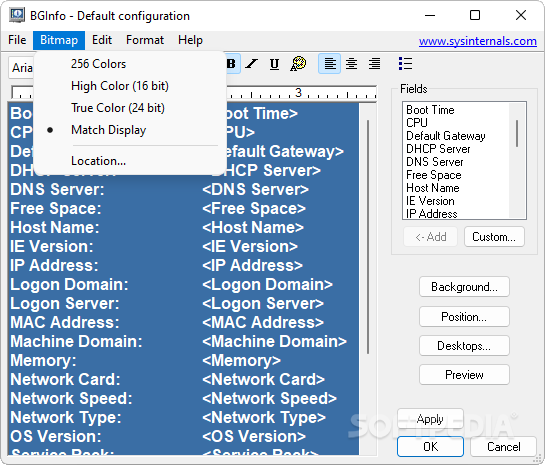
· Bitmap|256 Colors: Limits the bitmap to 256 colors. This option produces a smaller bitmap.
· Bitmap|High Color/True Color: Creates a 16-bit or 24-bit color bitmap.
· Bitmap|Match Display: Creates a bitmap with color depth matching that of the display. Because the bitmap generated by BGInfo is not updated when a user changes the display's color depth you may see unexpected results (especially dithering of the text and background) with some combinations of bitmap and display depth.
· Bitmap|Location: Specifies the location to place the output bitmap file. On Terminal Services servers the bitmap should be placed in a location that is unique to each user.
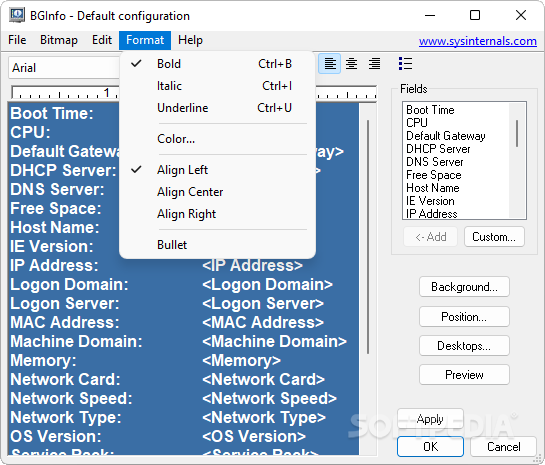
· Edit|Insert Image: Allows you to insert a bitmap image into the output. Because BGInfo's configuration information is stored in the registry and Windows limits the size of registry values you may encounter errors when inserting larger images. On Windows 9x/Me systems the limit is 16K, while on NT/2000/XP systems the limit is 64K.


Softpedia guarantees that BGInfo 4.13 is 100% CLEAN, which means it does not contain any form of malware, including but not limited to: spyware, viruses, trojans and backdoors.

This software product was tested thoroughly and was found absolutely clean, therefore it can be installed with no concern by any computer user.

However, it should be noted that this product will be retested periodically and the award may be withdrawn, so you should check back on this page from time to time. (click here for more information)


Related downloads IT News Popular downloads New additions   Latest reviews  
Cpu-Z 1.46
A freeware program that provides some information about your CPU
CPUCooL 8.0.7
A program that monitors temperature, fan speed, and voltages for many motherboards
3D CPU Meter 2.0.1996.41211
3D CPU Meter is a small and simple application that shows you in a nice interface the CPU usage
CPUMon 1.60
A small application that enables you to monitor CPU performance from your desktop
OverSoft CPU Informer 0.98
OverSoft CPU Informer - CPU recognition program
CPU Usage Viewer 1.0
CPU Usage Viewer displays the percentage utilization of the CPU
CPUSpy 1.044
Tests and displays CPUID data such as cache details, processor features and much more
EPMon 0.99.08
EPMon shows the CPU usage in systray
OraLobEditor 1.9
OraLobEditor is a useful and powerful Oracle LOB(CLOB,BLOB) field edit tool

go to top Use the following code to link to this page:


Welcome!
Hello, Guest

Login if you have a Softpedia.com account.

Otherwise, register for one.

Main categories:
  • Antivirus
  • Compression tools
  • CD/DVD Tools
  • Office tools
  • Programming
  • Authoring tools
  • File managers
  • Desktop Enhancements
  • Internet
  • Network Tools
  • IPOD TOOLS
  • Mobile Phone Tools
  • Multimedia
  • Tweak
  • System
  • Security
  • Others
  • Science / CAD
  • UNIX
  • Windows Widgets
  • PORTABLE SOFTWARE

  • Week's best:
  • Adobe Media Player 1...
  • Registry Mechanic 8....
  • BitSpirit 3.3.2.263
  • AnyDVD 6.4.5.6
  • Firefox 3.0.1 / 2.0....
  • AutoCAD 2009
  • Norton AntiVirus 200...
  • Norton Internet Secu...
  • The Bat! Professiona...
  • WinRAR 3.80 Beta 3 /...
  • GMail Drive shell ex...
  • DAEMON Tools Lite 4....
  • UBCD4WIN 3.2.0
  • Adobe Reader 9.0.0 /...
  • Total Commander Ulti...
  • System Mechanic 8.0....
  • Adobe Acrobat Profes...
  • iPhone PC Suite 1.0....
  • Portable Firefox 3.0...
  • MPlayer for Windows ...
  • Vista Codec Package ...
  • Windows Live Messeng...
  • WinBubble 1.73
  • Kaspersky Anti-Virus...
  • Malware Removal Tool...
  • Royale Noir Theme fo...
  • IBM Lotus Symphony 1...
  • Adobe Dreamweaver 10...
  • Adobe Fireworks 10.0...
  • BitDefender Total Se...
  • © 2001 - 2008 Softpedia. All rights reserved.
    Softpedia™ and Softpedia™ logo are registered trademarks of SoftNews NET SRL.
    Copyright Information | Privacy Policy | Terms of Use | Contact Softpedia | Update your software | Archive