
Get a basic software inventory of any WMI enabled computer on the network to generate a list of applications deployed through Windows Installer. #Software Inventory #Software Scanner #Scan Software #Inventory #Scanner #Scan
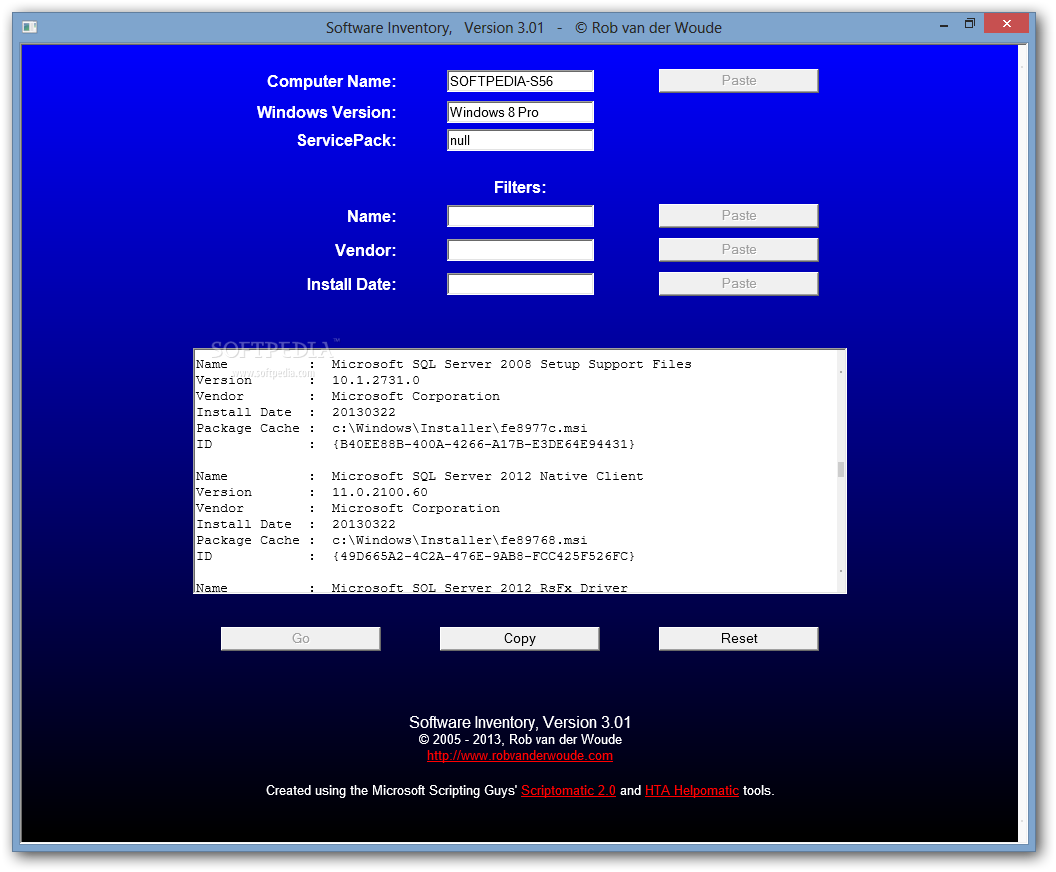
Network administrators have a whole variety of tasks. This can even include being a ware of things installed on PCs across the network. On the bright side of things, this can be done remotely from the master computer, and Basic Software Inventory is the type of app with which to accomplish this.
A cool advantage is that you don’t have to go through a setup process to make it work, so you can carry it around on a thumb drive to use on other computers. However, that .NET Framework needs to already be on the target computer. Registry entries are not altered in the process, even if the program can scan computers connected to your network.
The visual design isn’t built to impress, but it’s not something from which to look away. There’s a clean combination of colors and clear fields to show values you need to fill in, and the ones brought back from analysis. Over LAN, only one PC can be targeted at a time.
Note that the application can only successfully scan WMI-enabled computers, which means that programs on the target computer are only read if installed through the Windows Installer module. Although this might help you identify the right programs installed on a specific PC, it might not help you detect the wrong ones.
You start off from the computer name field, which needs to be the exact name, and not the IP address, which can be pasted from clipboard at the press of a button. Additional filters can be applied, such as name, vendor, and install date. The list is generated in a text field, with the possibility to send all content to clipboard so you can save it wherever needed.
Bottom line is that network administrators might need to know the programs they’re working with on all computers across the network. Basic Software Inventory aims to help in this regard, but it can only successfully scan a rather limited range of installed programs.
What's new in Basic Software Inventory 3.02:
- Improved update check.
- Uses MSIEXEC.EXE's icon instead of the bland MSHTA.EXE icon
Basic Software Inventory 3.02
add to watchlist add to download basket send us an update REPORT- runs on:
- Windows All
- file size:
- 5 KB
- filename:
- software.zip
- main category:
- System
- developer:
- visit homepage
Bitdefender Antivirus Free

Microsoft Teams

Windows Sandbox Launcher

calibre

Zoom Client

Context Menu Manager

4k Video Downloader

IrfanView

7-Zip

ShareX

- IrfanView
- 7-Zip
- ShareX
- Bitdefender Antivirus Free
- Microsoft Teams
- Windows Sandbox Launcher
- calibre
- Zoom Client
- Context Menu Manager
- 4k Video Downloader