
A lightweight and simple application designed to display system information on your desktop, such as the operating system or network adapter details. #Desktop information #Battery information #System information #Processor #Memory #Battery
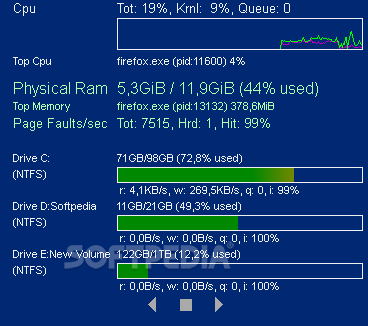
Desktop Info is a seemingly simple application that can display a plethora of information about the current computer without any effort from the user.
Basically, you only need to run it and it automatically analyzes your computer to show you several details about your PC.
For example, you can view how much free RAM you currently have, along with the total installed amount, and you can also be informed on how strained your CPU is. Desktop Info can show you how much free space you have on each of your partitions, so you are not caught off-guard when you run out of space.
Another handy feature of this application is that you can export all the displayed data to TXT, RTF, HTML or XML, so you can save the document for later analysis or comparison.
Its major drawback is also the thing that makes it popular among the tech-savvy users: the only way to customize any of its parameters means manually editing an .info file. If you are familiar with the syntax and the commands, all the changes can be applied within seconds, otherwise, chances are you might break something so it is best to stick with the default configuration.
Nonetheless, if you do venture into adjusting the settings, you get the possibility to tamper with the font size, type and formatting for each category, along with the size and position of the main window of Desktop Info.
Desktop Info is a reliable solution for all those who want to keep an eye on their RAM and CPU levels at all times. Moreover, you can also monitor the overall space on your drives so you can start cleaning up files before you run out of free space.
What's new in Desktop Info 3.13.0:
- March 2024This was going to be a minor release fixing a few bugs in v3.12 but once again I got carried away. I’ve noticed while working on the scaling that some fonts give more accurate height measurements than others.
- Change 1: Added ‘xr’ and ‘yb’ to absolute positioning to position from the right and bottom edges.
Desktop Info 3.13.0
add to watchlist add to download basket send us an update REPORT- runs on:
-
Windows 11
Windows 10 32/64 bit
Windows 8 32/64 bit
Windows 7 32/64 bit
Windows Vista 32/64 bit
Windows XP 32/64 bit - file size:
- 10 MB
- filename:
- DesktopInfo3130.zip
- main category:
- System
- developer:
- visit homepage
Microsoft Teams

Bitdefender Antivirus Free

ShareX

4k Video Downloader

IrfanView

Zoom Client

Windows Sandbox Launcher

Context Menu Manager

calibre

7-Zip

- Context Menu Manager
- calibre
- 7-Zip
- Microsoft Teams
- Bitdefender Antivirus Free
- ShareX
- 4k Video Downloader
- IrfanView
- Zoom Client
- Windows Sandbox Launcher
