
Block various websites to prevent accidental access and possible infection from malicious content thanks to this app which neatly adds your entries to the HOSTS file. #Website blocker #Block website #Unblock webpage #Block #Restrict #Website

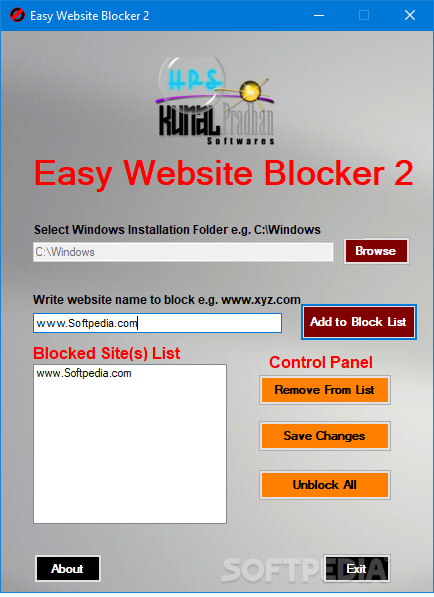
Just like its name suggests, Easy Website Blocker is a simple application designed to help you block access to a number of user-defined websites.
Since there are several other similar products on the market, it’s only natural to expect a more complex software product with tons of customization options.
Only that Easy Website Blocker is much easier to use and the first component that demonstrates it is the interface: it lets you configure the blocked websites list with just a few clicks.
The program initially prompts the user to input the path to the Windows installation folder, usually C:\Windows, and then provide the address of the website to be blocked. Of course, you can set up your very own list of pages to be blocked, with dedicated features to remove specific entries or to unblock them all.
What Easy Website Blocker actually does is to add new lines in the Windows HOSTS file, thus blocking access to the pages you input. That’s why it asks you for the Windows installation folder and that’s also why you need administrator privileges when launching it on Windows 7 workstations.
The program obviously runs on low resources and doesn’t affect system performance at all.
Overall, Easy Website Blocker does what it says with minimum effort, but it clearly lacks many important features that could come in handy to lots of users out there.
For instance, it doesn’t include password protection to block unauthorized access or a backup tool to make sure you’re on the safe side while adding and removing entries.
All things considered, we can state that Easy Website Blocker is just a fast way of adding a few exceptions to the HOSTS file. It’s easy to use by individuals of all levels of experience, and is a way for keeping your computer healthy, especially if others use it.
What's new in Easy Website Blocker 2.0:
- User can see websites blocked previously.
Easy Website Blocker 2.0
add to watchlist add to download basket send us an update REPORT- runs on:
- Windows All
- file size:
- 130 KB
- filename:
- ewb2.zip
- main category:
- System
- developer:
- visit homepage
Bitdefender Antivirus Free

Microsoft Teams

ShareX

4k Video Downloader

calibre

Zoom Client

Context Menu Manager

IrfanView

Windows Sandbox Launcher

7-Zip

- IrfanView
- Windows Sandbox Launcher
- 7-Zip
- Bitdefender Antivirus Free
- Microsoft Teams
- ShareX
- 4k Video Downloader
- calibre
- Zoom Client
- Context Menu Manager