
Make your mouse cursor visible during presentations by embedding animated elements, such as colored halo, mouse image, crosshair, keyboard indicators and click indicator. #Cursor highlighter #Track cursor #Mouse tracker #Mouse #Pointer #Cursor

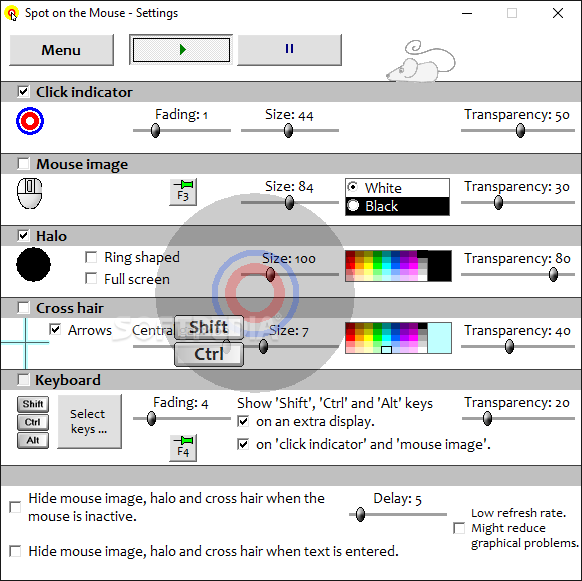
SpotOnTheMouse is a small Windows application whose purpose is to help you make your mouse cursor more visible when you make a presentation by adding various animated elements that follow your cursor, such as colored halo, mouse image, or crosshair.
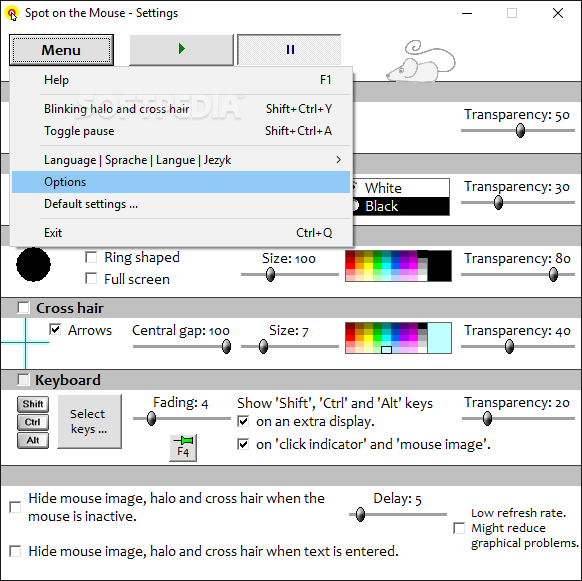
You are welcomed by a clean feature lineup that allows you to carry out most operations with minimal effort. You can enable or disable the mouse animated viewing mode with just a few clicks.
SpotOnTheMouse gives you the possibility to add various animated mouse objects that automatically follow your mouse cursor, such as click indicator (a red circle that appears when you perform a left-click mouse operation and a blue circle when you carry out right-clicks), image revealing a virtual mouse (black or white), halo (a yellow area moving along with the mouse pointer), or crosshair (arrows above and below the pointer that indicate the direction of the mouse cursor).
What’s more, you can make the utility reveal keyboard indicators on the screen, such as function (e.g. F1, F2), system (e.g. Pause, Escape), input (e.g. return, delete, back), navigation (e.g. page up or down), and character (e.g. Space) keys, as well as mouse buttons.
For each of the aforementioned animated elements, the program comes packed with several tweaking parameters that help you alter the size, adjust the transparency, and pick the desired color. Plus, you are allowed to hide the mouse image, halo, and cross hair when the mouse is inactive and text is entered, as well as enter a delay time.
Tests have shown that SpotOnTheMouse accomplishes a task very quickly and without errors. It leaves a minimal footprint on system resources, so the overall performance of the computer is not hampered.
To sum things up, SpotOnTheMouse comprises some handy features for helping you make your mouse cursor visible during presentations, and is suitable for all types of users, regardless of their experience level.
What's new in Spot On The Mouse 2.8.1:
- Fixed bug causing halo, mouse image and cross hair to be behind other windows in certain conditions.
Spot On The Mouse 2.8.1
add to watchlist add to download basket send us an update REPORT- runs on:
-
Windows Server 2019
Windows Server 2016
Windows 10 32/64 bit
Windows Server 2012
Windows 8 32/64 bit
Windows 7 32/64 bit
Windows Vista 32/64 bit - file size:
- 1.2 MB
- filename:
- Setup_SpotOnTheMouse.exe
- main category:
- System
- developer:
- visit homepage
Windows Sandbox Launcher

paint.net

4k Video Downloader

IrfanView

7-Zip

ShareX

Bitdefender Antivirus Free

Zoom Client

calibre

Microsoft Teams

- Zoom Client
- calibre
- Microsoft Teams
- Windows Sandbox Launcher
- paint.net
- 4k Video Downloader
- IrfanView
- 7-Zip
- ShareX
- Bitdefender Antivirus Free