
Will clean up your PC memory from unnecessary memory allocation. #Clean Ram #Memory cleaner #Memory tweak #Clean #Cleaner #Ram

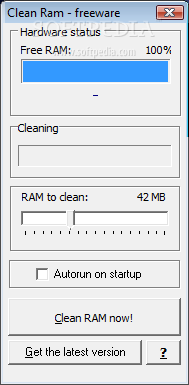
Clean Ram is a tiny utility designed to help you reallocate memory and thus improve performance of certain processes.
The application is incredibly easy to use and features a minimal interface that should make everything work like a breeze even for beginners.
The interface just displays the hardware status and the free RAM, providing you with a simple slider to select how much RAM to clean and an option to automatically run the application at startup. There's a single action to perform, clearing the RAM, which has to be started manually each time.
And that sums up the purpose of the application. Although it is indeed efficient and could have a great contribution to your computer performance, there are still some areas to be improved.
It is easy as pie, but Clean Ram needs a help file, not only for rookies, but also for more experienced users who want to find out more information about the way the program works. Plus, there's no doubt clearing the RAM is quite useful to all users, but a dedicated tool to do this automatically at a user-defined interval would be much more helpful.
It's pretty obvious that Clean Ram needs only a small amount of resources to run, but it only works with Windows XP, so newer versions of the operating system are not supported.
All things considered, this is the kind of application that could come in very handy to a handful of users, but it still needs many improvements. A new and more professional interface, with graphs and statistics, new features and a more user-friendly approach would turn Clean Ram into a top product.
Clean Ram 1.2.0
add to watchlist add to download basket send us an update REPORT- runs on:
- Windows All
- file size:
- 527 KB
- filename:
- cramv120.exe
- main category:
- Tweak
- developer:
calibre

Microsoft Teams

IrfanView

Bitdefender Antivirus Free

ShareX

7-Zip

4k Video Downloader

Zoom Client

Context Menu Manager

Windows Sandbox Launcher

- Zoom Client
- Context Menu Manager
- Windows Sandbox Launcher
- calibre
- Microsoft Teams
- IrfanView
- Bitdefender Antivirus Free
- ShareX
- 7-Zip
- 4k Video Downloader