
Free up RAM to make Windows run faster using this tool that does everything automatically but also lets you control some settings. #Memory optimizer #Memory tweaker #Free ram optimizer #RAM #Memory #Optimizer

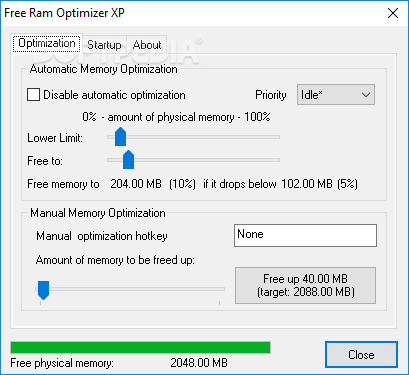
The market is already full or apps aimed at memory optimization, but Free Ram Optimizer XP promises to be a much more effective and user friendly tool. And as far as user friendliness goes, it is indeed an excellent application, with very intuitive options and a well-organized interface.
Before proceeding any further, you should know that the application hasn't received updates for a long time and it seems to be discontinued. As the name suggests, it is primarily designed for Windows XP. Nevertheless, it works smoothly on newer Windows version too, including Windows 10.
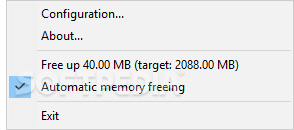
Once launched, the program places an icon in the systray that gives you instant access to the main window and gives you the possibility to free up memory with one cick. It’s almost impossible to get lost in the main window thanks to its clean layout, with a tabbed structure to make sure both beginners and those more experienced figure out which feature is which.
Automatic memory optimization is possible and, what’s more, enabled by default. You, however, need to define the amount of memory to be freed up and the lower limit. Free Ram Optimizer XP also allows you to configure a dedicated hotkey for manual memory optimization, again with a dedication option to define the amount of memory to be freed up.
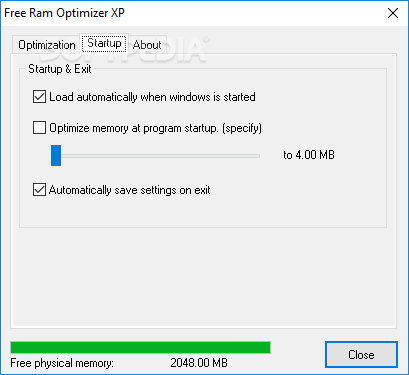
There are only a few settings to play with, which can only be good news for beginners and disappointing for advanced users. You can, for instance, launch the program at Windows startup and perform a memory optimization every time you launch the program.
To sum up, Free Ram Optimizer XP does what it says, it looks good, it’s not a resource hog and can be safely used by both beginners and more experienced users. However, it's an old product and has been surpassed by other, more effective system tweakers.
Free Ram Optimizer XP 1.0
add to watchlist add to download basket send us an update REPORT- runs on:
- Windows All
- file size:
- 332 KB
- filename:
- fro.zip
- main category:
- Tweak
- developer:
- visit homepage
Microsoft Teams

7-Zip

Windows Sandbox Launcher

Zoom Client

calibre

ShareX

Bitdefender Antivirus Free

4k Video Downloader

paint.net

IrfanView

- 4k Video Downloader
- paint.net
- IrfanView
- Microsoft Teams
- 7-Zip
- Windows Sandbox Launcher
- Zoom Client
- calibre
- ShareX
- Bitdefender Antivirus Free