
Clear-cut and powerful application that was developed specifically to aid you in backing up, restoring and optimizing your registry entries. #Registry backup #Registry copy #Registry restore #Registry #Restore #Backup

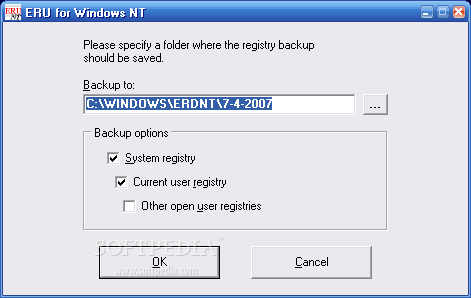
Erunt is a very small yet powerful tool that can provide you with a backup and restore system when it comes to your Windows registry entries.
The user interface consists of a small window in which you have only a few options. You can get started by specifying a directory where the registry backup will be saved. In the matter of backup options, you can enable Erunt to save the system registry, current user registry and other open user registries.
Once you have initialized the task, you can view a progress bar for the current and total files which are being saved. The moment the job is completed, a message pops up and reveals the current destination of your registry backup.
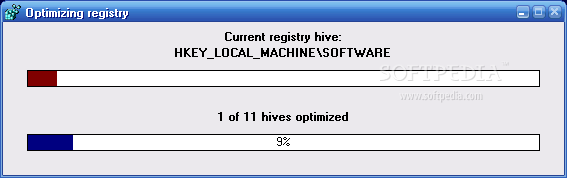
A separate application allows you to optimize your Windows registry files. After the task is completed, you can view the initial and current size of the registry, as well as the reduction. In order for the effects to be visible, you have to restart your computer.
If you want to restore a registry backup, all you have to do is go to its location, open Erunt and select one of the provided restoration options (system registry, current user registry, other saved user registries) and mode (NT, automatic, file copy).
The program uses a very low amount of system resources. It does not include a help file, but that is because this piece of software is extremely easy to use, even for beginners.
Erunt is a very good tool that can help you backup and restore your Windows registry keys. We have not come across any kind of problems during our tests and we strongly recommend it to all users. However, it is important to keep in mind that it is not going to work in later versions of Windows, such as 8 and 8.1. A portable edition is also available for download, so that you can take with you anywhere on a USB thumb drive, called Portable Erunt.
Erunt 1.1j
add to watchlist add to download basket send us an update REPORT- PRICE: Free
- runs on:
-
Windows NT
Windows 2003
Windows 7 64 bit
Windows Vista
Windows XP
Windows 2K - file size:
- 773 KB
- filename:
- erunt-setup.exe

- main category:
- Tweak
- developer:
Context Menu Manager

Zoom Client

Microsoft Teams

IrfanView

Windows Sandbox Launcher

calibre

4k Video Downloader

ShareX

7-Zip

Bitdefender Antivirus Free

- ShareX
- 7-Zip
- Bitdefender Antivirus Free
- Context Menu Manager
- Zoom Client
- Microsoft Teams
- IrfanView
- Windows Sandbox Launcher
- calibre
- 4k Video Downloader