
Optimize system registry by finding and removing errors and invalid entries. #Fix registry #Fix error #Scan error #Fix #Registry #Error

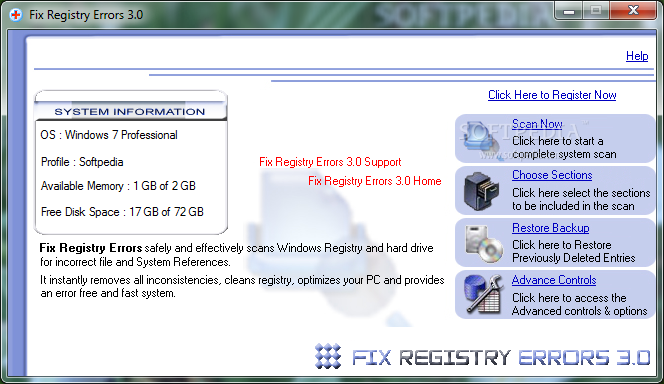
Fix Registry Errors is a program with a title that pretty much explains its functionality - it allows you to scan your Windows registry and fix any problems which occur.
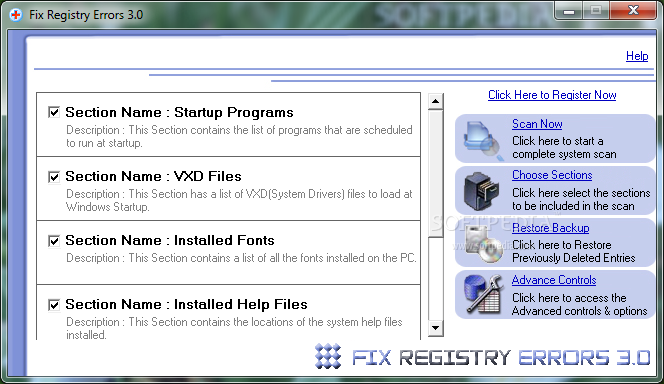
The interface of the application is plain and simple to navigate through. Once you choose the sections that will be included in the scan (e.g. installed sound files, invalid program shortcuts, startup programs), you can initiate the task by clicking the "Scan Now" button.
Once the analysis is completed, you can check out the section, number of problems and status, along with the total number of problems and affected sections. But you can also view details of each issue. Simply select which items you want to repair and let Fix Registry Errors take care of the rest.
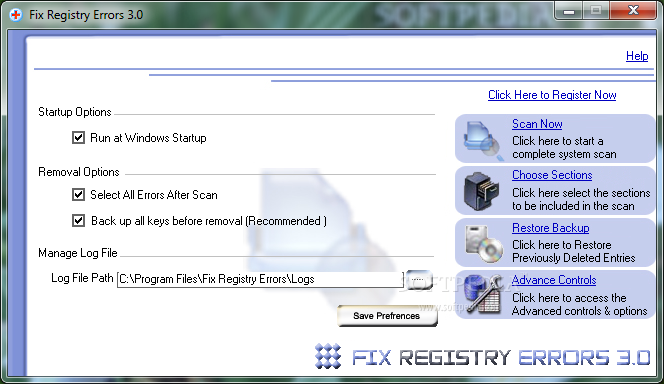
You can enable Fix Registry Errors to backup all keys before making any modifications, to select all errors after scanning and to automatically run at system startup, restore backups, specify the log file path, and more.
The simple-to-use tool runs on a low-to-moderate amount of system resources, can guide you to a FAQ page online, quickly finishes a scan and clean job, and didn't freeze, crash or pop up errors during our tests. However, we had expected to find more registry sections for the tool to cover. Also, the interface is slightly outdated. We recommend Fix Registry Errors with reservations.
Fix Registry Errors 3.0.0
add to watchlist add to download basket send us an update REPORT- runs on:
- Windows All
- file size:
- 5.9 MB
- filename:
- FixRegistryErrors.exe

- main category:
- Tweak
- developer:
- visit homepage
calibre

Context Menu Manager

ShareX

Bitdefender Antivirus Free

4k Video Downloader

IrfanView

Zoom Client

Microsoft Teams

Windows Sandbox Launcher

7-Zip

- Microsoft Teams
- Windows Sandbox Launcher
- 7-Zip
- calibre
- Context Menu Manager
- ShareX
- Bitdefender Antivirus Free
- 4k Video Downloader
- IrfanView
- Zoom Client