
Straightforward and lightweight program that provides all types of users with a simple means of registering and unregistering DLL files. #Register DLL #Unregister DLL #Registry Helper #Registry #DLL #Register
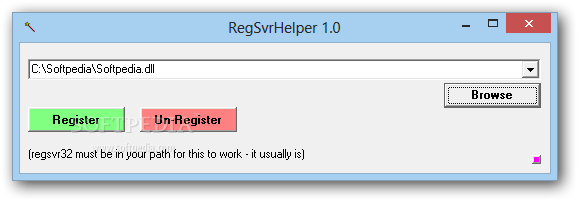
RegSvrHelper is a handy and reliable utility designed to register and unregister DLL files in a simple manner. It uses the RegSvr32 application in order to achieve its purpose, but it is not a replacement for the aforementioned Windows built-in utility.
Registering or subsequently, reversing the operation (also known as unregistering) can be achieved easily with the aid of the RegSvr32 command-line options. Even though it’s a common approach, command-prompt usage is oriented towards advanced users and as such, will never make the day of a beginner.
RegSvrHelper is a great alternative that can be used by absolutely any audience. It is lightweight, does not require installation and relies on a very minimalistic interface to achieve its purpose.
Since it is portable, this software solution is not going to add any new entries to the Windows registry, and you can easily take it anywhere with you, by simply copying the program files to an external storage unit.
In order for the application to work properly, the RegSvr32 must be in the local path (it usually is, yet you should perform a quick check anyway). If it is not, the application triggers an error when trying to register a DLL.
Usage is not rocket science; you do not need to be a computer geek to figure out how to handle the program. Simply browse for the DLL or OCX file that you need to process and press the Register or Unregister (if that file was previously registered). If the process turns out to be successful, you will be notified accordingly.
If, at any point, you wish to view a history of the registered files, the program keeps a log (in INI format) of the last twenty operations located in the root drive. However, if it fails to generate this report, it does not mean that it does not accomplish its purpose.
Taking all of this into consideration, we can safely say RegSvrHelper is a simple utility that forces DLL files to register to your local settings. It is a great helper for developers, as well as home users, who, for various reasons, need an additional DLL to run third-party programs.
The system’s performance is not going to be hampered and the response time is good. We did not come across any errors or hangs in our tests.
RegSvrHelper 1.0
add to watchlist add to download basket send us an update REPORT- runs on:
- Windows All
- file size:
- 12 KB
- filename:
- rghelp01.zip
- main category:
- Tweak
- developer:
4k Video Downloader

Microsoft Teams

Zoom Client

paint.net

Windows Sandbox Launcher

ShareX

Bitdefender Antivirus Free

7-Zip

calibre

IrfanView

- 7-Zip
- calibre
- IrfanView
- 4k Video Downloader
- Microsoft Teams
- Zoom Client
- paint.net
- Windows Sandbox Launcher
- ShareX
- Bitdefender Antivirus Free