
BeClean is the complete suite of system cleaning tools. #Registry Cleaner #History Cleaner #Desktop Cleaner #Registry #History #Desktop

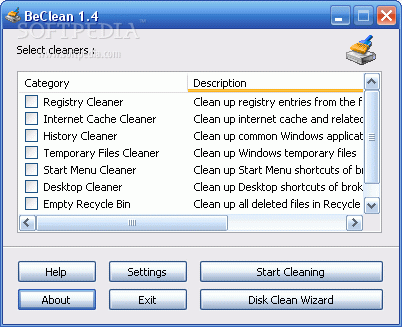
BeClean is a software that can erase from your computer any unwanted files that may be cluttering your system.
In the user-friendly interface you can select the Windows registry, Internet cache, history, temporary files, Start menu, desktop, Recycle Bin, or particular folders and registry entries.
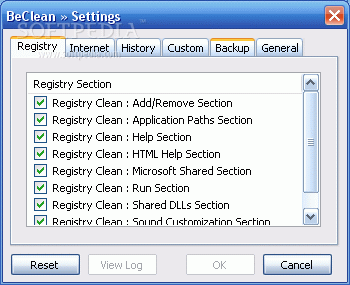
In the next step you can view more specific parts of each category. For example, you can remove the shared DLLs and HTML help section in "Registry Cleaner", or you can get rid of command lines from the Run menu and the media player recent file list in "History Cleaner".
Once the scanning and cleaning task is completed, a message box pops up and you can view the total number of items removed from your system, as well as elapsed time. You can also open a log file.
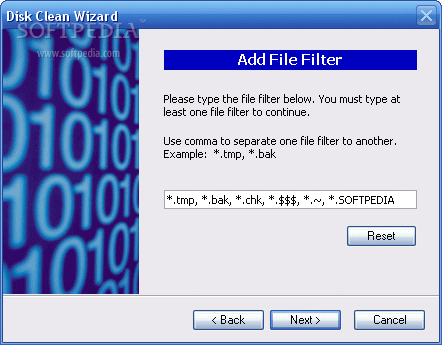
You can run the "Disk Clean Wizard". Select the drive(s) you want to clean, input the file filter and choose additional tasks (delete system backup files in Win 9x or delete the setup folder in Win ME).
Also, you can keep the Shift button pressed while initiating the cleaning process, in order to run a simulation (files will not actually be deleted).
In the "Settings" menu you can select the sections of each category that BeClean will work with. Here you can also add specific files, folders and registry keys, as well as import previously created BeClean custom files, in order to create your personalized category for cleaning purposes.
There is a backup and restore system available for the Windows registry. BeClean can be set to perform a task each time Windows starts up and to prevent any dialogs from popping up.
The program manages to complete a task in a short amount of time while using a small amount of system resources. We haven't encountered any kind of problems during our tests.
On the other hand, BeClean could have packed even more areas for each category. Otherwise, we strongly recommend this application to all users.
What's new in BeClean 1.4:
- Removed: Registry Cleaner - ActiveX Control Section
- Fixed: Compability issue with Windows XP SP1
BeClean 1.4
add to watchlist add to download basket send us an update REPORT- runs on:
- Windows All
- file size:
- 1.8 MB
- filename:
- beclean.zip
- main category:
- Tweak
- developer:
- visit homepage
calibre

7-Zip

Microsoft Teams

Zoom Client

Windows Sandbox Launcher

IrfanView

ShareX

Bitdefender Antivirus Free

4k Video Downloader

paint.net

- Bitdefender Antivirus Free
- 4k Video Downloader
- paint.net
- calibre
- 7-Zip
- Microsoft Teams
- Zoom Client
- Windows Sandbox Launcher
- IrfanView
- ShareX