
Change the status of Ease of Access to disabled or enabled just by clicking a button with this simple and easy-to-use software solution. #Ease of Access Disabler #Disable Ease of Access #Ease of Access Enabler #Ease of Access #Enable #Disabler

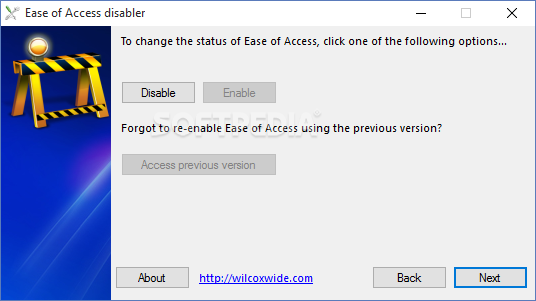
Ease of Access Disabler enables you to deactivate the Ease of Access Control Panel applet included in Windows Vista and later OS editions, as well as to reactivate it.
You should keep in mind that, as the name hints at, it can only disable the Ease of Access Center. Because this is a built-in Windows feature, it cannot be completely removed from the computer. It includes speech recognition tools, mouse customization options, an on-screen keyboard, narrator, text or visual alternatives for sounds, and so on.
Installing this small-sized program is a fast and easy job. Afterward, make sure to launch the application with administrative privileges, otherwise it will not work. Although it hasn't been updated for a long while, it also works on Windows editions newer than Vista.
As far as the interface is concerned, Ease of Access Disabler adopts a basic wizard, where you can select between four languages to continue (English, German, Italian, or French).
Two buttons are available for enabling and disabling Ease of Access, so you can later run this utility to restore the OS built-in feature. System reboot is not necessary, since changes are immediately committed to the computer.
After disabling Ease of Access, you can attempt to launch it to verify results it by triggering the Win + U key combination or by entering the utilman.exe command line in Run. A semi-transparent frame with a dark tint appears on the full screen, notifying you that Ease of Access has been disabled by your administrator.
Its icon is also removed from the Vista logon screen, preventing any other PC users from launching it while you're away. On the other hand, the center is not completely gone, as it can still be accessed by visiting the Control Panel.
To wrap it up, Ease of Access Disabler is a simple utility for blocking access to the Ease of Access feature integrated into Windows, but it cannot remove it from the PC.
What's new in Ease of Access Disabler 1.6:
- Simple to use Wizard-style user interface
- Multilingual support (German, English, French, Italian)
- Under-the-bonnet fixes to improve disabling (99.9% success rate, previous 85%)
- OK Button to close message
Ease of Access Disabler 1.6
add to watchlist add to download basket send us an update REPORT- runs on:
- Windows All
- file size:
- 636 KB
- main category:
- Tweak
- developer:
Microsoft Teams

ShareX

Zoom Client

Bitdefender Antivirus Free

Windows Sandbox Launcher

Context Menu Manager

calibre

IrfanView

4k Video Downloader

7-Zip

- IrfanView
- 4k Video Downloader
- 7-Zip
- Microsoft Teams
- ShareX
- Zoom Client
- Bitdefender Antivirus Free
- Windows Sandbox Launcher
- Context Menu Manager
- calibre