
With this lightweight and user-friendly application, you can boost your computer and Internet speed with just a few quick mouse moves. #Increase performance #Optimize speed #Speed optimizer #Increase #Performance #Booster


GameBoost is a very user friendly and straightforward application supposed to optimize game and Internet settings to squeeze every single bit of performance from your computer.
Although it tries to perform such an important task, it’s pretty easy to use the program as it provides an incredibly simple interface.
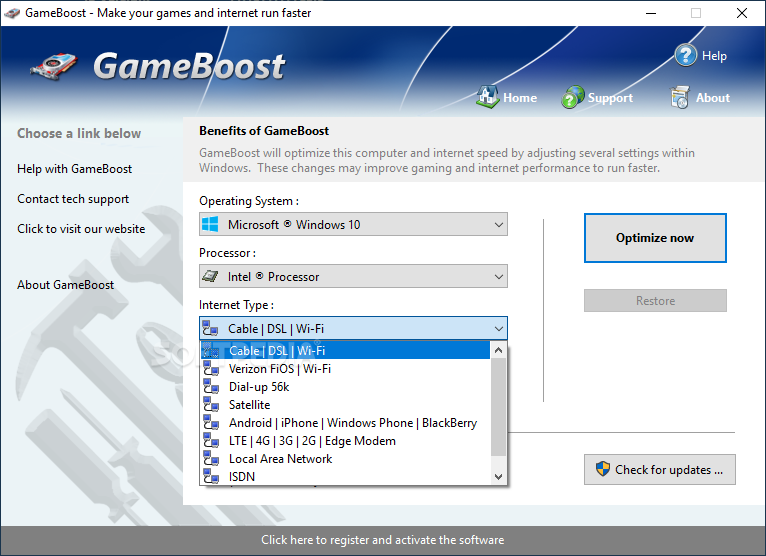
The whole optimization process comes down to just three clicks, as GameBoost prompts you to pick the operating system you’re using, the modem type and speed setting.
The operating system can be Windows 7, Vista, XP, 2000, 2003 or 2008, while the modem type options include cable modem, ISDN, local area network, wireless Internet or satellite modem.
Pressing the “Go” button should let GameBoost do its magic, with the whole process completed in just a few seconds.
The magic we were talking about basically comes down to a quick optimization of file allocation size and buffers, Windows system resources, application priority level, maximum and minimum file cache, windows animation settings and monitor refresh rates.
As we said, the whole process is blazing fast and although there are some other similar apps out there promising to optimize the system and needing more hardware resources for the job, GameBoost remains pretty light all the time.
Still, we haven’t noticed a significant performance boost after using the application, but this may also depend on the current Windows settings.
Overall however, GameBoost is a tool to try, especially because it promises to make your computer a bit faster while browsing the Internet and while playing games. Plus, it can be used by all types of users without any risk.
What's new in GameBoost 3.3.7.2022:
- Fixed false positive virus warnings the installer and application would present with some antivirus software.
GameBoost 3.3.7.2022
add to watchlist add to download basket send us an update REPORT- runs on:
-
Windows 11
Windows 10 32/64 bit
Windows Server 2012
Windows 2008 32/64 bit
Windows 2003
Windows 8 32/64 bit
Windows 7 32/64 bit
Windows Vista 32/64 bit
Windows XP 32/64 bit - file size:
- 5.9 MB
- main category:
- Gaming Related
- developer:
- visit homepage
Microsoft Teams

Context Menu Manager

Windows Sandbox Launcher

IrfanView

ShareX

7-Zip

4k Video Downloader

Zoom Client

Bitdefender Antivirus Free

calibre

- Zoom Client
- Bitdefender Antivirus Free
- calibre
- Microsoft Teams
- Context Menu Manager
- Windows Sandbox Launcher
- IrfanView
- ShareX
- 7-Zip
- 4k Video Downloader