
Comprehensive system tweaker for Windows XP that can enable or disable accelerated DLL unloading, speed up shutdown, optimize prefetch, and more. #System tweaker #Tweak Windows XP #XP tweak #Tweaker #System #Tweak
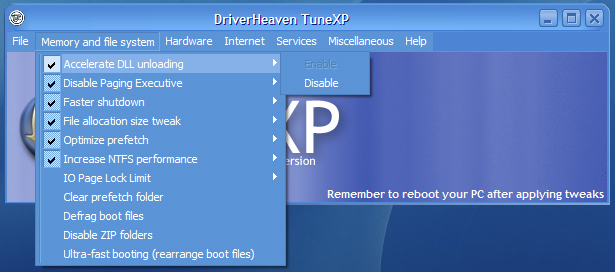
TuneXP was designed for XP users exclusively and aims to provide a set of tweaks that will improve the speed of your system. Unlike modern software applications that include a bunch of diagnostics tools, such as registry cleaners and benchmarking, TuneXP will boost your system’s performance through a few classic and efficient tricks.
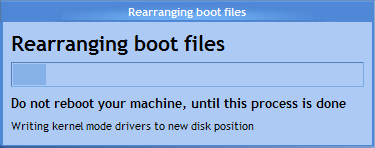
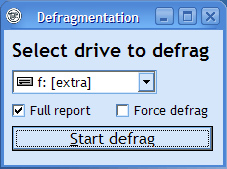
The installation procedure is all about a few clicks and before you know it, you will be prompted to select the Windows installation drive, so the application can start. The usage is strictly menu-based, structured on the most significant categories on your system. The first and the most feature-rich is the ‘Memory and file system’ menu, which offers you the possibility to enable or disable tweaks such as: accelerated DLL unloading, Paging Executive, Faster Shutdown, File Allocation size, Optimize prefetch. In the same section, you will be able to allow for an intensive boot file defrag or ultra-fast booting.
The next menu provides hardware specific changes, the most significant of which is the possibility to increase the CPU priority. You can also enable UDMA-66 for Intel chipsets or to speed up the Windows IRQ handling. The Internet menu consists of just two options, one for resetting your IP settings and one for enabling the increase of the DNS cache, facilitating a more speedy access to websites.
From the "Services" section, you can start the fast user switch for multi-user logon and access. The same menu will provide the means to disable themes, a resource consuming service that could easily be stopped for the well-being of your computer. The Miscellaneous category encases shortcuts to a few Windows specific utilities, such as disk checker, defragmenter, system file checker and Windows update.
All the changes you have made require a restart in order to take effect. This is rather inconvenient, but it’s not too much to ask in return for the faster and more stable operating system that TuneXP can guarantee to accomplish. Needless to say, the tool can only be used on Windows XP. On the downside, the tool has been discontinued so it will not receive any further updates.
What's new in TuneXP 1.5 Final:
- ADDED:
- File allocation size tweak
- Accelerate DLL unloading
- Control over several Windows services
TuneXP 1.5 Final
 Softpedia Editor's Pick
add to watchlist
add to download basket
send us an update
REPORT
Softpedia Editor's Pick
add to watchlist
add to download basket
send us an update
REPORT
- runs on:
- Windows XP 32/64 bit
- file size:
- 1 MB
- filename:
- TuneXP_15.exe
- main category:
- Tweak
- developer:
- visit homepage
Microsoft Teams

calibre

Zoom Client

paint.net

ShareX

IrfanView

7-Zip

Bitdefender Antivirus Free

4k Video Downloader

Windows Sandbox Launcher

- Bitdefender Antivirus Free
- 4k Video Downloader
- Windows Sandbox Launcher
- Microsoft Teams
- calibre
- Zoom Client
- paint.net
- ShareX
- IrfanView
- 7-Zip