
A nifty little software solution that can help Windows XP users disable the AVI locking interval when a file is selected in Windows Explorer. #Remove AVI Preview #Tweak Windows XP #Restore AVI Preview #Tweak #AVI Preview #Restore
Windows XP remains one of the most popular operating systems ever launched by Microsoft, even if it is no longer supported by the company as of April 2014.
Despite being appreciated and used all over the world, this OS still has its fair share of faults, that third-party developers tried to mend by coming up with dedicated apps.
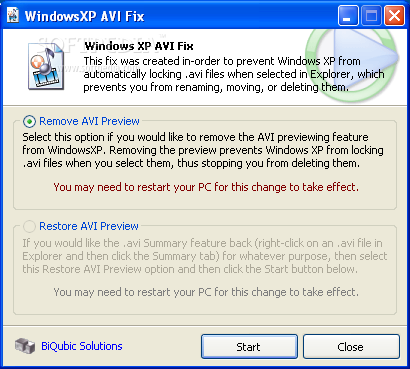
Such a solution is WindowsXP AVI Fix, especially handy to those who get annoyed by the way AVI videos get locked every time they are selected in Windows Explorer.
The OS typically locks them for a few seconds to retrieve information about them, such as image width and height, audio duration, format and bitrate or video framerate and data rate. However, when dealing with very large files, the locking period can last longer.
The reason why this could prove frustrating to users is that during this interval, the said AVI files cannot be moved, erased or even renamed.
And this is where WindowsXP AVI Fix can prove useful. Its GUI (graphical user interface) is quite straightforward and allows users to overcome this AVI lock with a single mouse click. To ensure the process is successful, it is recommended to restart the computer.
Once the fix has been applied, users no longer get access to the data previously displayed in the Summary section of the Properties window (found in the right-click menu).
Those who want to restore the functionality can do so just as easily, by using the second option from the main window - this too should be followed by a computer restart, just to make sure no issues occur.
WindowsXP AVI Fix 1.01 Build 0101
add to watchlist add to download basket send us an update REPORT- runs on:
- Windows XP
- file size:
- 50 KB
- filename:
- winxpavifix.rar
- main category:
- Tweak
- developer:
ShareX

4k Video Downloader

Bitdefender Antivirus Free

Windows Sandbox Launcher

Microsoft Teams

paint.net

calibre

7-Zip

IrfanView

Zoom Client

- 7-Zip
- IrfanView
- Zoom Client
- ShareX
- 4k Video Downloader
- Bitdefender Antivirus Free
- Windows Sandbox Launcher
- Microsoft Teams
- paint.net
- calibre