
Thoroughly manage the BIOS of your ATI video card in order to squeeze the most performance out of it with this practical application. #Bios editor #Ati bios #Ati #Bios #Editor #9700
Customizing the settings of a graphical card and tweaking it to obtain the best performance it is capable of is often done by gamers and overclocking aficionados. When it comes to BIOS level modifications, though, professional tools and extensive knowledge are required in order to avoid damage to the hardware.
For users who own an ATI Radeon graphics card there is a very simple utility, called ATI BIOS Editor, that can be quite useful in managing the BIOS of the video card. With this program you can save the current BIOS or load a new one.
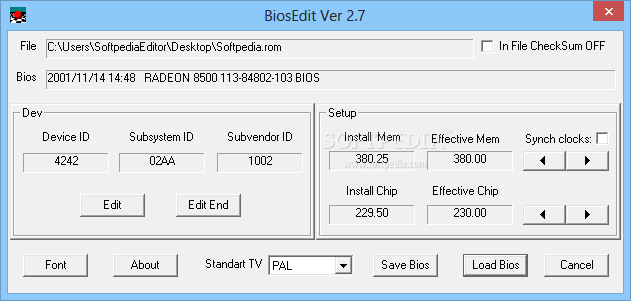
ATI BIOS Editor can read details regarding the device, subsystem and subvendor ID, as well as edit them if necessary. Also, the 'Setup' area of the main window displays information related to the installed and effective memory and chipset, while providing the possibility to synchronize the clocks.
From within this application you can select the TV standard for the graphics card, which can be either PAL or NTSC. A third option would be to leave it blank and have none selected.
Before proceeding to load a new BIOS or making modifications to the memory or video card chipset clocks, you should consider the risks these actions imply. Altering device IDs and setting custom values in the clock fields may result in system instability and may even harm the physical device.
Nonetheless, the benefits of using a software like ATI BIOS Editor are great enough to make it worth taking the chance, especially if you create backups and know your way around such complicated variables and parameters.
To sum it up, ATI BIOS Editor deserves a try if you want to gain some extra performance, but note that not all ATI Radeon video cards are supported. You will find that as soon as you unpack and run the utility because if your graphics card is on the list, you will see the ID, memory and chipset clock values displayed in the main window.
ATI BIOS Editor 2.7
add to watchlist add to download basket send us an update REPORT- runs on:
- Windows All
- file size:
- 14 KB
- filename:
- BiosEdit2.7.zip
- main category:
- Tweak
- developer:
- visit homepage
paint.net

calibre

ShareX

IrfanView

Bitdefender Antivirus Free

Microsoft Teams

Windows Sandbox Launcher

7-Zip

4k Video Downloader

Zoom Client

- 7-Zip
- 4k Video Downloader
- Zoom Client
- paint.net
- calibre
- ShareX
- IrfanView
- Bitdefender Antivirus Free
- Microsoft Teams
- Windows Sandbox Launcher