
PyOpenCL bitcoin miner with a GUI frontend so you can quickly and easy connect to one of the existing servers in order to start mining for Bitcoins. #Poclbm GUI #Bitcoin miner #GPU miner #Poclbm #Bitcoint #Miner

Note: The application triggers many malware alerts due to the fact that it's related to Bitcoin. However, these are false positives, so it's safe to download and use GUIMiner.
Although not a concept embraced by everyone, bitcoins are a payment method that seems to spread rapidly in some corners of the Internet, while it is banned in other parts. Mining is practically the procedure of generating your own bitcoins and it involves solving a puzzle and getting a certain result with random hashes.
In order to become a Bitcoin miner, you need proper hardware and software to carry out the job. GUIMiner is a simple program designed to help you generate bitcoins.
If you have never used Bitcoin before, you have to install the original Bitcoin software, which is used as a server, as well as create an online wallet. Once you have done that, you can start using GUIMiner.
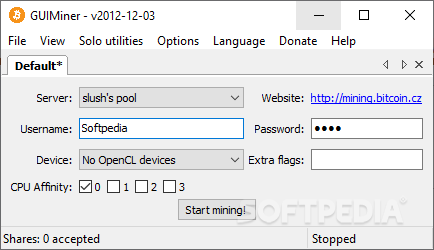
The program provides you with a user-friendly interface, which makes it suitable for any type of user. At the first run, the application tries to detect the available OpenCL device. If it does not find any, it allows you to mine using your CPU or GPU's capabilities. Moreover, you are able to even create a new customized miner. OpenCL miners are destined for AMD cards and CUDA-enabled nVidia devices.
You can choose the desired mining server from a predefined list. You have the possibility to mine alone, but it usually takes months to gather a 'block', which is worth 50 bitcoins. Thus, it may be much easier to enter one of the preconfigured mining pools. For every server, you have to specify the host, port, as well as your Bitcoin login credentials.
The main window of the application allows you to permanently monitor the mining process status, while the 'Summary' section displays the speed and the number of accepted items for each miner. The console allows you to view a log of the performed actions and their result.
The mining process consumes both time and computer resources, but if you decide to use this cash system, GUIMiner might be a good choice. With a simple interface and dozens of available servers you can join for faster progress, you can start mining right away.
What's new in GUIMiner 2012-12-03:
- Update poclbm with bugfix for issue #54
GUIMiner 2012-12-03
add to watchlist add to download basket send us an update REPORT- PRICE: Free
- runs on:
- Windows All
- file size:
- 7.4 MB
- filename:
- guiminer-20121203.exe
- main category:
- Tweak
- developer:
Zoom Client

Windows Sandbox Launcher

7-Zip

IrfanView

Microsoft Teams

4k Video Downloader

ShareX

paint.net

calibre

Bitdefender Antivirus Free

- paint.net
- calibre
- Bitdefender Antivirus Free
- Zoom Client
- Windows Sandbox Launcher
- 7-Zip
- IrfanView
- Microsoft Teams
- 4k Video Downloader
- ShareX