
A command line firmware update application designed for NVidia adapters that allows you to perform additional tasks, such as debugging the EEPROM part. #NVIDIA firmware #Update firmware #Firmware updater #NVIDIA #Firmware #Update
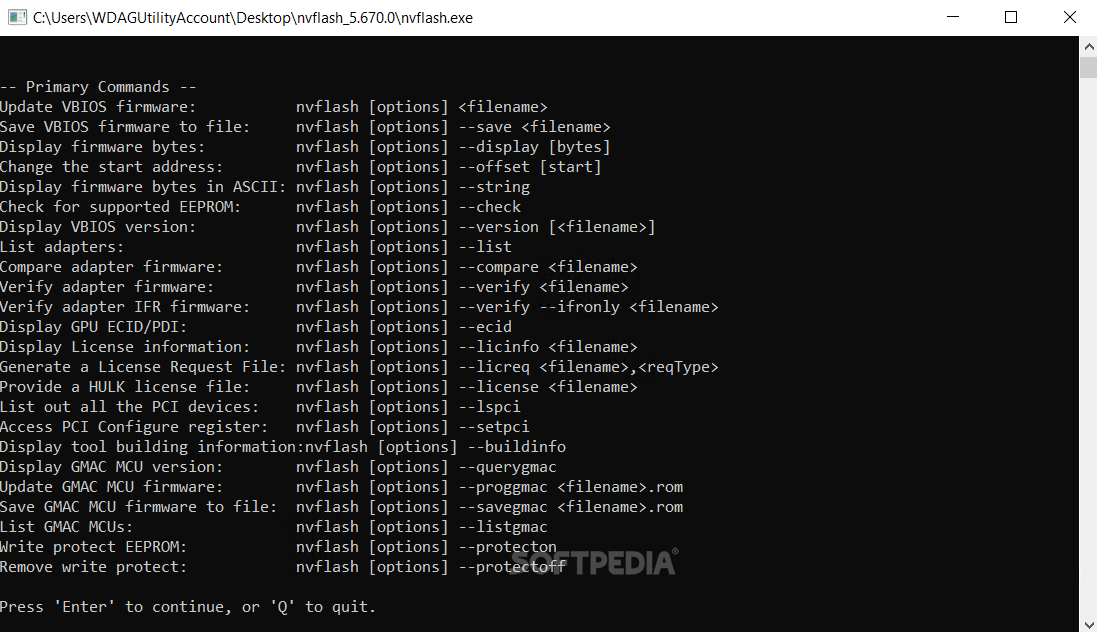
nVFlash provides you with the necessary means to flash (upgrade or downgrade) the BIOS of your NVIDIA adapter in a matter of seconds. Before you do this, make sure you have a legit BIOS for your video card alongside the required know-how.
As nVFlash only runs in DOS, you also need a diskette or CD to boot from in this particular environment. First thing you want to do once you booted the DOS is performing a backup of the current BIOS of your graphics card. This can easily be accomplished with the 'nvflash -b' command.
Flashing the VGA BIOS does not require much time and you must be aware of any error the may occur during the process. When confronting with an error, it is highly recommended that you do not restart the PC, as this usually bricks the graphics card (makes it unusable). Just use the backup you performed prior to this operation before attempting to flash your card with a new BIOS.
nVFlash also features commands for comparing and verifying firmware, writing and removing protections or listing versions, adapters and even applied patches. One more important addition is the '--index' argument that you can use if your system comprises several video cards. By utilizing this option, you are able to flash your adapters individually by communicating their indexes.
This tool is not meant for overclocking as it surely lacks any option to tweak clock speeds, thus its only purpose remains the flashing of your NVIDIA card's / cards' BIOS. Given the proper knowledge, nVFlash performs the task quickly so you can enjoy an increased stability and better performance of your graphics card and your system overall.
nVFlash 5.821.0
add to watchlist add to download basket send us an update REPORT- PRICE: Free
- runs on:
-
Windows 11
Windows 10 32/64 bit
Windows 8 32/64 bit
Windows 7 32/64 bit - file size:
- 6.3 MB
- filename:
- nvflash_5.821.zip
- main category:
- Tweak
- developer:
IrfanView

Zoom Client

Microsoft Teams

calibre

paint.net

Bitdefender Antivirus Free

Windows Sandbox Launcher

7-Zip

ShareX

4k Video Downloader

- 7-Zip
- ShareX
- 4k Video Downloader
- IrfanView
- Zoom Client
- Microsoft Teams
- calibre
- paint.net
- Bitdefender Antivirus Free
- Windows Sandbox Launcher