
Load and view 3D objects so you can carefully analyze them with several rendering options at your disposal in this lightweight application. #3d object #3d viewer #3ds viewer #Viewer #3d #Display
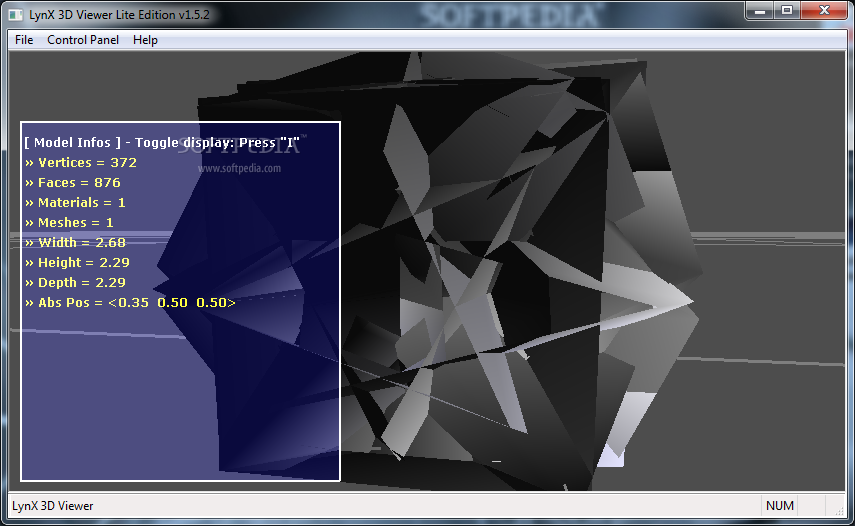
Since the computer is used for a large number of fields of activity, 3D modeling quickly became a common one. Specialized applications and powerful machines are needed to design and render such objects, but simply for viewing purposes, lightweight applications like LynX 3d Viewer Lite Edition prove to be enough.
The interface of composed of two windows, namely a control panel, as well as a viewer so controls don't get mixed or take up precious space. You can only load files through the dedicated explorer, but it's not necessary a bad thing, because you get to see the supported formats. They're not plentiful, the application only being able to run 3DS, ASE, OBJ and just a few more.
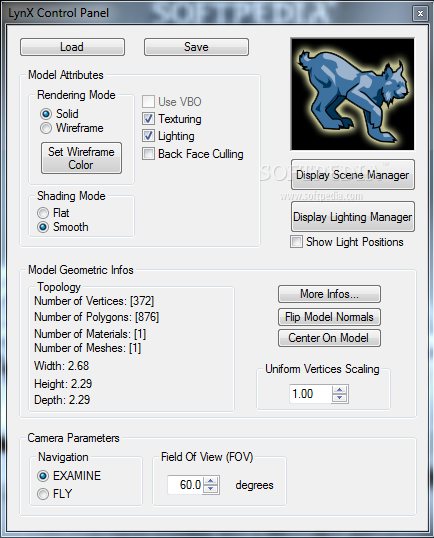
Using the mouse, you can easily analyze the inserted object from any possible angle. What's more, the camera can either be set to examine or fly, with the possibility to also adjust the field of view. Besides the object you insert, you can toggle a model info panel to appear in the viewer, to analyze vertices, faces, materials, width, height and depth.
More settings can be managed from the control panel. All of them strictly refer to viewing, so you can rest assured that the model remains intact. Texturing, lighting, as well as VBO (Vertex Buffer Object) can be toggled on or off, either to increase performance on a low-end system, or to better analyze details.
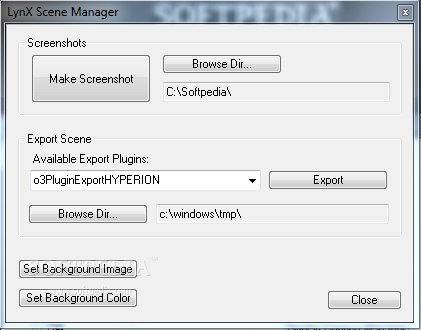
An implemented scene manager gives you the possibility to capture screenshots at given moments, set a custom background image or color. For more enhancements, you can customize a light object from a dedicated panel. However, only one instance is available, with no possibility to add more.
On an ending note, LynX 3d Viewer Lite Edition can truly come in handy when you have to present 3D objects, without going through the hustle of installing huge applications. The interface is easy enough, letting you view from any angle and customize several details, but little formats are supported and some of the most popular are not amongst them.
Download Hubs
LynX 3d Viewer Lite Edition is part of these download collections: Open OBJ, View 3DS, Open 3DS, View OBJ
What's new in LynX 3d Viewer Lite Edition 1.5.2:
- Feature: auto-update of pan, wheel and keyboard speed according to model size.
- Removal: mouse and keyboard sliders to control motion speed.
- Change: update FreeImage plugin with the latest FreeImage 3.80 lib.
- Change: update LynX with the latest oZone3D 2.66 kernel.
LynX 3d Viewer Lite Edition 1.5.2
add to watchlist add to download basket send us an update REPORT- runs on:
- Windows All
- file size:
- 3.4 MB
- filename:
- LynX3DViewerLite_v1.5.2_Setup.exe
- main category:
- Windows Widgets
- developer:
- visit homepage
IrfanView

Windows Sandbox Launcher

7-Zip

calibre

4k Video Downloader

Microsoft Teams

Zoom Client

Bitdefender Antivirus Free

ShareX

Context Menu Manager

- Bitdefender Antivirus Free
- ShareX
- Context Menu Manager
- IrfanView
- Windows Sandbox Launcher
- 7-Zip
- calibre
- 4k Video Downloader
- Microsoft Teams
- Zoom Client