
Fast conversion of many files on multi-core processor systems. #Media File Converter #Media File Encoder #Convert Media File #Converter #Convert #Encoder

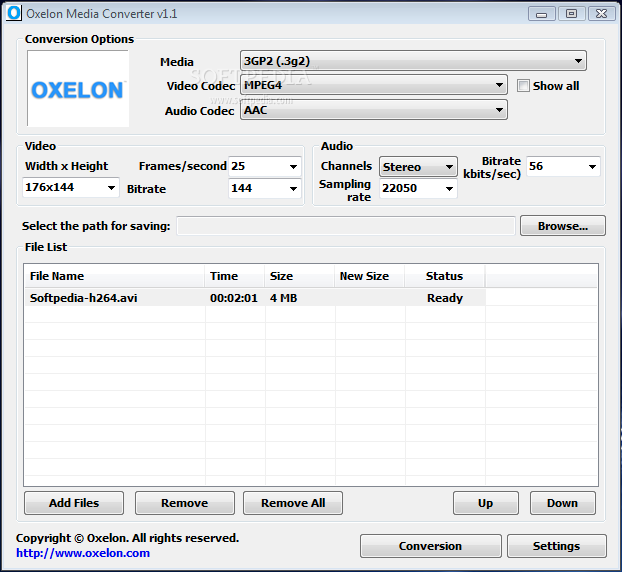
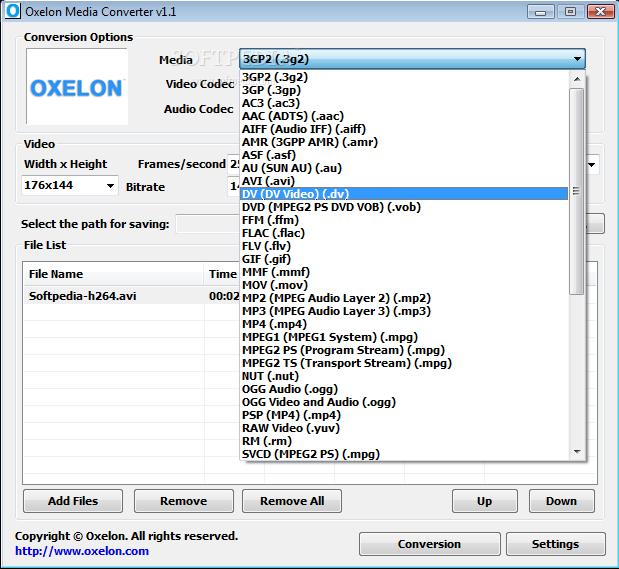
Oxelon Media Converter is an application that you can use to encode media files between various formats, including 3GP, AVI, FLAC, FLV, RM and SWF.
The interface of the program is based on a plain and simple window in which you can import media files via the file browser only, because the "drag and drop" method is not supported. Batch processing is possible.
In the list you can view the name, time, initial and new size, along with status of each clip. Once you specify the output location and extension, you can proceed with the conversion job.
You can alter audio and video settings when it comes to the size, frames per second, bit rate, sample frequency rate, channels and others.
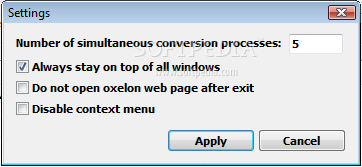
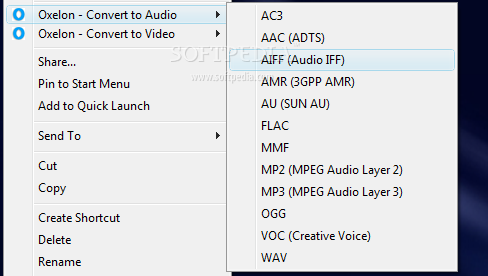
But you can also remove an item from the list or clear the entire queue, specify the number of maximum simultaneous encoding jobs, disable the context menu, as well as enable Oxelon Media Converter to stay on top of other applications, and more.
The media conversion tool requires a low-to-moderate amount of system resources, has a good response time, quickly finishes a task and preserves a pretty good image and sound quality. We haven't come across any kind of issues during our tests, since Oxelon Media Converter did not freeze or crash.
However, there is no help file available and the interface is outdated. Other than that, we recommend Oxelon Media Converter to all users, regardless of their experience level.
Oxelon Media Converter 1.1
add to watchlist add to download basket send us an update REPORT- runs on:
- Windows All
- file size:
- 3.1 MB
- filename:
- oxelonmedia.exe
- main category:
- Multimedia
- developer:
- visit homepage
Zoom Client

Microsoft Teams

7-Zip

4k Video Downloader

Context Menu Manager

calibre

Windows Sandbox Launcher

ShareX

IrfanView

Bitdefender Antivirus Free

- ShareX
- IrfanView
- Bitdefender Antivirus Free
- Zoom Client
- Microsoft Teams
- 7-Zip
- 4k Video Downloader
- Context Menu Manager
- calibre
- Windows Sandbox Launcher