
A complex and very useful tweaking utility.. #System tweak #System performance #System setting #Plugin #Optimize #Tweak

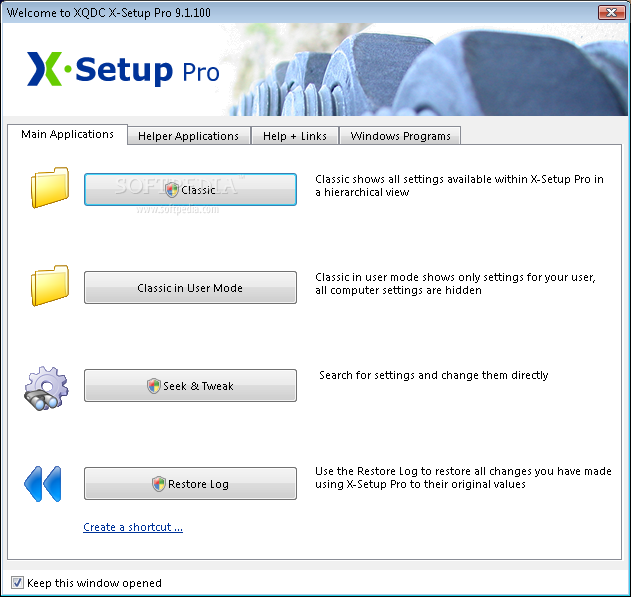
X-Setup Pro is a tweaking tool that allows you to modify settings that are usually not accessible in Windows. This way, you have complete control over your computer system.
This application may have a straightforward interface, but you have to know a thing or two about the hidden layers of Windows to use X-Setup Pro.
But again, there's a nicely drawn help file you can check out if you are uncertain about something.
The GUI comes with four tabs - Main Applications, Helper Applications, Help and Links, and Windows Programs.
The last one lets you instantly access various utility tools found in Windows, such as DirectX, Windows Update, system restore, registry editor, disk cleanup, and others.
In Main Applications you can view a classic display (which shows all settings available within X-Setup Pro in a hierarchical view), classic in user mode view (which only shows settings for your user, so all computer settings are hidden), or access Seek & Tweak (which looks for settings to directly change them) and restore log (this is a very powerful utility similar to "system restore"; you don't need to create a backup because this tool can restore all previously used settings before using X-Setup Pro).
Enabling Classic or Classic in User Mode allows you to access various keys found in Appearance, Common Annoyances, Hardware, Information, Internet, Network, Program Options, Startup or Shutdown, System, or Virtual Paranoia.
X-Setup Pro performs automatic updates, and you can even use it on a bootable disc.
The truth is that X-Setup Pro lets you access a lot of settings that you normally can't, but inexperienced users might find it hard to understand all of them.
In conclusion, if you want a powerful tool that will allow you to manipulate Windows settings, then by all means, use X-Setup Pro.
X-Setup Pro 9.2.100
 Softpedia Editor's Pick
add to watchlist
add to download basket
send us an update
REPORT
Softpedia Editor's Pick
add to watchlist
add to download basket
send us an update
REPORT
- runs on:
- Windows All
- file size:
- 4.2 MB
- filename:
- X-Setup-9.2.100.zip
![X-Setup Pro [GIVEAWAY] - The QQ Acrive Desktop window allows you to customize the desktop's settings.](https://windows-cdn.softpedia.com/screenshots/XSetup-Pro_2.png "X-Setup Pro [GIVEAWAY] - The QQ Acrive Desktop window allows you to customize the desktop's settings.")
![X-Setup Pro [GIVEAWAY] - The IE Options window helps you customize the passsword caching In IE](https://windows-cdn.softpedia.com/screenshots/XSetup-Pro_3.png "X-Setup Pro [GIVEAWAY] - The IE Options window helps you customize the passsword caching In IE")
![X-Setup Pro [GIVEAWAY] - The Setup and Tweak window allows you to search for a certain plugin and then tweak it.](https://windows-cdn.softpedia.com/screenshots/XSetup-Pro_4.png "X-Setup Pro [GIVEAWAY] - The Setup and Tweak window allows you to search for a certain plugin and then tweak it.")
- main category:
- Tweak
- developer:
- visit homepage
7-Zip

IrfanView

Bitdefender Antivirus Free

paint.net

Windows Sandbox Launcher

Zoom Client

Microsoft Teams

ShareX

4k Video Downloader

calibre

- ShareX
- 4k Video Downloader
- calibre
- 7-Zip
- IrfanView
- Bitdefender Antivirus Free
- paint.net
- Windows Sandbox Launcher
- Zoom Client
- Microsoft Teams