|
|
|
|
January 6th, 2012, 16:03 GMT · By Ionut Ilascu
Aomei Partition Assistant Professional Review |
|
|
|
|
SHARE:
Adjust text size: 
|
|
The professional version of Aomei Partition Assistant has been designed as an easy to handle, comprehensive approach to disk partitioning.
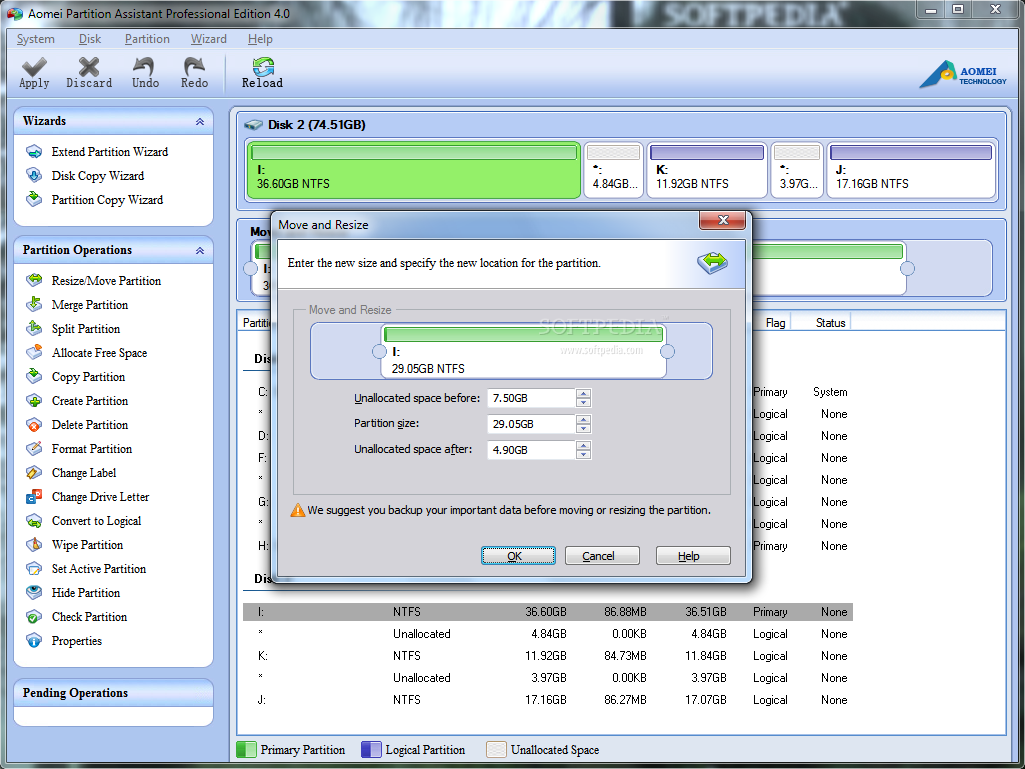
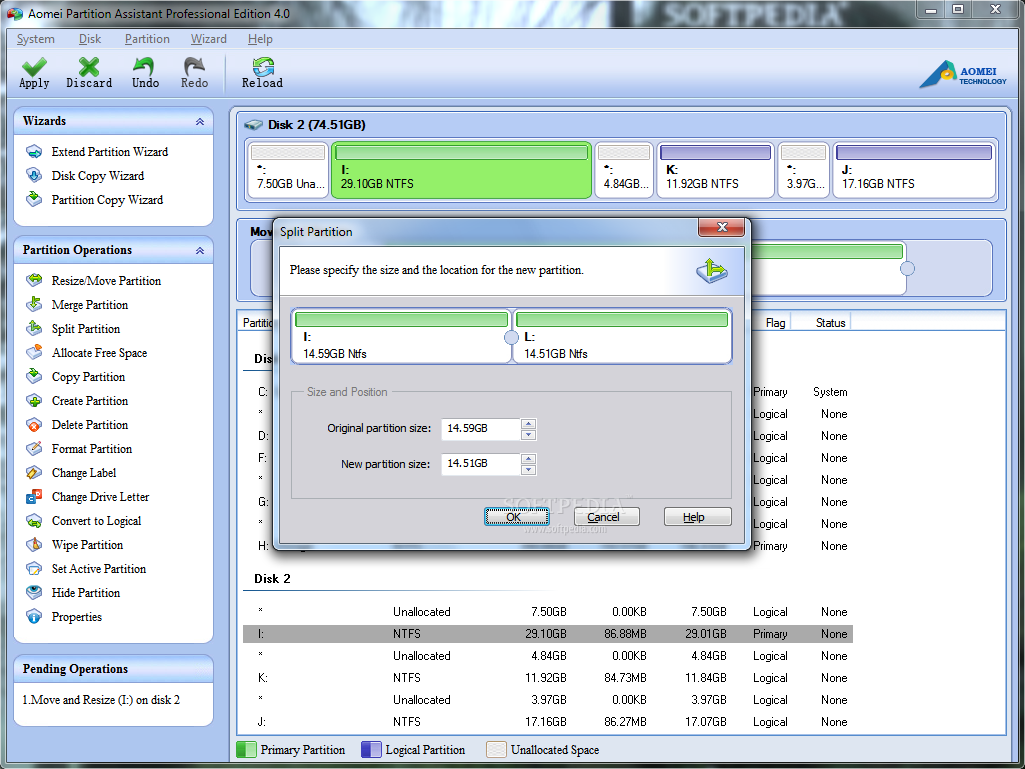
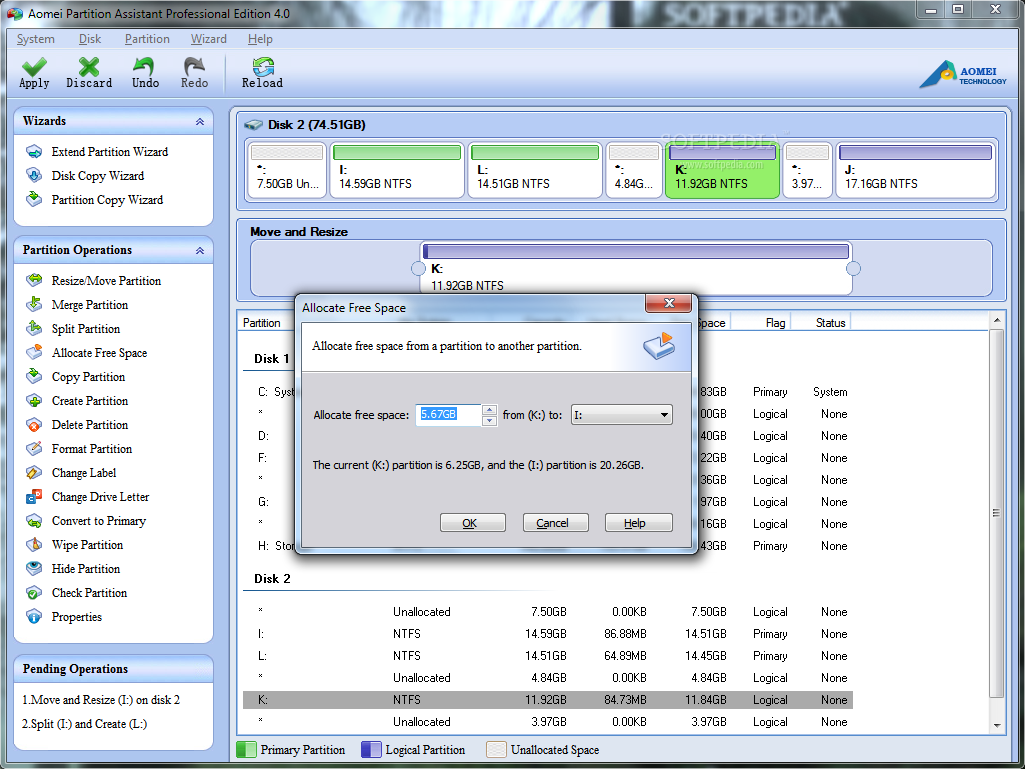
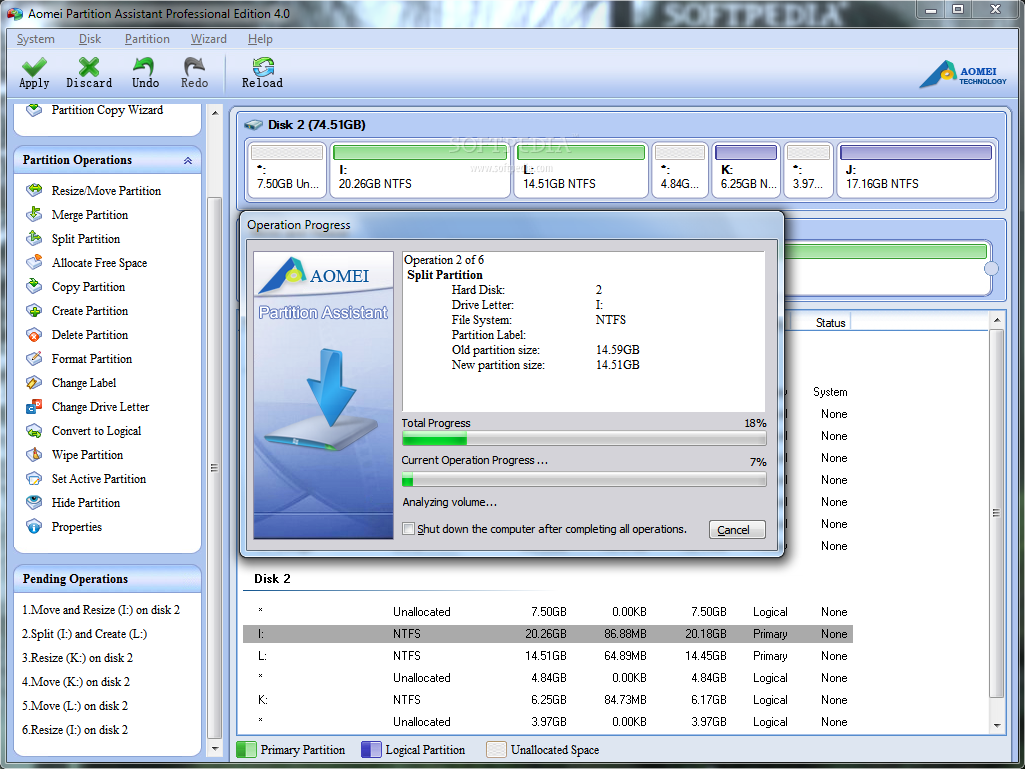
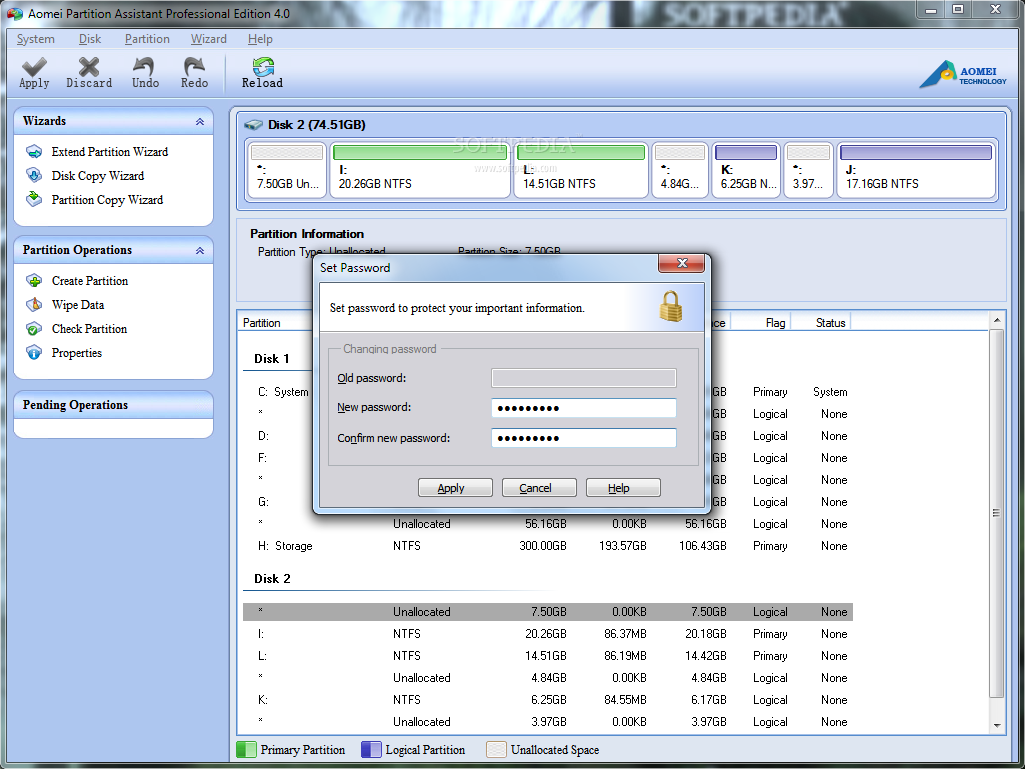
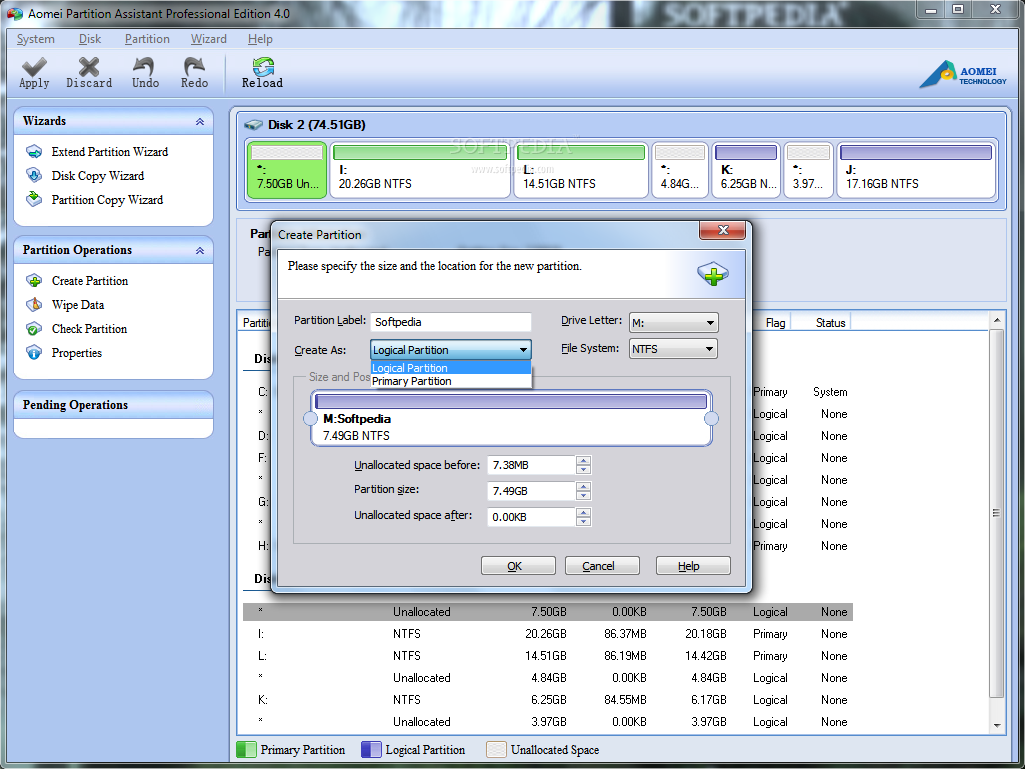
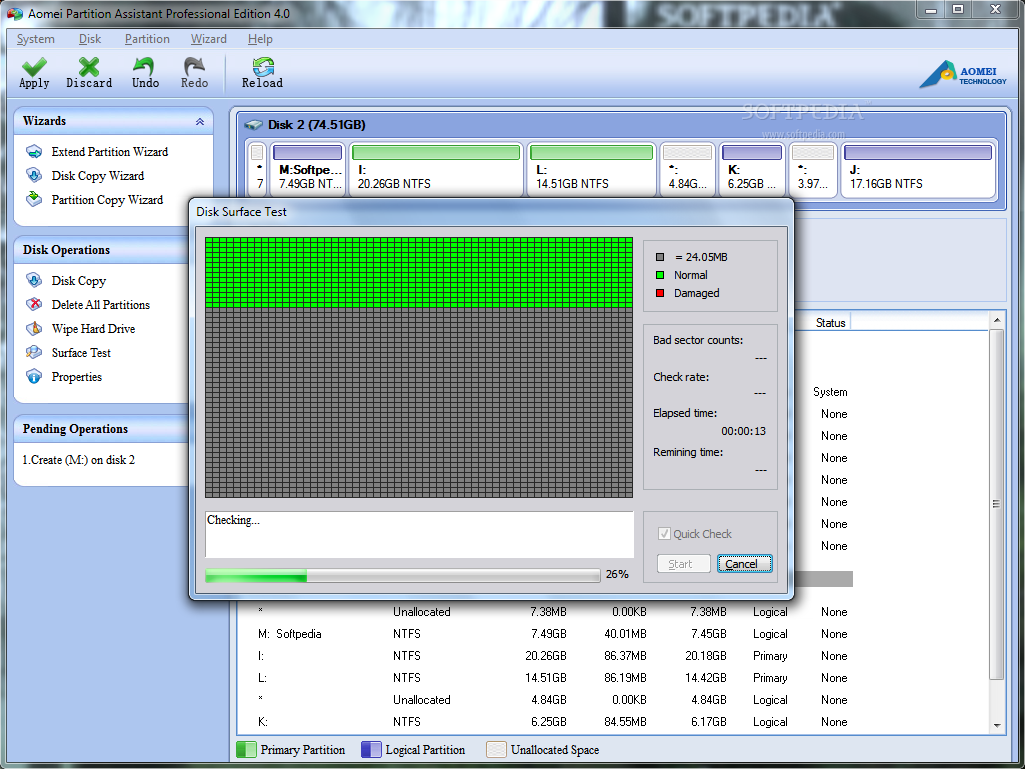
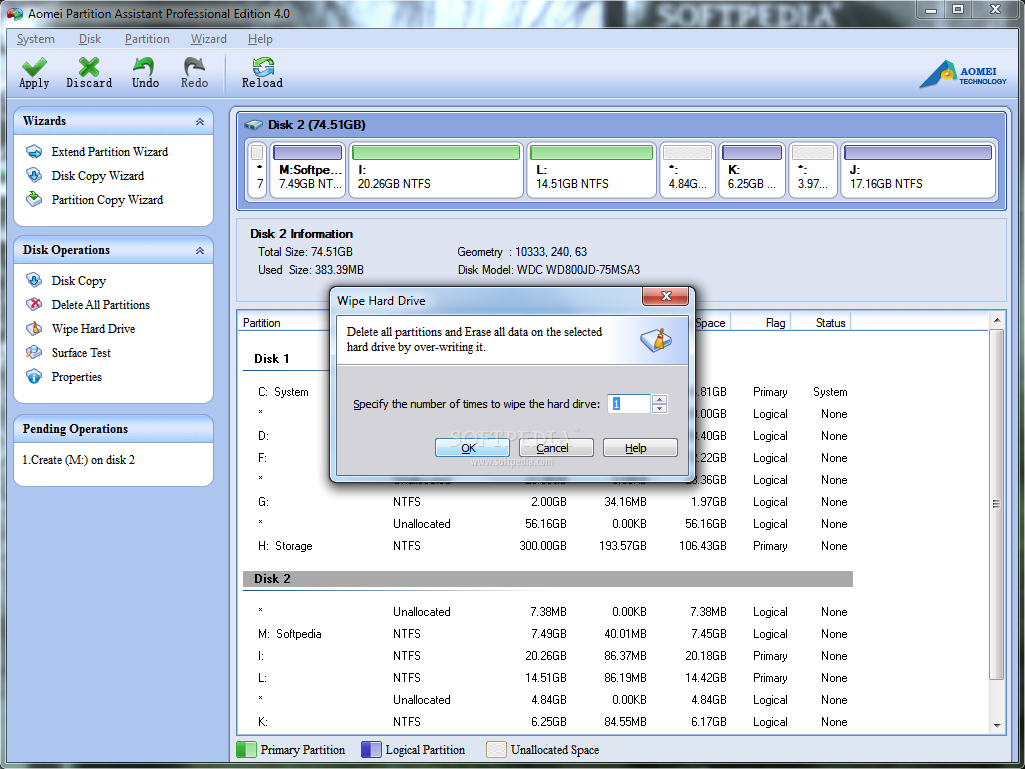
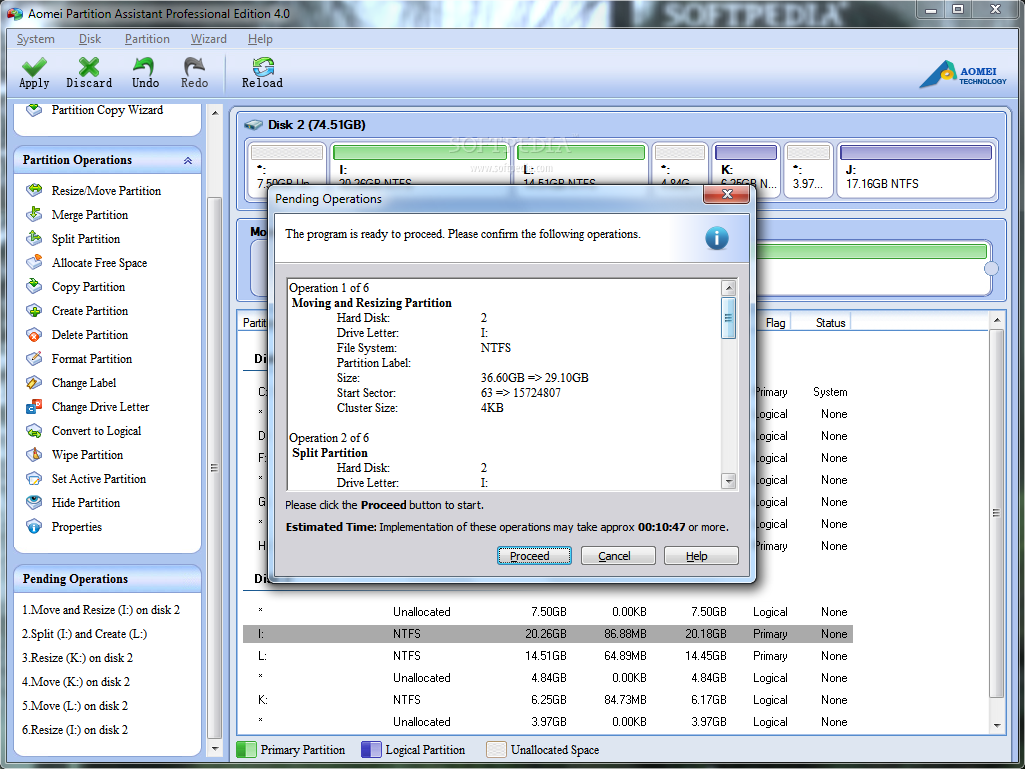
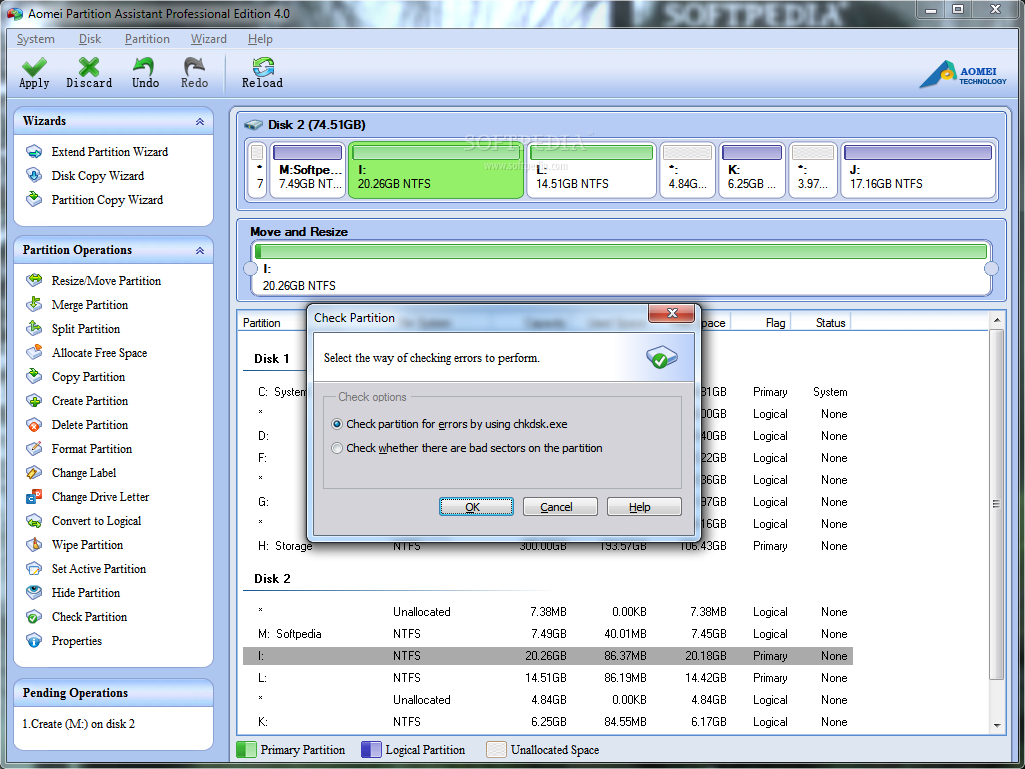
There used to be a time when it would have been tough to get your hands on a good partition manager that did a great job and was also easy to handle. Those days are long gone and, now, you can even find free tools that can split up large disks into multiple partitions. However, Aomei Partition Assistant Professional is capable of more than this, since it comes in handy if you want to move and resize partitions, create new ones, merge volumes or wipe them clean. For the average home user, there are two versions of the program, a free one, Home Edition, and Professional. The latter has more features unlocked, yet the differences between them are not too steep. What separates them is the inability of the free version to convert a basic disk to dynamic or a GPT one to MBR. Furthermore, it cannot add a drive to RAID or remove it. The paid product can also be used on a larger number of Windows operating systems. Check this page for the full comparison chart. The price of the Professional edition is $39.00 (€31.78), but you can test it for free if you’re okay with the limitation: it can be used only with 100MB partitions. Our tests were conducted on the full version of the application, though. Looks are not impressive, but options are arranged in an intuitive way, so using the program should not be a problem, regardless of your computer skills. Operations can be initiated from the disk view screen, as well as from the drop-down menus available on the left hand side of the application window. Aomei Partition Assistant Professional offers a wide set of options, which include everything from resizing and moving the selected partition to splitting, merging, creating a new volume from unallocated space, formatting, deleting and even sanitizing. Additional choices let you hide a partition in Windows, or change its letter and label. Managing the size of a partition is a simple job, as the options available let you define a new size either by punching in the values yourself for more accuracy, or by dragging by the graphical representation until the desired result is reached. However, it looks like the bug we noticed during our previous testing of the program is still present, when resizing the partition. So the value will slightly change when pressing the “Ok” button. We also noticed that sometimes, when moving a drive, it cannot be pushed all the way so that there is no unallocated space before it; in this case, you have to punch in the value for the unallocated space before or after. One of the new functions introduced in version 4 of the application is partition splitting. The option simply lets you divide one drive into two partitions, equally sized, if possible. You still have control over the volumes as you can resize them as you see fit. No unallocated space can result from this operation. Allocating free space from one partition to another is also a new feature in this version. Simply put, this option lets you increase the space on a drive by taking it from another. The advantage of this is that the drives involved do not have to be next to each other. The only requirement is that they be on the same disk. Once you set the amount of space to be transferred, Partition Assistant Professional automatically creates all the intermediary operations that need to be done in order to reach the desired result. Although the disk view is updated as soon as you make a change, tasks are not executed immediately. They are listed under the “Pending Operations” menu and you can undo the actions one by one or discard them all at once. This way, you can set all the actions at once and the application proceeds to executing the tasks in the same order they were defined. Although we did not have any trouble resizing and moving drives with information on them, we do not recommend initiating such actions without making a backup first. This can be done straight from the application, through the “Copy Partition” option. You can copy only the used space on a drive or make a sector-by-sector copy, which includes all sectors, free or occupied. Aomei Partition Assistant Professional has not changed much since the previous major version, but it brings two new options (merge/split partition and quick allocate free space) and supports 4TB GPT drives. Also, it now integrates flash drive support and can run on Windows 8 operating system. The Good It comes with an intuitive interface and a versatile set of options. You can review all operations before starting to make the changes. Allocating free space from one drive to another automatically creates all intermediate actions to reach the desired result. The Bad Just as noted in the previous review, wiping a drive turns it into unallocated space. On the same note, moving a drive in some cases is not accurate and may result in unwanted strips of unallocated space. The Truth This version of Aomei Partition Assistant Professional has not changed much since our previous encounter with the application, in that we noticed the same malfunctions. However, it comes with new options, which make splitting and resizing a drive much easier. Note: we have 100 licenses to give away for Aomei Partition Assistant Professional 4.0. In order to grab one you should drop a post in the comments section below, with some interesting lines about the application or your experience with partition management software. The campaign will run for one week.
GIVEAWAY OVER

|
EDITOR'S RATINGS:
|
| User Interface: |     (5/5) |
| Features: |     (4/5) |
| Ease of use: |     (4/5) |
| Pricing/Value: |     (4/5) |
| Overall: |     (4/5) |
|
|
|
|
|
|
|
|
|
 |
91,161 hits
· 149 comments
Link to this article
· Print article
· Send to friend
|
MUST-READ RELATED ARTICLES:
READER COMMENTS: |
| Comment #1 by: gopal on 07 Jan 2012, 13:18 UTC | reply to this comment | Brillient way to impove the hard drive performance by creating the partitions,Thanks to SOFTPEDIA for the wonderful giveaway. |
| Comment #2 by: maynak00 on 07 Jan 2012, 13:18 UTC | reply to this comment | nice program but not best.i want it.thanks softpedia ! |
| Comment #3 by: Hawk on 07 Jan 2012, 13:20 UTC | reply to this comment | Good software, with awesome features, but have a poor UI and some bugs when move partitions. |
| Comment #4.1 by: skumaramigos@gmail.com on 27 Apr 2012, 13:48 GMT | Aomei Partition Assistant Professional is robust in windows partition It can create more space by adding new available space to your partition. |
| Comment #5 by: TiM on 07 Jan 2012, 14:50 UTC | reply to this comment | It would be great Software for me to have! I always have to go to my Friend's and use the GParted Software on his Ubuntu 10.04 to Partition the various Hard drives I help people to purchase and Partition at little or no profit...
"Aomei Partition Assistant Professional offers a wide set of options, which includes everything from resizing and moving the selected partition to splitting, merging, creating a new volume from unallocated space, formatting, deleting and even sanitizing. Additional choices let you hide a partition in Windows or change its letter and label". I'did be happy to win one!!!!!!! |
| Comment #6 by: Kenicen on 07 Jan 2012, 15:48 UTC | reply to this comment | As far as partitioning software goes, there are alot of them out there. Some are very easy to use than others and some are just plain difficult for especially the novice user. Aomei has a professional interface that should be familiar to persons who have used other such tools before. I tried other partitioners and they all lacked something or the other i needed, would like the opportunity to try this program to see if it is different. |
| Comment #7 by: zeusz4u on 07 Jan 2012, 23:29 UTC | reply to this comment | I have used both trial and cracked (it's not legal, but that's it now) version of Acronis Disk Director so far. I was not impressed at all. When I tried to increase the size of C: - where I have my Windows 7 installed, it simply screwed up my Windows. I was not able to start after using Acronis. It's a shame considering the price of the software.
I like the fact that this version has got a somewhat limited, but FREE version. I'll give it a try. Being a giveaway, I hope I can get my hand on one of those licenses to upgrade to professional to unlock the other features as well.
To be honest, I find the price really high. Considering the fact that once you partition your hard drive, you may not need it again (I don't say never again, but most probably you won't use it for a looooooong time). Therefore it doesn’t make sense to spend money on such software at all. As I stated above, I had some bad experience with another commercial software - which it is now obvious why I didn't purchase. I'd recommend using the free alternatives out there. There are plenty of them, Paragon PM, Partition Wizard, Easeus PM Home, Cute PM, or even the older versions of Partition Magic could serve you well.
Also once you touch your partitions it's a good politics to always back up your data so you won't get into my shoes, losing your Windows, and having to reinstall everything. :)
Thank you Softpedia for this giveaway. |
| Comment #8 by: Chandrasekar on 08 Jan 2012, 00:35 UTC | reply to this comment | Aomei Partition Assistant Professional is a simple but powerful partition manager and it allows move,resize and merge partitions and also convert partitions.I thank softpedia for giving this giveaway and would like to win a license |
| Comment #9 by: Mayur on 08 Jan 2012, 03:36 UTC | reply to this comment | Nice giveaway, Count me in...
Thanks for giveaway |
| Comment #10 by: Stefan Julian on 08 Jan 2012, 06:10 UTC | reply to this comment | only use version 3 pro..so count me in to have license v4.just one word..GOOD |
| Comment #11 by: Ramiz Malik on 08 Jan 2012, 08:46 UTC | reply to this comment | I Thought This One is the most useful software of all partitions managers because of it,s features i love it and also softpedia |
| Comment #12 by: austhome on 08 Jan 2012, 09:50 UTC | reply to this comment | I haven't had any experience with partitioning yet but I'm willing to learn. |
| Comment #14 by: zidane on 08 Jan 2012, 14:25 UTC | reply to this comment | The good:
1-everything for disk operations.
2-good chkdsk .
The Bad
1-too many options,
2-apply button must on the right side instead of reload button, |
| Comment #15 by: vnqcomputer on 08 Jan 2012, 15:16 UTC | reply to this comment | I hope will to get a license code of this program. |
| Comment #16 by: yasser on 08 Jan 2012, 15:59 UTC | reply to this comment | I think that softpedia is a woderful webpage. I trust you so much that I feel
happy whenever I see your name. Thnx for wonderful softwae. |
| Comment #17 by: nizxb on 08 Jan 2012, 18:54 UTC | reply to this comment | Thank you so much for this Giveaway.Please count me in.This is my first time i have used Aomei Partition Assistant and i really like it.It seems a pretty useful application.We can easily create partitions,delete them,copy them,split them and can even merge them.We can also extend a partition with ease without even restarting the PC.I really like this tool.Hope i win one of the license key.
Regards |
| Comment #18 by: HN on 09 Jan 2012, 00:53 UTC | reply to this comment | I am currently using Acronis Disk Director for partitioning & I would love to own a copy of Aomei Partition Assistant Professional.
Please include me in the draw.
Thank you! |
| Comment #19 by: Donde on 09 Jan 2012, 05:50 UTC | reply to this comment | I bought a 160g hard disk on my desktop PC and sent it to a service center to install a new operating system. When i got home i was confused why it only appears 80G available disk on "My Computer". I've asked to the computer store what is happening on my disk..They said it is just hiding! So i looked for a software and there you have it! I've tried the trial version and it works! I already got another drive on my disk. BRAVO! |
| Comment #20 by: frenchjac on 09 Jan 2012, 07:24 UTC | reply to this comment | I would like a better program than --> diskmgmt.msc. And Aomei Partition Assistant Professional would same me a lot of time tweaking my computer and my friend also. It look ease of use and a great interface. Thumbs up |
| Comment #21 by: Mahafuz on 09 Jan 2012, 08:18 UTC | reply to this comment | I have four 5 drives or partitions in my PC. Each drive/partition is used for different purpose. But according to the need of different types of data/document storage, I need to enhance the size or volume of some of them and need to reduce some of them. That's why I need an effective and efficient partitioning software with easy to understand, user friendly interface like Aomei Partition Assistant Professional 4.0. So if you kindly give me one of it, it will do lots for me. Can I have one? |
| Comment #22 by: comphelp on 09 Jan 2012, 08:34 UTC | reply to this comment | An excellent program. Clean and smooth running and has all the necessary functions. But the program lacks the ability to boot from CD/DVD or USB.
thanks Softpedia for this contest, for excellent taste, and for the chance! |
| Comment #23 by: liondesert_77 on 09 Jan 2012, 10:15 UTC | reply to this comment | I think it's a great partition tool and very easy to use with different storage |
| Comment #24 by: Symbianer on 09 Jan 2012, 18:00 UTC | reply to this comment | i've tested lots of partition management softwares and my first experience was partition magic, i always had problems with these type of softwares. i've tested the free version of Aomei partition assistant and i think this one looks promising, haven't seen any problem yet and hope to win the pro version. |
| Comment #25 by: Sujay on 10 Jan 2012, 10:53 UTC | reply to this comment | Using the free version for about a year! Happy with it.
Will the giveaway license include free support? I am happy with the free version but cousin who is not so tech-savvy might need support. I am asking for a license for him if there is free support available in the pro version. |
| Comment #26 by: BlueStrut on 10 Jan 2012, 19:56 UTC | reply to this comment | Well...I used partitioning software sometimes. I was pleased when I discovered that no restart is needed when you make a partition out of unallocated space :) . |
| Comment #27 by: calupi on 10 Jan 2012, 20:21 UTC | reply to this comment | I used the free version of Partition Assistant 3.0 and I found it simple, effective and very good for normal task, i.e. enlarging or shrinking partitions, get information about a partition, without leaving windows. Very well done. |
| Comment #28 by: Andrei Serban on 10 Jan 2012, 20:43 UTC | reply to this comment | It looks like a very nice piece of software. Merging partitions is a very usefull function in my opinion, a function that's not available in many programs of this type. |
| Comment #29 by: Louis on 11 Jan 2012, 09:13 UTC | reply to this comment | My friend recommended me aomei partition assistant home about a month ago, worked fine. straightforward options let me easily finish the extension for my system partition.
And several hours ago, my friend recommended me this giveaway again, truthfully, I really want to upgrade to pro edition because everybody think free is nice and i believe i got this opportunity.
The most important, I will recommend softpedia to all of my friends. And of course, I will recommend Aomei Partition Assistant to all. |
| Comment #29.1 by: Louis on 01 Feb 2012, 07:07 GMT | Hello, softpedia, when I could receive one license. I checked my email inbox but nothing. Thanks! |
| Comment #30 by: RGG SOFT on 11 Jan 2012, 09:35 UTC | reply to this comment | Aomei is creating great competition to Boss like EaseUS.
Aomei PA as feature like NTFS partitions without reboot. Spilt and Merge features. Support up to 4TB which is mare than expected. a simple easy to understand UI.
Count me for Aomei Partition Assistant 4.
thanks for giveaway |
| Comment #31 by: owen on 11 Jan 2012, 11:40 UTC | reply to this comment | Nice straight forward, easy to use software, very small download for the features it provides.
Count me in thanks, nice giveaway. |
| Comment #32 by: smaragdus on 11 Jan 2012, 13:27 UTC | reply to this comment | Aomei Partition Assistant seems to be a good partition manager. |
| Comment #33 by: fyre on 11 Jan 2012, 14:50 UTC | reply to this comment | Great tool used to resize partitions that were running out of space!!!! |
| Comment #34 by: Leshy on 11 Jan 2012, 15:27 UTC | reply to this comment | Happy to try this partitioner. Sometimes disc builds will not work with one, but another does the job fine. The more SysAdsmin tools, the better ! Please provide a license so I can run it on a lab. test drive. Softpedia gets better & better ! Good idea to have a Rescue Discs hub, but it could easily be expanded almost 10-fold. Thanx bunches - Leshy -- leshy99@gmail.com |
| Comment #35 by: Zenbob on 11 Jan 2012, 19:57 UTC | reply to this comment | I have used the Classic Partition Magic with great success for most basic Windows routines and Easus Partition Manager for mixed boot installs, with Win and Linux partitions...and usually no problems. When I tried Aomel Partition Assistant, I got errors in reading partitions, as well as in fulfilling the exact required resizes and partition moves. It rendered an Ubuntu install basically slag...of course I had just done the basic Ubuntu install, tested that it worked fine, and could easily reinstall later if slag happened. However, many users would cry a lot if their long perfected and lovely install with all updates special drivers, etc., were so mangled, even if they had a restore DVD burned and sitting around, as that is just another layer of fuss. Why Partition management software has to be as Byzantine and hair raising is beyond me. Partition Magic is ancient and still has one of the best, least stressful interfaces and reliable performance, and fast, too. Some of the other partition managers are both scary and slow. That seems like a bad, bad trade off. I would like to try the "improved pro" version of Aomel, just to see what it is capable of. My clients might even like it, as they seem to think Easus is too complex for them. (OK, I know, I know, but that is their opinion, and we cannot alter that with a hammer, it is not usually seen as constructive). Cheers, and thanks for the good review! - Zenbob |
| Comment #36 by: Aqsa on 11 Jan 2012, 20:44 UTC | reply to this comment | Superb Software Nice functions and simple to use one of my best softwares please count me in,I have used many partition managers but this one is best i have used it,s free version that,s great but i really want it,s professional version please count me in
Thank You! |
| Comment #37 by: boot speed on 11 Jan 2012, 21:05 UTC | reply to this comment | I have a 120 gigabyte drive that has already been partitioned into 3 partitions. i would like to know if aomei partition assistant can have an add on built into it to allow my computer push the hard drive to the safe maximum cylinders, tracks and sectors available. some manufacturers will down grade and ship for examply a 200 gb disk drive to only format 120 gb.
I used to use an apple computer and increased the total amount available on the floppy disk with a utility that extended the read/write armature and then retracted it to a safe margin of error and addted extra tracks to the floppy disk. Could aomei partition manager also add a disk alignment tool to the partition assistant it (it helps the disk drive)? and would they also be able to increase the number of bytes or words per sector? I am looking for such a utility and would like to use aomei partition assistem professional in case i have to reformat the hard disk. I am looking for a free backup online company to dump my operating system and files to. yes, i might also need a disk partition recovery tool. is there something to allow me to add sectors per track? |
| Comment #38 by: Work4Free1 on 12 Jan 2012, 04:37 UTC | reply to this comment | I volunteer at a non-profit organization that provides training for mature adults. As the turn-over rate for other volunteers seems high, I am constantly setting up computers with different configurations. It would be nice to be able to easily create hidden partitions where I can keep the commonly used images. I would certainly welcome the opportunity to test drive Aomei. Thanks Softpedia. |
| Comment #39 by: john d on 12 Jan 2012, 23:32 UTC | reply to this comment | can I ask for a license? I am late but this should come very handy as I never like linux based partition stuff. This has a good interface, so easy to use.
john d |
| Comment #40 by: Nathan on 13 Jan 2012, 04:29 UTC | reply to this comment | I missed the free giveaway, now I have to do it the hard way :) |
| Comment #41 by: dire... on 13 Jan 2012, 06:01 UTC | reply to this comment | Partition Assistant 3 was wat i used somtimes and I found it simple, effective and very good for normal task, partitions, and test healt etc to get information about a partitions |
| Comment #42 by: RAGAGH on 13 Jan 2012, 09:15 UTC | reply to this comment | Provide best options towards disk partitioning such as resize, copy, merge split, space allocation features. The best one It has wizards for the above so know pain for your head.
thanks, count me softpedia. |
| Comment #43 by: 12 on 13 Jan 2012, 15:03 UTC | reply to this comment | Good program on the surface. I would give it a try. |
| Comment #44 by: BlogWurm on 13 Jan 2012, 23:52 UTC | reply to this comment | ____________________________________________________________________________________
Aomei Partition Assistant Professional
____________________________________________________________________________________
With Aomei Partition Assistant Pro you can create, delete and edit partitions with only some clicks,
do this until your needs and partition table fits.
Its interface is simple and plain,
so you reach what you want to gain.
Softpedia contests are one of the best,
so I'll take part in this contest.
____________________________________________________________________________________
Thanks Softpedia and Aomei for this giveaway.
____________________________________________________________________________________ |
| Comment #45 by: Mum on 14 Jan 2012, 02:27 UTC | reply to this comment | Recieved an external Hard Drive, a gift from my son who sent it to me from London, i live in Australia, would love to partition the drive, and believe Aomei PAP Professional 4.0 would be My Best Help. Thanks in anticipation to Softpedia. |
| Comment #46 by: Muliadi on 14 Jan 2012, 07:09 UTC | reply to this comment | Great program. I like it, easy to use. Thank's for your give away. |
| Comment #47 by: john on 14 Jan 2012, 15:36 UTC | reply to this comment | i think it will be fine to purpose our serves |
| Comment #48 by: Jason on 14 Jan 2012, 20:44 UTC | reply to this comment | Overall it is a nice program. I'm not an advanced user, but I'm usually the one people come to with computer problems. This program, once you get used to the interface, can do almost everything needed for even the most messed up partitions. Thanks Softpedia for the giveaway! |
| Comment #48.1 by: Jason on 17 Jan 2012, 15:33 GMT | This is my 2nd post, but I think it is really worth Saying. I tried the evaluation version on a flash drive with a bad partition, and was able to use the rebuild feature to recover the partition. --- Just wouldn’t let me apply it. :( Would love it for free in the awesome giveaway! Thanks Softpedia! |
| Comment #50 by: PRF on 15 Jan 2012, 03:29 UTC | reply to this comment | I normally use Parted Magic for most of my partitioning needs. It's a great piece of free sofware that works with both Linux and Windows file systems. Can "Aomei Partition Assistant Professional Edition" be booted fom a CD/USB? Does it support Linux file systems such as ext3/4? or is it limited to Windows file systems only? I see no mention of Linux or Linux file systems in the above discription. |
| Comment #51 by: antonytony on 15 Jan 2012, 07:09 UTC | reply to this comment | Partition assistant professional edition is a small but powerful program for handling partitions. I use it complimentary to easeus and paragon partition programs.
Though it is relatively small program but i found it having most of the features of these programs. Any action is first queued which can be edited and can be launched. I got PA pro 3 and 4 in their giveaway and found it to be really amazing. Though i experienced few problems in editing the partitions , it was only rare so it doesn't matter.
Thanks for the giveaway softpedia. Please announce such giveaways in a separate page softpedia.... |
| Comment #52 by: BBOYShubham on 15 Jan 2012, 13:24 UTC | reply to this comment | it is good but cannot utilize it properly! it is good but not the best! |
| Comment #53 by: vovps on 15 Jan 2012, 18:03 UTC | reply to this comment | Aomei Partition Assistant very good program for comp! |
| Comment #56 by: RU on 16 Jan 2012, 21:46 UTC | reply to this comment | I am a typical novice user who is too frightened to buy for fear of not knowing how or what I just bought. That being said, all of the positive comments persuaded me to at least try to win. |
| Comment #57 by: nicknowsky on 17 Jan 2012, 04:14 UTC | reply to this comment | always looking for new tools for my PC/Tech repair business |
| Comment #58 by: Sergod on 17 Jan 2012, 15:05 UTC | reply to this comment | Partition management software must be very secure in order to trust it. In my experience, specially for the least experienced users, this software must be very clear and easy to use to avoid information lost. There will always be some risk, but with the right tools and some knowledge, we can manage our drives and some other drives (I work as a technician) with ease. |
| Comment #59 by: talkman on 18 Jan 2012, 06:49 UTC | reply to this comment | Partition managers are double edged swords, I used partition magic once to create a Linux partition. It did it, but wiped off my windows. It took many re-installs to get it right. Like to see what I can do with Aomei. |
| Comment #60 by: Surender Markam on 18 Jan 2012, 15:14 UTC | reply to this comment | some time back, I used a software to create a partition from a exist local disk. but unlucky it format the disk and I lost my data. I hope, this software do better than that. |
| Comment #61 by: Pete on 20 Jan 2012, 03:29 UTC | reply to this comment | The features are impressive, will recommend to my friends tooo |
| Comment #62 by: dan on 20 Jan 2012, 08:37 UTC | reply to this comment | This is a good and solid partition manager. It's only for Windows I see. |
| Comment #63 by: asdgdff on 20 Jan 2012, 11:15 UTC | reply to this comment | i need it now... it a important software then any other now... i hope i get one please count me in ok.TQ Softpedia |
| Comment #64 by: darko on 20 Jan 2012, 13:48 UTC | reply to this comment | I used to use Free Partition Manager and it was ok, I use it frequently and had no troubles with him. I think that with this kind of programs you have to know what you are doing because otherwise you are asking for troubles. I'll be glad to try Aomei Partition Assistant and share my thoughts with you all. |
| Comment #65 by: Rob on 20 Jan 2012, 21:44 UTC | reply to this comment | Used the home edition 4.0 on a PC partition and worked great, only sad part is I had to wait for it to restart. If only I had the proedition... |
| Comment #66 by: Kuno Paschunke on 22 Jan 2012, 05:00 UTC | reply to this comment | Can someone please tell me if the driver (ampa.sys) is installed to run permanently in the background or is just loaded when the applicatione needs it? |
| Comment #67 by: kj567 on 23 Jan 2012, 16:19 UTC | reply to this comment | Partition Management is a truely interesting and intriquing subject! |
| Comment #68 by: Quatib "Magnetic Center of the Universe" on 23 Jan 2012, 17:55 UTC | reply to this comment | I need a copy of AOMEI partion assistant. I have been working with computers sience Commodore and have been looking for a product like this.
Joseph Arellano
Test Engineer
jsarellano@frontier.com |
| Comment #69 by: newton53 on 24 Jan 2012, 16:43 UTC | reply to this comment | Good programs..İam wanting a licance key !!!!!!!! |
| Comment #70 by: GNMilasi on 25 Jan 2012, 11:47 UTC | reply to this comment | Although to use the Parted Magic and the GParted he has many and many years, I would very like to gain a license of the Aomei Partition Assistant Professional… Congratulations for the Softpedia for plus this prize to that they sanction to it… |
| Comment #71 by: Darrick Fella on 25 Jan 2012, 17:35 UTC | reply to this comment | omg I need a partition manager that knows what it's doing for me cuz I sure don't ! |
| Comment #72 by: LeKanaw on 26 Jan 2012, 16:54 UTC | reply to this comment | After reading the review, I would very interested to receive a license.
Many Thanks |
| Comment #73 by: Larry on 26 Jan 2012, 17:37 UTC | reply to this comment | Aomei Partition Assistant Professional seems like a tool that will be very useful in working with partitions. This will be especially true when working with RAID arrays and for partition splitting. |
| Comment #74 by: callenos2 on 26 Jan 2012, 19:32 UTC | reply to this comment | I really need a professional partition assistant - my old laptop came with Vista and I really want to use the 10Gb under XP OS. Oh, I'm interested in renaming my memory sticks and Aomei Partition Assistant Professional seems that will allow me this. |
| Comment #75 by: florin on 27 Jan 2012, 03:24 UTC | reply to this comment | Aomei Partition Assistant Professional is a simple but powerful partition manager and it allows move,resize and merge partitions and also convert partitions.I thank softpedia for giving this giveaway and would like to win a license |
| Comment #76 by: Joy on 27 Jan 2012, 14:30 UTC | reply to this comment | Nice, Powerful, Robust and easy to use software.
Count me in & Thanks for the nice giveaway. |
| Comment #77 by: Bobbert on 27 Jan 2012, 14:31 UTC | reply to this comment | Aomei Partition Assistant is powerful and easy to use. It has a good clean interface that is intuitive for users. |
| Comment #78 by: ascaacacasd on 30 Jan 2012, 08:14 UTC | reply to this comment | please give me a one license i keen to use it,because very important software i need it only one... please thanks. very thanks for Softpedia to give this emergency opportunity |
| Comment #79 by: CoolObserver on 30 Jan 2012, 11:26 UTC | reply to this comment | I have had mixed success with partition software. The easiest to use was Paragon Partition Magic 8 but it is no longer supported and I have had limited success with other partition software. I like gparted but I can only use it outside windows from a CD. I have tried trial versions of Partition Commander and the free Partition Manager (?), but I need to study the manuals thoroughly to really understand what I am doing. Partition Magic made it easy to read and assess what I needed as I went along. |
| Comment #80 by: Satnam on 30 Jan 2012, 15:02 UTC | reply to this comment | great partition tool and latest version make a user friendly |
| Comment #81 by: Oblivion1 on 30 Jan 2012, 17:14 UTC | reply to this comment | looks ok and interesting to try as I tend to use either easus or paragon |
| Comment #82 by: darrick fella on 02 Feb 2012, 04:21 UTC | reply to this comment | i have tried my work with partition management software including the
windows disk management function, , partition manager....and haven't really found one of those keepers you just always fav. if i was to choose from what i tested i would have to say ..... partition manager. it' just
too hard to look at! help!!!!!!!!!!!! |
| Comment #83 by: Harivind on 02 Feb 2012, 15:34 UTC | reply to this comment | it is PERFECT software.iam tried demo its cool.i want to try remaining but its limited.so i want one key |
| Comment #84 by: A Tech on 02 Feb 2012, 17:50 UTC | reply to this comment | Having a good partition management software allows for the custom creation of a recovery partion to rebuild everything back from a failed drive as it once was. By simply cloning one partion to another this makes the recovery process painless! |
| Comment #85 by: Per-Anders on 03 Feb 2012, 13:45 UTC | reply to this comment | This would be good to install Windows 7 besides Windows XP, so that we can use older software besides the new software at our company. |
| Comment #86 by: TJ on 03 Feb 2012, 13:59 UTC | reply to this comment | Have used Parted, Partition Magic, etc. -- each having their own short-comings (especially with removable/bootable media and with compressing partitions, defragmenting free space is generally a nightmare) so I'm always looking for improvements to the tools of the trade. If there's still a few licenses available, count me in! |
| Comment #88 by: Pr0fessor on 03 Feb 2012, 22:18 UTC | reply to this comment | very useful for manage partitions. i used very often partitions tools and the software must be stable! thats very important. if the software is not stable it might be bad for the stored data on the disk. i think this software ist stable enought.... |
| Comment #89 by: siriusdh on 03 Feb 2012, 23:49 UTC | reply to this comment | Would like to try it, tried many partition managers none seemed to do the job very well, or with bugs involved. |
| Comment #91 by: Abhishek Anand on 04 Feb 2012, 04:08 UTC | reply to this comment | its a good program as far as the look and feel is concerned , easy to use , user friendly.
would love to have it. |
| Comment #93 by: Nyam Nyam on 05 Feb 2012, 03:33 UTC | reply to this comment | This software is amazing, work fine and excellent in my computer. A serious alternative program to partitioning, like ghost or easeus. Very easy to use. |
| Comment #94 by: colongchong2000 on 05 Feb 2012, 09:19 UTC | reply to this comment | I enjoyed using this software. What a great utility. Softpedia, Thank you for letting me know a useful program, even though I only used with the limitations of the program because I do not have copyright
huyenchauthuc@yahoo.com |
| Comment #95 by: drackula on 06 Feb 2012, 19:56 UTC | reply to this comment | Would love to give this program a run |
| Comment #96 by: Shoprg on 07 Feb 2012, 01:49 UTC | reply to this comment | I have used many partition management software programs.
These day it seems all are very good. I have yet to find one that is inadequate. I am looking forward to see how this one may be different/better. |
| Comment #97 by: iYo_MoNz on 07 Feb 2012, 02:39 UTC | reply to this comment | Very good software and recomended program to partitioning. User friendly & simple UI. |
| Comment #98 by: Mick on 07 Feb 2012, 17:29 UTC | reply to this comment | This sounds like EaseUS...came from nowere... |
| Comment #99 by: Manu on 08 Feb 2012, 14:56 UTC | reply to this comment | Nice software. I previously used EASEUS Partition Master home edition, but find this app more powerful. But the UI was better in EASEUS i think. Nice giveaway. Hoping to get a license. |
| Comment #100 by: uFuNFU2 on 08 Feb 2012, 23:32 UTC | reply to this comment | Windows 7 Works to Check out & inspect, Shrink, Expand, Create, Change to Dynamic etc... I use it whenever possible, and when I don't I use ParAGON Partition Discs i have burnt, as well as ACTIVE-@-Boot Disc to deal with drives, System Mechanic Pro v10+ Has ability to Optimize SSD's BTW sweet! Ok cheers Enjoy Your PC Time. StanDP~"AVID PC ENTHUSIAST SINCE 1982,..." |
| Comment #101 by: reza paya on 09 Feb 2012, 19:24 UTC | reply to this comment | Hi.OK:
I had my flashdisk broken.then brong it back with partition manager. they help you well.
Thanks anyway |
| Comment #106 by: Imprecator on 23 Feb 2012, 22:43 UTC | reply to this comment | A Partition Manager with support for Server Versions for free? count me in |
| Comment #107 by: PRF on 25 Feb 2012, 02:58 UTC | reply to this comment | By your review "Aomei Partition Assistant Professional" doesn't sound like it's worth downloading. Think I'll stay with "Parted Magic". The interface ain't so pretty, it's based on Linux and probably a bit tricky for a novice to use but it gets the job done. and the nice thing about it, it's free all the time. Thanks but no thanks.
PRF |
| Comment #108 by: kc4cop on 25 Feb 2012, 07:26 UTC | reply to this comment | I have used several hight cost disk partitioning programs including Partition Magic originally written and distributed by Power Quest and distributed later by Symantec and Acronis' partitioning program. I have been able to re-size partitions containg data with these programs without any bfaults occuring but the re-sizing process was never quick or especially easy. Increasing the size of one partition using space taken from another, non-adjacent, partition usually involved going through conversions of unallocated space, free space and used space to reach the final partition sizes that I wanted. Aommei Partition Assistant Pro 4.0 can accomplish the resizing of non-adjacent partitions without the previously required intermediate steps. This gives the Aommei program a great advantage in re-sizing partitions over the other programs I have used. |
| Comment #109 by: Bossmj on 25 Feb 2012, 22:53 UTC | reply to this comment | A few non starters in the review on this site;
"For the average home user, there are two versions of the program, a free one, Home Edition, and Professional. The latter has more features unlocked, yet the differences between them are not too steep.
@moving a drive in some cases is not accurate and may result in unwanted strips of unallocated space.
@This version of Aomei Partition Assistant Professional has not changed much since our previous encounter with the application, in that we noticed the same malfunctions.
Leaves one asking oneself, is it worth devoting the time or machine to test it when one could find another options with less limitations? |
| Comment #110 by: shesadri on 26 Feb 2012, 06:23 UTC | reply to this comment | i'm disappointed using gweneral version of windows disk manager . thanks to the aomei partition assistant manager. the best software for disk management. |
| Comment #111 by: Emme7 on 26 Feb 2012, 15:32 UTC | reply to this comment | This is great to try this software (Aomei Partition Assistant Professional). I have been searching for this type of software and hope it will do what I want it to do and that is to turn my new hard drive into an unallotted drive, thus wiping away my failed attempts to install Windows in this unformatted new hard drive. Then I will format the drive, hopefully making it ready for my laptop. |
| Comment #112 by: randy ilman on 28 Feb 2012, 04:36 UTC | reply to this comment | good partition assist. For me, i try the free version and its exellent. |
| Comment #113 by: hgmarin on 02 Mar 2012, 17:19 UTC | reply to this comment | The last time I used partitioning software computers were still running DOS. Can't remeber what I used then, but it worked. Now I have a 1TB hard drive that Windows 7 doesn't label with a drive letter, but Control Panel does recognize. I need some software that will repartition this drive and let me have it back in a usable condition. Also need the siftware to physically scan it before anything else is done to it. This sounds like just the program that is needed. Will report back and let everyone know just how the progress and success went. |
| Comment #114 by: WillieWonks on 09 Mar 2012, 19:40 UTC | reply to this comment | Will it work with external hard drives? |
| Comment #115 by: ajit on 10 Mar 2012, 16:53 UTC | reply to this comment | making partions is complex thing to do but with the help of such type of software this can be done alot easier nice sotware thanks |
| Comment #116 by: bestdlwebnode@gmail.com on 12 Mar 2012, 07:23 UTC | reply to this comment | I would like to get a full licence of this tool as i always increase the size of my hdd drive due to low space and for that i have to format my pc. If this can do that for me without formatting then it would be great for me. |
| Comment #117 by: zxiso on 21 Mar 2012, 16:54 UTC | reply to this comment | Have used proprietary and OSS partmanagers, and have yet to find a partmanager fit for purpose better than PMagic. Will see if this one is an "also ran". |
| Comment #118 by: Gaurav on 23 Mar 2012, 17:10 UTC | reply to this comment | Good Software For Home Users...
I Want To Change My C Drive Size...In Home Edition It is Not
Possible.....
I Need It Badly.....
The Last Hope Is Just Softpedia...[My Angel] |
| Comment #119 by: romeos on 24 Mar 2012, 07:30 UTC | reply to this comment | Good. should continue for other products also |
| Comment #120 by: Maritimedoc67 on 26 Mar 2012, 00:44 UTC | reply to this comment | I've not had an opportunity to use this software yet. It does however appear to offer a fairly broad range of operations. I look forward to giving it a go! |
| Comment #121 by: haris on 26 Mar 2012, 22:34 UTC | reply to this comment | i'm very interesting with this program, i want to learn about partition |
| Comment #122 by: liondesert_77 on 27 Mar 2012, 10:47 UTC | reply to this comment | I think it's the most powerful partition manager in the world every one must use it |
| Comment #123 by: dball on 28 Mar 2012, 00:16 UTC | reply to this comment | I bought a 1.5 terabyte drive & I made the Windows partition too small. Then my computer didn't see the rest of the hard drive at all. With the Home Edition of Partition Assistant, I was able to enlarge the Windows partition and split the hard drive into two more partitions in about five minutes. Very user friendly. |
| Comment #125 by: mycauldron on 31 Mar 2012, 11:25 UTC | reply to this comment | If this software allows you to add space to the c: drive without all the issues of using Acronis and others and with a GUI. Then we have a winner.
I don't see Wiping a drive and it becomming unallocated a bad thing. But the unwanted strips are of concern unless you can change them afterwords. |
| Comment #126 by: Vokial on 01 Apr 2012, 06:56 UTC | reply to this comment | I don't think about me as a power user, but I stumble upon new OS installation into different machines. My biggest problem is the exact calculation of multipliers from b to B - all I want is to deliver a 'pretty' partition of 50 GB instead of 48.8 GB... Can Aomei help me with this? I'll tell you later! ;-) |
| Comment #127 by: The Ancient One on 01 Apr 2012, 13:39 UTC | reply to this comment | With any partitioning program you will have some problems with moving and resizing partitions and you should always backup your data before doing any operation on a partition. This program seems to be as good as any other partitioning program that I have used such as gparted, paragon and easus master partitioner. |
| Comment #128 by: bbivan on 05 Apr 2012, 09:30 UTC | reply to this comment | Aomei partition assistant it is the great partitions software, it is help me alot ,currently I'm using the home edition 4.0, i would like to win the Professional version. Thanks giveaway ,please count me in :) |
| Comment #130 by: Joe on 27 Apr 2012, 16:47 UTC | reply to this comment | I have used Aomei Partition Assistant home edition and it gave me fantastic results. Can't wait to get the professional version. Get this and you are a step ahead in disk management. Thanks. |
| Comment #133 by: topgum on 28 Apr 2012, 22:55 UTC | reply to this comment | I recently tried to clone a failing 1.5 TB Western Digital drive to a 3 TB Seagate with Acronis, Partition Magic and was unable to accomplish this the cloned drive would not boot due to a MBR error. I tied this again with a 3TB Western digital drive with their free version of Acronis and experienced the same results. Then I applied their windows align tool and like magic the drive booted. The align process took about three hours but I walked away and it happen. I didn't have to reinstall any software. |
| Comment #137 by: vivek on 30 Apr 2012, 12:59 UTC | reply to this comment | have tried this software's trial version....it works as advertised |
| Comment #138 by: LDSbro on 01 May 2012, 16:00 UTC | reply to this comment | Aomei Partition Assistant Professional ln my opinion is perfect for creating, resizing, etc. partitions. |
| Comment #139 by: Antman on 01 May 2012, 18:00 UTC | reply to this comment | Normally I would use the Gparted for partition management, but it lacks the ability to add disks to a raid array looking forward to taking Aomei |
| Comment #140 by: sanjay tiwari on 02 May 2012, 06:34 UTC | reply to this comment | this is very good software to resize fat32 and ntfs partition |
| Comment #141 by: Mohinder on 04 May 2012, 13:03 UTC | reply to this comment | Aomei is a great software it saves my Job, Many Many thanks |
| Comment #142 by: Shadab on 05 May 2012, 08:23 UTC | reply to this comment | hmmm...so it hasn't changed much since previous version.Well still i'll give it try to see by myself bcoz previous one so was good...so.. |
| Comment #143 by: theonlinehero on 06 May 2012, 04:33 UTC | reply to this comment | Good interface but lacks some important Features...... |
| Comment #144 by: antonytony on 07 May 2012, 17:41 UTC | reply to this comment | There r so many apps for managing partitions. Most of them are very big programs. But aomei partition assitant has a low size but yet powerful on features..
It is capable of resizing/deleting/moving/formatting/exploring most of the types.
It is ideal for users having a lot of data and requiring a lot of drives. It also allows us to perform these operations without damaging any data..
Surely a useful prg for me.. Thanks aomei and softpedia... |
| Comment #145 by: hmkv on 09 May 2012, 12:58 UTC | reply to this comment | It is an interesting software. I really wish and hope I could own one. If you give one...Thanks...if not...even then thanks for creating it. |
| Comment #146 by: Azkiyak on 11 May 2012, 06:04 UTC | reply to this comment | Not lip service anymore, Partition Assistant has its own advantages, I still have version 3.0 that was I got through the giveaway, I even compare it with other software the results are really good and valid.
I'm glad to hear that Softpedia giveaway in Partition Assistant license. Would be happy if I can update the full version of Partition Assistant and free. Thanks Softpedia. | |
Copyright © 2001-2013 Softpedia. Contact/Tip us at 
|
|