Search Perform an advanced search query SOFTPEDIA
 
SOFTPEDIA
Updated one minute ago
HomeSubmit a program for being reviewedAdvertise on our websiteGet help on surfing our websitesSend us your feedbackGet information about our XML/RSS backend and how to use itBrowse the news archiveVisit our discussion forumVizitati forumul in limba romana


Review Finder NormalFreeware onlyShareware only

Simple Defrag
Category: SOFTPEDIA REVIEWS :: Windows

Faster read/write times for your HDD
By: Ionut Ilascu, Editor, Software Reviews

Auslogics Disk Defrag by AusLogics Inc Add Your Rating   See Editor's Ratings
Version reviewed: 1.1.4.217

Get the best performance out of your expensive hardware investments, improve your PC's performance and stability.

Some features:

Improve computer performance and stability
Increase your productivity - no more waiting for files to open
Defragment disks in only a few minutes
Useful disk fragmentation map and detailed fragmentation report

DOWNLOAD PROGRAM    REQUEST A REVIEW

If you really want a computer in tip top shape, then you'd better be prepared to make some efforts to keep it this way. Many users would rather have their OS re-installed than bother with all sorts of applications designed to make the computer do its best in terms of performance.

As generally nothing comes free, more and more users tend to employ the tools included in the operating system. They are quite useful for a beginner, but an average user knows that using them should only be temporary and transitioning to third party instruments will lead you to better results.

Windows comes equipped with Disk Defragmenter, a utility designed to compact the disk files and this is generally the first option when it comes to improving disk access time. But despite the fact that it is shipped with Windows, the tool is no magician when doing its job. It will simply perform a basic defragmentation process of your files and that is it.

But what few users know is that defragmentation tools can be found in freeware state and they perform quite good. Disk Defrag from AusLogics Inc is a free utility specially designed to help you "gather" the files stored on disk. The result of this activity will be a faster disk access time for read/write operations. What this translates into is that during copying or moving the files to one drive or another, the process will be more speedy.

The user interface is not a hassle even for the beginner and the wizard like process will make it extremely
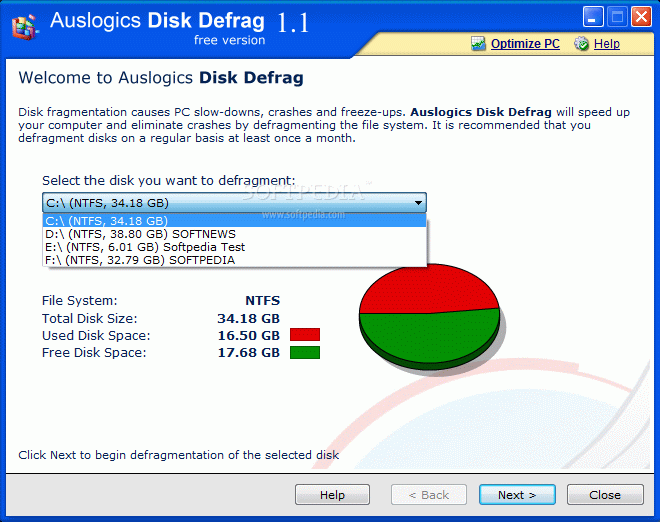
easy for you to handle the application. The first screen allows you to choose the drive you want to defragment. As soon as the selection is made the software will display additional information on the partition. Thus you can learn about the file system type, total disk size, used and free space available. To make it more comfortable for you a graphic is displayed showing the used and free disk space.
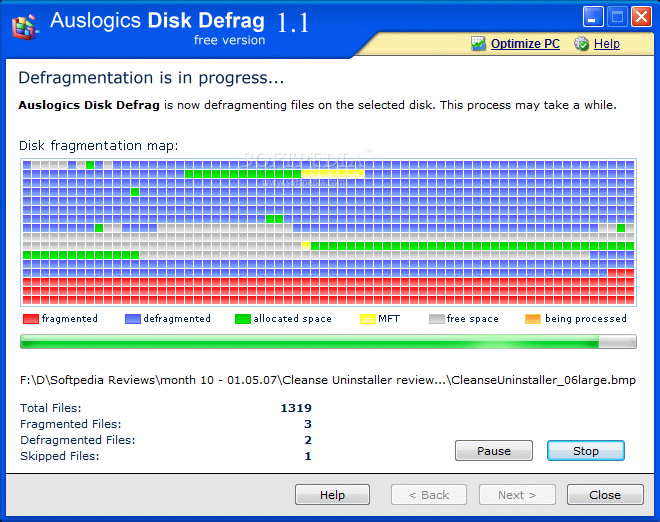
Hitting Next button takes you directly to file compacting process. You will be able to see how the application does its job and if your eye is quick enough you will be able to catch a glimpse at the files that are being processed. The legend at the bottom of the defragmenting window explains plain and simple what are those little colored squares above and their color codes.

The image shows you the files that are still fragmented, the already compacted ones, the allocated space, the free space and the files that are being processed. The operation can be stopped or paused at any time. These options can come in quite handy considering that about half the CPU power is used during the activity.

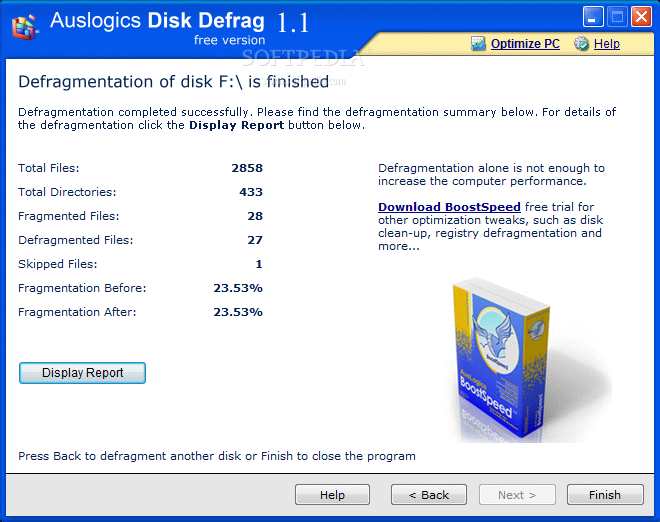
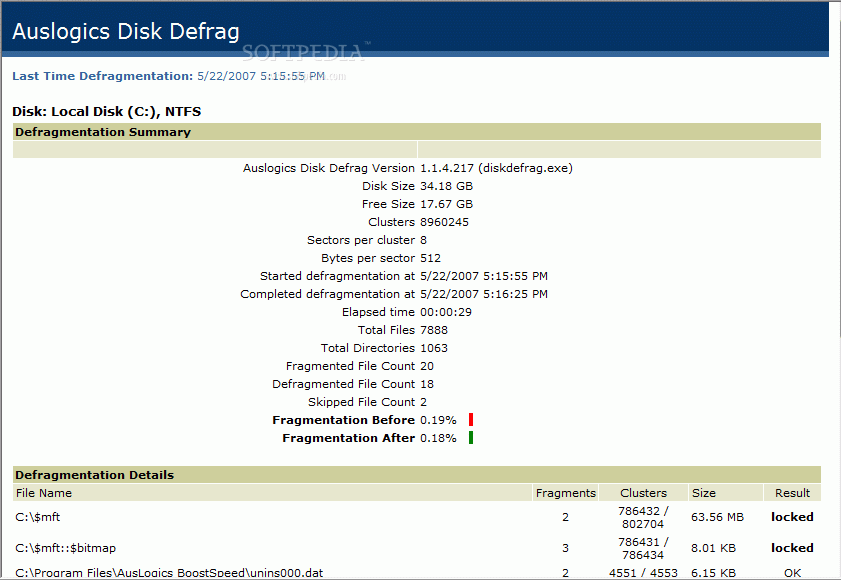
As soon as the process is complete you will be displayed a brief report of the activity (numbers of files skipped, the fragmentation level before and after, the number of files that have been defragmented etc.). For a more detailed study, you can click "Display Report" button in the lower left hand side of the screen. This is displayed in your web browser and apart from the information of the brief in the previous screen it contains defragmentation details (the list of defragmented files).

In order to compact the files on another disk you will have to press Back button or press Finish and restart the application.

As you can see the program has no advanced options and there is no analysis of the drive prior to the defragmentation process. There are no "set it and forget it" options available and the operations are on manual control. But despite these mischiefs the software does quite a good job and it is highly stable. There is no hassle while working with it and the procedure is pretty fast. In the end you will have an overall look at the before and after state of the disk.


The Good

AusLogics Disk Defrag is absolutely free and the three steps wizard makes it extremely easy to handle. The operation is fast and comprehensive enough to make the results visible in the read/write access time.

The Bad

If you are running it on Vista, the interface may look a bit out of place as it preserves the XP looks. Despite its simplicity in features and options, some users may feel the need to an automatic defragmentation when the system is idle.

The Truth

Simple, reliable and quite fast in actions. The number of skipped files was low, two on the system drive and one on each of the other partitions. Give it a try as it is a good free alternative.

Here are some snapshots of the application in action:
Review image
Review image
Review image
Review image

MORE RELATED ARTICLES: PerfectDisk - The Perfect Solution for A Perfectly Healthy Hard drive Powerful and Easy File Defragmentation Is Waiting Next Door Defrag Away Slow Paging...Not Anymore Defraging and Optimizing Mind Your Defrag Soft


Editor's ratings:
User Interface:   Features:   Ease of Use:   Price/Value:   OVERALL:


22nd May 2007, 15:53 GMT | Copyright (c) 2007 Softpedia | Contact:

Read by 8,463 user(s) | Add comment | Link to this news
Subscribe to news | Print article | Send to friend
TODAY'S HEADLINES: GameJackal Pro Review  Records Master Review  StoryMill Review  Crypt4Free Review  EnvyNG Review  Speed Launch Review  Defraggler Review  Nikon Capture NX Review  StorURL Review  Click 2 Crop Review  Math Educator Review  SuperDocker Review  
Today's News | Yesterday's News | View News Archive
Search:

Auslogics Disk Defrag 1.4.16.308 - OPINIONS AND REVIEWS Pages: 1

Auslogics Disk Defrag 1.4.13.296
Reviewer: Adanacs

Email me | PM me
Read all my reviews (19)

Date: 2008-03-25, 19:19 GMT
Version: Auslogics Disk Defrag 1.4.13.296
Overall rating: (Very Good)

GUI:    Features:    Ease of use:    Value:    
a very nice defragmentation tool. It does the job pretty good and fast. I like it.
Auslogics Disk Defrag 1.4.12.293
Reviewer: Ean

Date: 2008-03-10, 20:52 GMT
Version: Auslogics Disk Defrag 1.4.12.293
Overall rating: (Excellent)

GUI:    Features:    Ease of use:    Value:    
An excellent tool designed by really smart people. Congratulations Ozzies!
Auslogics Disk Defrag 1.4.11.275
Reviewer: Robert Ward

Date: 2008-02-22, 06:54 GMT
Version: Auslogics Disk Defrag 1.4.11.275
Overall rating: (Excellent)

GUI:    Features:    Ease of use:    Value:    
Instead of just sitting there leaving you wondering whether the defragmenter is broken, frozen, or not responding, the Auslogic program is unique in actually showing you its progress and the name of the file it is currently working on.
Auslogics Disk Defrag 1.1.5.225
Reviewer: Philbee

Email me | PM me
Read all my reviews (2)

Date: 2007-07-31, 14:22 GMT
Version: Auslogics Disk Defrag 1.1.5.225
Overall rating: (Very Good)

GUI:    Features:    Ease of use:    Value:    
very fast, easy to use defrag program. easy to install and uninstall. i'm a biog fan of auslogic's products. they make excellent freeware.
Auslogics Disk Defrag 1.1.4.217
Reviewer: dacohenz

Email me | PM me
Read all my reviews (2)

Date: 2007-06-03, 21:08 GMT
Version: Auslogics Disk Defrag 1.1.4.217
Overall rating: (Excellent)

GUI:    Features:    Ease of use:    Value:    
This software is a lot faster than XP's defrag, and does as good a job in my opinion. Speed is important where I work, I don't have time to wait for XP's defrag to run. This software is free and does a great job.

Dave
http://www.davescomputerserv.com

go to top Pages: 1


SHARE YOUR OPINION ABOUT Auslogics Disk Defrag 1.4.16.308

Since you are not logged on, your comments will have to be approved before being displayed.
Click here to login, or register.
Your Name:
Your Email: (will not be published anywhere)
Type in the result:
GUI (Graphical User Interface): Poor   Fair   Good   Very Good   Excellent  
Features: Poor   Fair   Good   Very Good   Excellent  
Ease of use: Poor   Fair   Good   Very Good   Excellent  
Price/Value: Poor   Fair   Good   Very Good   Excellent  
Overall rating: Poor   Fair   Good   Very Good   Excellent  
Your review/opinion:


DO YOU WANT TO CONTACT US?  

If you have some comments or you want to send us some information you can send us an email directly to .
You can use the form below for the same purpose.
Your full name: (at least 3 characters)
Your email address: (at least 5 characters)
Message subject: (at least 5 characters)
Message text:
(at least 10 characters)
Type in the result:


Welcome!
Hello, Guest

Login if you have a Softpedia.com account.

Otherwise, register for one.

Main categories:
  • Antivirus
  • Compression tools
  • CD/DVD Tools
  • Office tools
  • Programming
  • Authoring tools
  • File managers
  • Desktop Enhancements
  • Internet
  • Network Tools
  • IPOD TOOLS
  • Mobile Phone Tools
  • Multimedia
  • Tweak
  • System
  • Security
  • Others
  • Science / CAD
  • UNIX
  • Windows Widgets
  • PORTABLE SOFTWARE

  • Week's best:
  • Vista Sidebar 2.5 Bu...
  • FlashGet 2.11.0.1188...
  • Opera 9.52 Build 101...
  • DVDFab Platinum 5.0....
  • Vuze (formely Azureu...
  • The Bat! Professiona...
  • AVG Anti-Virus plus ...
  • Acronis True Image H...
  • Rising Antivirus Fre...
  • DirectX Redistributa...
  • Adobe Flash Player 1...
  • Nero 8 8.3.6.0
  • FileZilla 3.1.1.1
  • AVG Internet Securit...
  • Microsoft Malicious ...
  • Maxthon 2.1.3.2430 F...
  • BitComet 1.04 Beta
  • Deluge 0.9.06 (1.0....
  • Pidgin (formerly Gai...
  • ATi Multimedia Cente...
  • K-Lite Codec Pack Fu...
  • Mozilla Thunderbird ...
  • Corel DVD MovieFacto...
  • Portable Winamp 5.35
  • VirtualDub 1.8.5 Bui...
  • Winamp 5 Full 5.541 ...
  • FFDShow MPEG-4 Video...
  • Hide IP Platinum 1.2...
  • GX::Transcoder 5.0.2...
  • TopSpyAdware Remover
  • © 2001 - 2008 Softpedia. All rights reserved.
    Softpedia™ and Softpedia™ logo are registered trademarks of SoftNews NET SRL.
    Copyright Information | Privacy Policy | Terms of Use | Contact Softpedia | Update your software | Archive