Softpedia
 

NEWS CATEGORIES:


NEWS ARCHIVE >>
SOFTPEDIA REVIEWS >>
MEET THE EDITORS >>
Home > News > Reviews > Windows software reviews

March 28th, 2008, 14:03 GMT · By Dragos Ichim

Secure Your Folders

SHARE:

Adjust text size:


My-Lockbox by FSPro Labs See editor's ratings     Request a review
Version reviewed: My-Lockbox

My Lockbox is a freeware software application that allows you to password protect whatever file on your computer.


Download My-Lockbox
Features:

The protected folder (lockbox) is hidden from any user and application of your system, including Administrator and System itself.
It is impossible to access the lockbox locally or remotely.
The program is extremely easy to use.
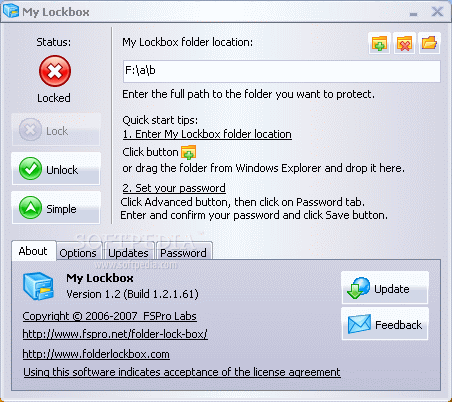
My Lockbox Control Panel allows you easily change basic lockbox parameters: lockbox location, protection status, password.

My Lockbox 1.2
Enlarge picture
Being constantly worried about others snooping into my files, the idea of finding protective software crossed my mind one day. Searching within privacy and security tags, a simple application caught my attention. Protecting a single computer folder with a password, My Lockbox is described to be an easy-to-use program, so I said to myself that I had to give it a try.

After installing the application, a system reboot is necessary for the new changes to take effect. A case-sensitive password accompanied by a hint needs to be defined during the setup procedure as that is the countersign which will allow you the unlocking of the protected
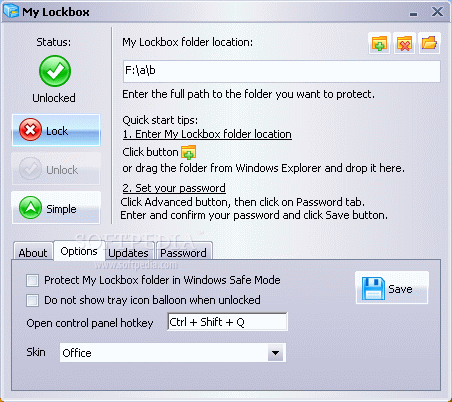
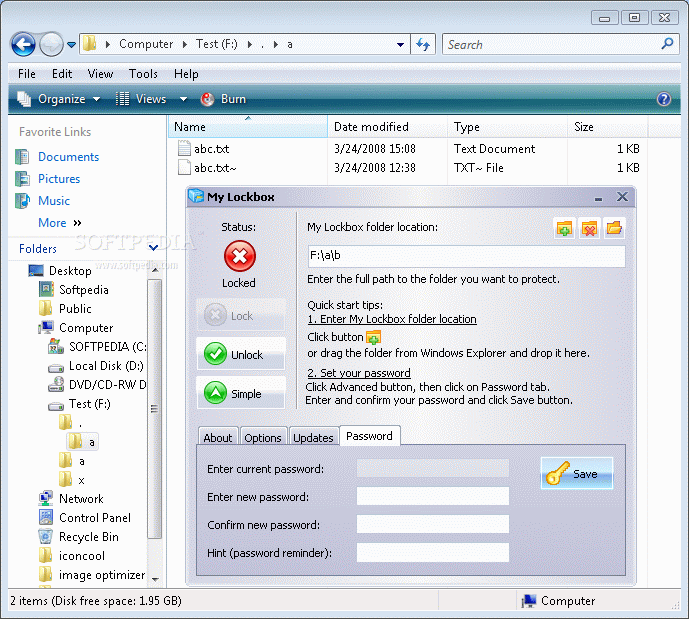
folder. Context menu is not added for this program, but you can always modify the folder you want to hide by dragging and dropping it onto the software's main window, or by browsing for it. The folder's locked/unlocked state is also shown in here. What is left for you to do is to press the lock button and the directory and all its contents will vanish from your hard-drive. Indeed, it can't get any easier than this.

A simple keyboard combination will bring the application's control panel onto your desktop. The interface has a nice design and you have the possibility to choose 1 of the 5 skins from its Option tab. From this menu you can protect the Lockbox folder in Windows Safe Mode, a very useful feature in case somebody wants to log in with system administrator privileges. Accessed locally or remotely, your password protected folder will be invisible for the human eye and nobody except the countersign's owner will get inside it.

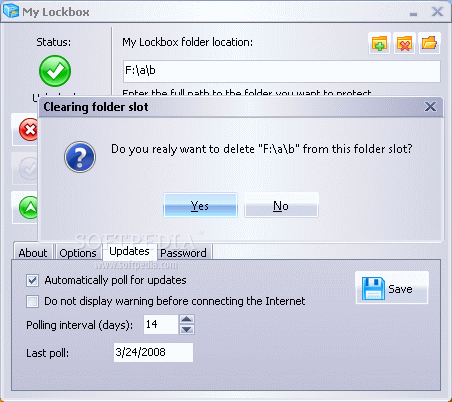
As it is a free program, the Updates tab can check regularly for improvements at the time interval you can set up manually. If the time interval hasn't reached the limit but you heard there was a new version available, you can always look for it by pressing the Update button.

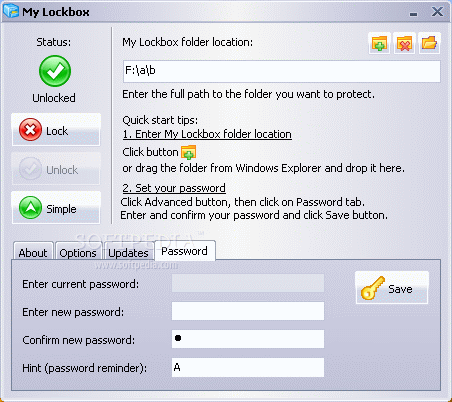
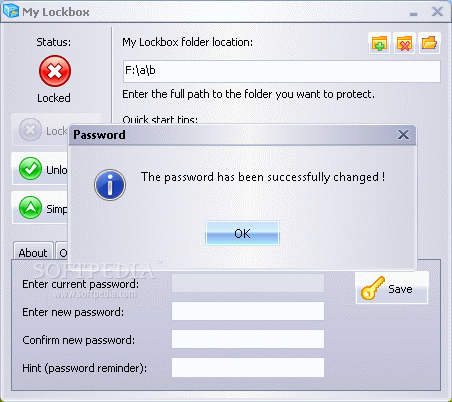
In case the password you set initially doesn't appear suitable anymore, this can be changed, as well as the hint accompanying it. To accomplish this, entering the old password is required. After every operation you make, don't forget to hit the Save button to memorize all the changes you have chosen.

Basically, My Lockbox Control Panel allows you to change the lockbox parameters, such as location, the protection status and the password. About the last one, a small problem arises: if you forget the password you set and the hint doesn't give you any clue, this program can become your worst nightmare because there is no "traditional" way to get in the folder you have protected. Running MS DOS, Safe Mode or logging in as system administrator will bring you to no good. Command prompt will tell you there isn't any folder if you are trying to change directory to the one you have hidden and Windows Explorer will do the same. Even when you will uninstall the software, the folder will still remain hidden if you don't provide the right password. On re-installation, the same hint will appear and the password you have to type must be the one you have forgotten. Pretty inconvenient, if you can't remember it.

If you don't have any idea on how to get your files back in case you lost the password, I found a solution you could use. Because the program is not encrypting the folder but hides it, a good way of bypassing the protection is booting from a Linux distro. During our testing, we've used Ubuntu 7.10 with great success. Even if the folder was securely hidden under Windows, in this distribution it was perfectly visible.

The Assistance menu is not available, but in this case it is quite useless, as the application does not have a lot of features and it mainly does one thing: hides a specific folder within a couple of clicks. If you have any questions, the software's publisher can be contacted by writing an email to one of its addresses or by completing a Contact Us web form. In either way, if you forget the password you set up, it is not going to be able to provide it as there isn't any password recovery feature integrated in the program.

With all this being said, My Lockbox turns out to be some very handy software. Unless you want your files to be moved from one partition to another or to be securely encrypted, the program helps you hide files or directories from your volume under a single password protected folder name. Careful with the hint because you don't want to lose the password, as the developer does not provide any recovery method.


The Good

Easy-to-use application with a skin customized interface. It hides the chosen folder and if you are not an "authorized" user, you can't find out what it contains even if you access it remotely. Logging in as System Administrator or running the Safe mode will not bypass the Lockbox folder's protection. Although a context menu is not available, you can always Drag&Drop the destination folder (or just browse for it). The program's Control Panel pops-out with simple keystrokes which can be customized anytime to suit your needs.

The Bad

Only one folder can be hidden, pretty inconvenient unless you want to change all the hard drive tree structure. In the Lockbox folder location, the text-box area gives you the impression you can type in it. It doesn't refresh the folders structure immediately. A new attempt to get in the Lockbox folder will display a "." (it is a dot) folder full with the files and folders outside the hidden directory. And remember not to lose the password you set up. Password recovery is unavailable and there is no warning about this.

The Truth

Unless you want a program to encrypt your files and folders with a password-key, My Lockbox seems to be a very good alternative. It doesn't take long to learn how to use it and it can bring long-term benefits. Other than this, you are more than free to have a go with it as it is a freebie. You might want to keep the password you set safe, because once you've lost it, there is no feature provided by the program to retrieve it.


Here are some snapshots of the application in action:


Review image

Review image

Review image

Review image

Review image

Review image


EDITOR'S RATINGS:

User Interface: (4/5)
Features: (3/5)
Ease of use: (5/5)
Pricing/Value: (3/5)
Overall: (4/5)
  Final verdict: Very good   100% Clean Certified

TELL US WHAT YOU THINK:

14,850 hits · 14 comments · Link to this article · Print article · Send to friend · Subscribe to news

MUST-READ RELATED ARTICLES:


Easy Process Hiding

Free Folder Hiding

Hidden Folders

Drive Access Restriction

READER COMMENTS:


Comment #1 by: ted on 20 Nov 2008, 20:34 UTC reply to this comment

Pro: If you need simplicity, this is it for free.
Con: If you need encryption, look elsewhere.
Comment: The software allows you to assign a password to a single folder, and when locked the folder disappears from the display. The folder can have multiple files and subfolders. To open the folder, click on the “My Lockbox” icon, which brings up a password request. The software can be loaded onto any number of external drives, to password protect one folder in each drive, as long as all folders to be protected have the same name, and as long as your computer recognizes all drives in the same way, e.g., as drive “E.” Do not put the software’s executable file into the password protected file. When you lock the file, it disappears. To open the file, you’ll have to re-download the software to the same drive.


Comment #2 by: Someone who needs HELP!!! on 08 Dec 2008, 15:04 UTC reply to this comment

OK so what if i installed My lockbox into the folder Ive hidden i cant use the shortcut key and it wont open regardless so is there any way to retrieve my files??

Comment #2.1 by: Jim on 05 May 2009, 14:02 GMT

I've got the same prob, did anyone reply/did you solve it?


Comment #3 by: mandy on 06 Jul 2009, 16:27 UTC reply to this comment

i hv this lock box installed in my PC since May 2008. But i forgot the password son after giving a complex hint to it. I cant find any way to recollect my forgotten password. When i tried to uninstall it, i could not do that also as it asked for password again. As another alternative when i tried to download and install the latest version of it, I could not do that also as it also demanded to uninstall the earlier version first.
At the End, I am unable to use Lockbox.
ANY HELP??????

Comment #3.1 by: dhruv Patel on 11 Sep 2009, 17:38 GMT

i have a similar problem, i know the password but its not taking it. it worked fine for a week but now its not responding. need help i have important file stored away and i need to retrieve it.

Comment #3.2 by: stevens on 10 Apr 2010, 05:19 GMT

Boot in safe mode log in as administrator. Remove lock bot, your file will back to its original place :)

Comment #3.3 by: sajid on 01 Aug 2010, 20:11 GMT

I had the same prob. for many months. i had forgotten the pasword. but i finally found the solution. i downloaded a new mylockbox program from the internet and installed it. then when it asked me which folder i wanted to protect, i looked into the list and i could see that same folder that i had locked with the previous my lockbox program. i selected that same folder again and clicked on 'ok'.
problem solved!! if this trick has worked be sure to tell this to others who r having this same problem with mylockbox as their important folders have dissappeared too. they need ur help.
After you get your data from your folder you can unistall this stupid program safely . Also- when you will assign a password for the newly installed mylockbox, you can enter the password as your hint question also so that even if u forget ur password you can simply look at the hint question.


Comment #4 by: Rui Real on 28 Nov 2009, 17:24 UTC reply to this comment

Hello, reading this i have to say that i use my lockbox for sometime and actually is a great program I had a problem with vista and i couldnt load windows normally just could use the MSDos prompt. But my folder was hidden and i couldnt retreive the info inside. I have a bootable CD that has a little imagem of Windows XP so i boot through that disk, and "voilá" i the windows explorer i could see the folder and retrieve all the data inside. no password, no hardwork. I don't know if i can say the name of the CD in here, but the interested can send me an e-mail and i tell wich one is and where to get it. Well it's the same that is listed in here, but they used ubuntu, i only had XP.


Comment #5 by: ilriver on 13 Jan 2010, 05:03 UTC reply to this comment

I don't remember my password for My lockbock. Plesea help me?


Comment #6 by: Anand on 13 Feb 2010, 15:09 UTC reply to this comment

same in my case

ANYONE PLEASE HELP

My full computer data is in that folder :-(

Comment #6.1 by: buzzy on 26 Nov 2011, 15:00 GMT

same dl pupy linux.iso and burn it on cd and start your pc tha os and get back your all stuff on hdd simple just like 123.......... :)

Comment #6.2 by: meow on 12 Feb 2012, 12:48 GMT

haha.., come on dude.., that's so stupid.., hehe..,


Comment #7 by: kiran on 27 Feb 2010, 10:42 UTC reply to this comment

Hi.

I installed mylockbox on my machine (windows vista). i locked a folder but the mylockbox got installed automatically.
I tried installing again to recover it. But i could not get my locked folder. Can anyone guide me with this. I am really getting no way to do it.

Regards

Kiran


Comment #8 by: SONU on 30 Nov 2011, 06:43 UTC reply to this comment

AFTER UNINSTALLING LOCK FOLDER CAN E SEE OUR HIDDEN FOLDER

Copyright © 2001-2012 Softpedia. Contact/Tip us at

WindowsGamesDriversMacLinuxScriptsMobileHandheldNews

SUBMIT PROGRAM   |   ADVERTISE   |   GET HELP   |   SEND US FEEDBACK   |   RSS FEEDS   |   UPDATE YOUR SOFTWARE   |   ROMANIAN FORUM