Search Perform an advanced search query SOFTPEDIA
 
SOFTPEDIA
Updated one minute ago
HomeSubmit a program for being reviewedAdvertise on our websiteGet help on surfing our websitesSend us your feedbackGet information about our XML/RSS backend and how to use itBrowse the news archiveVisit our discussion forumVizitati forumul in limba romana


Review Finder NormalFreeware onlyShareware only

Easy Firewall Protection
Category: SOFTPEDIA REVIEWS :: Windows

A firewall kids could use
By: Ionut Ilascu, Editor, Software Reviews

PC Tools Firewall Plus by PC Tools Add Your Rating   See Editor's Ratings
Version reviewed: 1.0.0.9

PC Tools applications are trusted and used by millions of users everyday to protect their business and home systems against online threats.

Some features:

Protects your PC as you are working, surfing and playing.
Intelligent automatic protection without all the questions.
Easy to use. Designed for both, novice and expert users.
Advanced rules to protect your PC against common attacks.

DOWNLOAD PROGRAM    REQUEST A REVIEW

Firewalls come in different shapes and different colors. Every firewall utility comes equipped with its own options and features. Some of them offer real protection and are difficult to harness as the intricacies of the settings and options are so tangled that a headache could be all a newbie can get.

Nothing good comes cheap in this century and protecting your computer's connections to the Internet and vice versa is not an easy task if you do not know what to do, what to set and how to set it. The best protection combination I could find up to now is installing an anti virus software, a firewall and WindowZone.

Firewall Plus is designed to be used by the moderate and beginner level computer user. It is actually a good start for learning a little about the settings of a firewall and how it should protect you from all the exterior attacks. It is developed by PC Tools, the author of Spyware Doctor, a highly awarded anti-spyware tool.

Firewall Plus comes free and all you need to do is register on the developer's website and you will receive the free license and the username.

The interface is pleasant enough and clean. There is nothing you cannot configure in here and all your work should be really easy. In a few minutes, you can finish establishing all the necessary rules designed to protect you from external attacks.

The options aligned vertically in the left side of the application window allow easy access to all the options included in the software. If you have any application that requires an Internet connection, the first time you open the application, you will be notified that the program is attempting to go online and your decision is necessary. You can either allow the access or block it.

The bad part is that once you have allowed or blocked an application’s access outside your computer, you will not be prompted again when it will use different ports than the regular ones. You cannot set a port for that application to communicate online and be prompted if/when a different "door" is used.

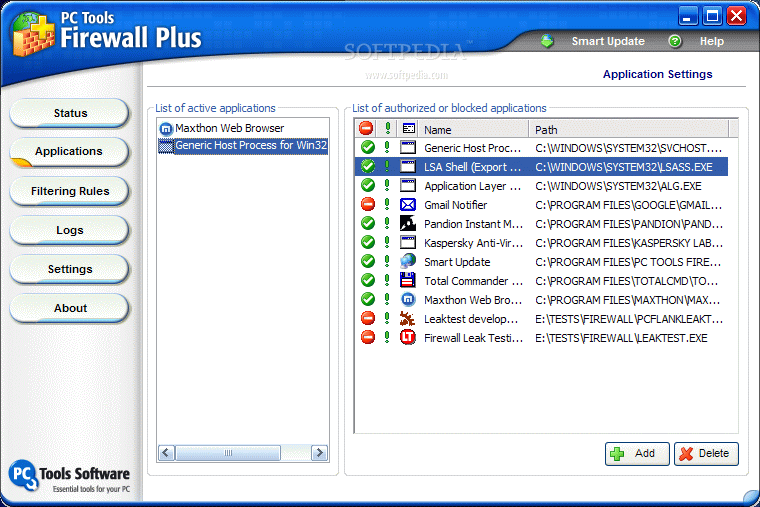
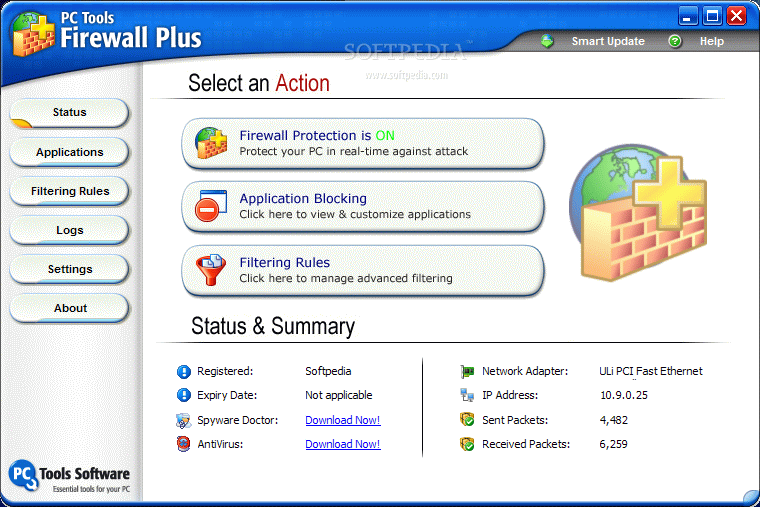
The status window of the application displays the state of the firewall ("on" or "off"), the number of sent and received packets to and from the Internet. Applications window shows the user the active programs that are connected to the Internet – web browsers, FTP clients, messaging applications. In the right pane, there is the list of the applications that are blocked or authorized.

You can add as many programs as you want in here and
change their status by simply clicking the red/green dot. The green exclamation mark is showing you the logging settings: one mark means that each block event is logged, two marks means that each block and allow event is logged and a simple dot means that there will be no logging for that application.

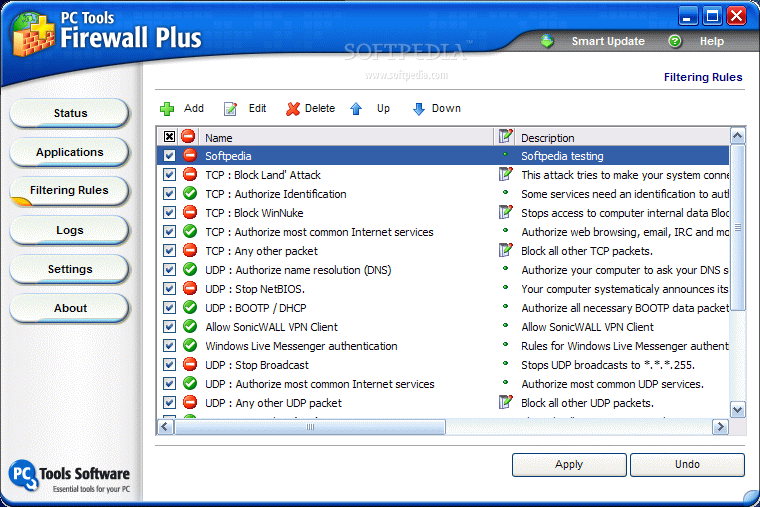
A set of filters is already available in the application, but if you are not content with the default settings, feel free to edit the rules, delete them or add some of your own. By simply checking the box, you enable those rules and the firewall will act accordingly.

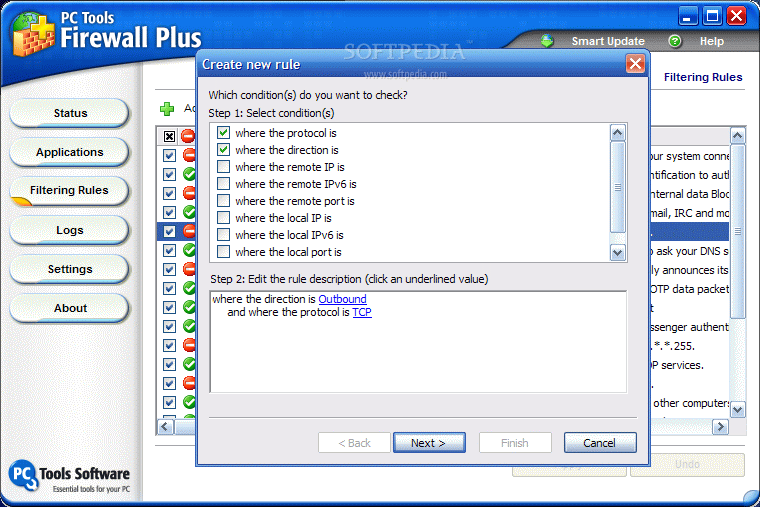
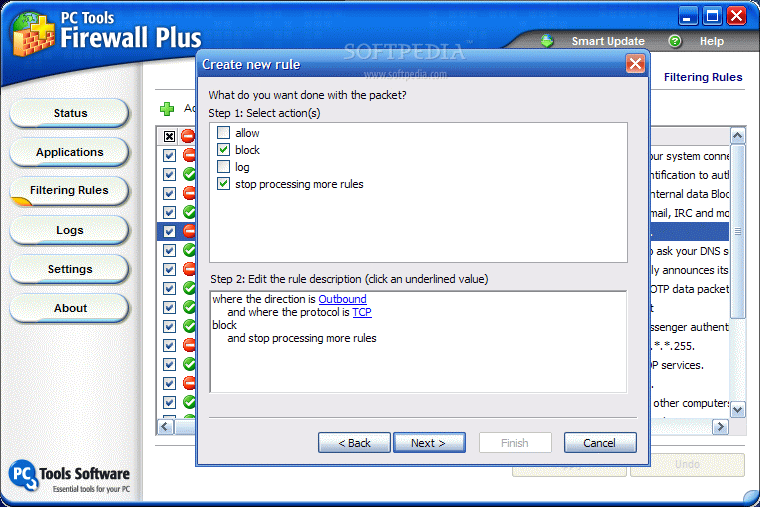
In order to create a new rule, you will have to select the conditions (protocol type, direction, remote/local IP, remote/local port, ethernet type), define them (click the underlined value and select the desired option). Then you have to choose the action concerning the packet: allow, block or log. Choosing either "allow" or "block" will automatically check the "stop processing more rules". Towards the finish of rule creating operation, you get to name it, add a brief description and make it active or not.

The flexibility of the application allows the user to undo an action. Rules can go up the scale or go down, depending on how used do you think it is. Also, if you wish to change something in one of the rules you can immediately edit it. It is recommended to have as few and pervasive rules as possible. They are easier to handle.

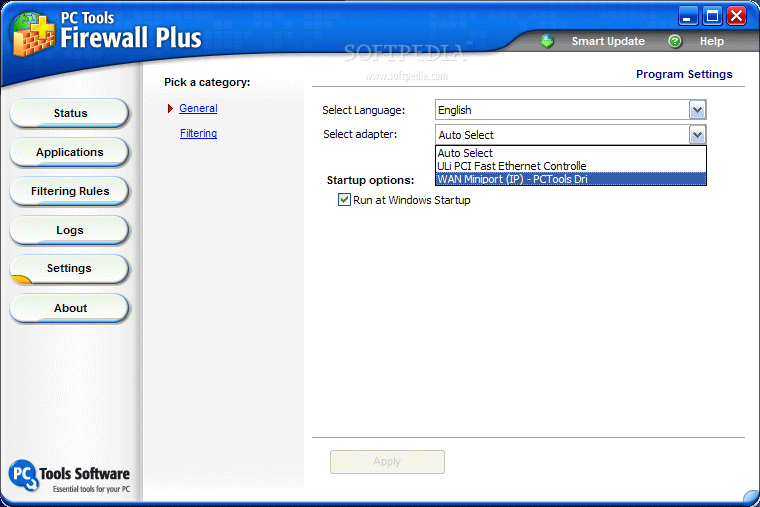
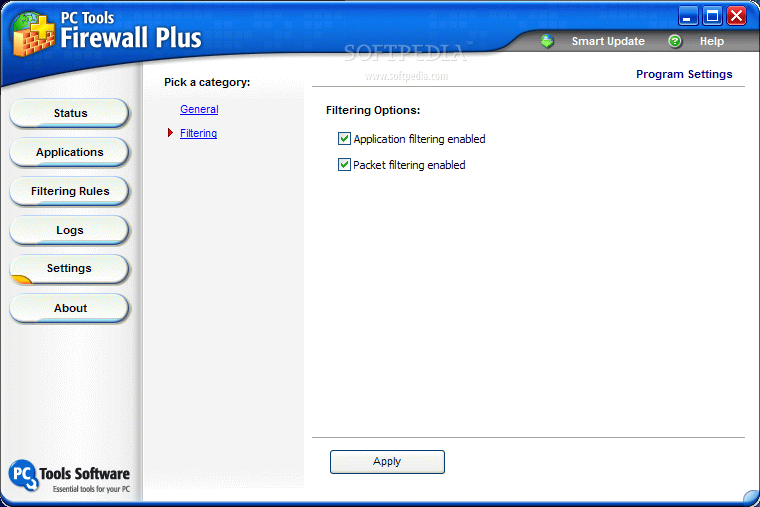
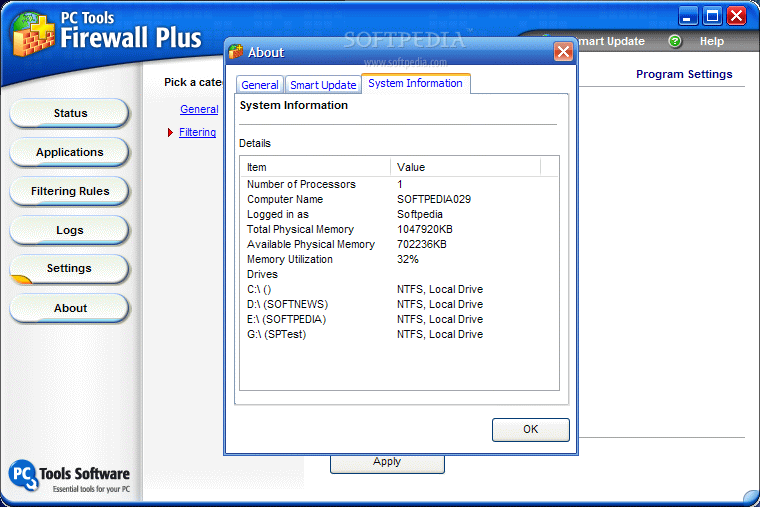
When reaching the Settings window, I was expecting to be overwhelmed with options, but the only modifications you can do in here is selecting the adapter and configuring the program to start at Windows. In the Filtering area, you only get to enable/disable the application and packet filtering.

The Good

Firewall Plus is a good application to start learning about the protection provided by firewalls. It does not have complicated options and even a kid can configure it. The program will offer some sort of protection and common attacks will be blocked.

The Bad

Well, the protection provided is not that foolproof and there still are some leaks even if enabled. But one of the main disadvantages is that you cannot force the applications to use, only the regular ports and in case another door is opened, you will not even know it (and your computer may catch a cold from the drought).

The Truth

From what I saw, the application is designed for newbies that want to say to their friends they are behind a firewall, but experienced users will soon realize that this is not a too reliable firewall. However, beginners can start their incursion into the world of firewall protection and learn new information.

In the end, let’s just say it can only get better.

Here are some snapshots of the application in action:
Review image
Review image
Review image
Review image
Review image
Review image
Review image
Review image
Review image
Review image


Editor's ratings:
User Interface:   Features:   Ease of Use:   Price/Value:   OVERALL:


19th January 2007, 16:04 GMT | Copyright (c) 2007 Softpedia | Contact:

Read by 10,631 user(s) | Add comment | Link to this news
Subscribe to news | Print article | Send to friend
TODAY'S HEADLINES: GameJackal Pro Review  Records Master Review  StoryMill Review  Crypt4Free Review  EnvyNG Review  Speed Launch Review  Defraggler Review  Nikon Capture NX Review  StorURL Review  Click 2 Crop Review  Math Educator Review  SuperDocker Review  
Today's News | Yesterday's News | View News Archive
Search:

PC Tools Firewall Plus 4.0.0.45 - OPINIONS AND REVIEWS Pages: 1

PC Tools Firewall Plus 3.0.1.14
Reviewer: I Love Vista

Date: 2008-05-08, 21:29 GMT
Version: PC Tools Firewall Plus 3.0.1.14
Overall rating: (Poor)

GUI:    Features:    Ease of use:    Value:    
Terrible software - couldn´t connect, and simply opening Internet Explorer crashed the computer. This software simply does not work on Windows Vista. My computer is wonderfully stable on Vista, never crashed before. If you have the stomach to try this, be sure to create a System Restore point, as the software does not create one on its own.
PC Tools Firewall Plus 3.0.1.14
Reviewer: Bartez

Email me | PM me
Read all my reviews (17)

Date: 2008-05-03, 13:16 GMT
Version: PC Tools Firewall Plus 3.0.1.14
Overall rating: (Very Good)

GUI:    Features:    Ease of use:    Value:    
First of all: although protection level of this firewall is quite good, don't expect marvelous scores at firewall test sites such as Moustec Firewall Challenge:

Reason for this is simple: PC Tools Firewall is..... Firewall, not HIPS application (isn't that strange that HIPS application without any real firewall component such as ProSecurity is considered one of best firewalls? ;) ).

Reason to choose this app? Application come translated to many languages, has very intuitive user interface, possibility of enabling advanced futures for advanced users or working in simple mode when needed (your parents will love you for that: easy to use firewall in there language ;) ).

I advice that you enable expert mode when installing, and then enable all options in Settings → Filtering including code injection prevention, stealth mode etc. to get maximum protection.

IMO it's the one of the best (if not the best) firewalls on market. It's because it combine most impotent things in everyday firewall handling: easiness of use and protection. Don't get me wrong: Comodo or Online Armor are better firewalls in security aspect, but they are fail badly in their usability aspect, they often interferer with games, display 1000 of pop-up boxes asking you about things you shouldn't be asked (ex. "Application X is trying to modify {2343-3445i-nf84n92-wm48fu-43454v} registry key,, would you allow it ?")

Anyway... i recently tested all major firewalls on market (free ones), and cannot stop walking back to PC Tools Firewall. Combined with other PC Tools free product: Threatfire (behavioral antivirus) it provides you with security level needed.
PC Tools Firewall Plus 3.0.1.14
Reviewer: M a t t L e e

Email me | PM me
Read all my reviews (127)

Date: 2008-04-09, 11:15 GMT
Version: PC Tools Firewall Plus 3.0.1.14
Overall rating: (Good)

GUI:    Features:    Ease of use:    Value:    
if youre running vista sp1, you dont have much of a selection.

comodo is vista compatible but doesnt do well with sp1 yet. it and pctools firewall are the only free firewalls compatible with vista atm that are on the matousec firewall leak test report. so until others become vista sp1 compatible, this is all you have atm.
PC Tools Firewall Plus 3.0.0.60
Reviewer: Mr_D

Date: 2008-02-08, 08:03 GMT
Version: PC Tools Firewall Plus 3.0.0.60
Overall rating: (Very Good)

GUI:    Features:    Ease of use:    Value:    
Quite a nice firewall. Very effective and easy to use.

Most functions for Windows 2000, and XP are fully automatic.
It can be set to regular mode or to be very watchful and do full application checking where it checks version info on files and if something changes, (like you update your browser to a new version) it will notice the change and alert you that it's not the same copy that you were running before. So, a trojan would have a hard time getting through this firewall since it even watches known files for internal changes.

It watches inbound and outbound traffic and can do full application and memory checking. This is new to me, it basically watches for programs injecting code (or new data) into other programs.

I've used 8 Firewalls in the last 5 years and this one runs better than most with no issues and low memory use,

BUT.....
I uninstalled it because I really don't like that it accesses the hard drive 3 times per second 24 hours a day. I observed this by using Sys Internals FileMon program. I asked about this issue on their forum but didn't get an answer. IF they fix the drive access issue then I'll use it.

go to top Pages: 1


SHARE YOUR OPINION ABOUT PC Tools Firewall Plus 4.0.0.45

Since you are not logged on, your comments will have to be approved before being displayed.
Click here to login, or register.
Your Name:
Your Email: (will not be published anywhere)
Type in the result:
GUI (Graphical User Interface): Poor   Fair   Good   Very Good   Excellent  
Features: Poor   Fair   Good   Very Good   Excellent  
Ease of use: Poor   Fair   Good   Very Good   Excellent  
Price/Value: Poor   Fair   Good   Very Good   Excellent  
Overall rating: Poor   Fair   Good   Very Good   Excellent  
Your review/opinion:


DO YOU WANT TO CONTACT US?  

If you have some comments or you want to send us some information you can send us an email directly to .
You can use the form below for the same purpose.
Your full name: (at least 3 characters)
Your email address: (at least 5 characters)
Message subject: (at least 5 characters)
Message text:
(at least 10 characters)
Type in the result:


Welcome!
Hello, Guest

Login if you have a Softpedia.com account.

Otherwise, register for one.

Main categories:
  • Antivirus
  • Compression tools
  • CD/DVD Tools
  • Office tools
  • Programming
  • Authoring tools
  • File managers
  • Desktop Enhancements
  • Internet
  • Network Tools
  • IPOD TOOLS
  • Mobile Phone Tools
  • Multimedia
  • Tweak
  • System
  • Security
  • Others
  • Science / CAD
  • UNIX
  • Windows Widgets
  • PORTABLE SOFTWARE

  • Week's best:
  • Vista Sidebar 2.5 Bu...
  • FlashGet 2.11.0.1188...
  • Opera 9.52 Build 101...
  • DVDFab Platinum 5.0....
  • Vuze (formely Azureu...
  • The Bat! Professiona...
  • AVG Anti-Virus plus ...
  • Acronis True Image H...
  • Rising Antivirus Fre...
  • DirectX Redistributa...
  • Adobe Flash Player 1...
  • Nero 8 8.3.6.0
  • FileZilla 3.1.1.1
  • AVG Internet Securit...
  • Microsoft Malicious ...
  • Maxthon 2.1.3.2430 F...
  • BitComet 1.04 Beta
  • Deluge 0.9.06 (1.0....
  • Pidgin (formerly Gai...
  • ATi Multimedia Cente...
  • K-Lite Codec Pack Fu...
  • Mozilla Thunderbird ...
  • Corel DVD MovieFacto...
  • Portable Winamp 5.35
  • VirtualDub 1.8.5 Bui...
  • Winamp 5 Full 5.541 ...
  • FFDShow MPEG-4 Video...
  • Hide IP Platinum 1.2...
  • GX::Transcoder 5.0.2...
  • TopSpyAdware Remover
  • © 2001 - 2008 Softpedia. All rights reserved.
    Softpedia™ and Softpedia™ logo are registered trademarks of SoftNews NET SRL.
    Copyright Information | Privacy Policy | Terms of Use | Contact Softpedia | Update your software | Archive