
A tool that removes W32/Apribot-C. #Virus protection #Trojan remover #Malware cleaner #W32/Apribot-C #Remove #Remover
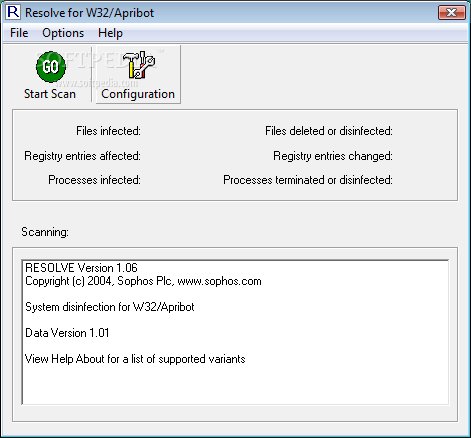
Resolve is the name for a set of small, downloadable Sophos utilities designed to remove and undo the changes made by certain viruses, Trojans and worms.
They terminate any virus processes and reset any registry keys that the virus changed. Existing infections can be cleaned up quickly and easily, both on individual workstations and over networks with large numbers of computers.
W32/Apribot-C is an IRC backdoor with spreading capability.
Each time the worm is run it tries to connect to a remote IRC server and join a specific channel. The backdoor component then runs in the background as a server process, listening for commands to execute. The infected computer can be used to perform several functions: W32/Apribot-C is an IRC backdoor with spreading capability.
Each time the worm is run it tries to connect to a remote IRC server and join a specific channel. The backdoor component then runs in the background as a server process, listening for commands to execute. The infected computer can be used to perform any of the following functions:
Proxy server (SOCKS4) FTP server SMTP server File system Manipulation Port scanner DDoS floods (TCP,UDP,SYN) Remote shell (RLOGIN) Key logger
When first run the worm copies itself to the Windows System folder under a randomly generated name. The copy may have some random data appended to it. In order for the copy to be run on startup, registry entries are created under random names in the following locations:
HKLMSoftwareMicrosoftWindowsCurrentVersionRun HKLMSoftwareMicrosoftWindowsCurrentVersionRunServices HKCUSoftwareMicrosoftWindowsCurrentVersionRun
The worm chooses from one or two of the following strings to form the filename:
SERV DISK STAT LOAD INI SCAN INIT SRV DSK CONF CFG MON DLL VXD CHK REG DRV WIN SYS Stat Load Scan Init Service Disk Config Monitor Check Reg Drive Win System
The following entry is also created: HKLMSOFTWAREMicrosoftWindows NTCurrentVersionWinlogon Shell = "Explorer.exe,[filename] -shell"
Many additional registry entries may be created, changed or deleted. In particular, many entries are created in the following registry locations:
HKCUSoftwareMicrosoftWindowsCurrentVersionPoliciesExplorer DisallowRun HKCUSoftwareMicrosoftWindowsCurrentVersionPoliciesSystem DisableRegistryTools HKLMSOFTWAREMicrosoftConnect
The following entries are set:
HKLMSYSTEMControlSet001ControlLsarestrictanonymous = 1 HKLMSYSTEMCurrentControlSetControlLsarestrictanonymous = 1
W32/Apribot-C may also attempt to disable debugging and firewall software.
The worm appends several lines to the HOSTS file, found in the driversetc subfolder of the Windows System folder. Each line consists of a randomly chosen IP address beginning with "127" and a web address. The worm appends this data in order to prevent access to a number of anti-virus and Microsoft web sites.
W32/Apribot-C can be removed from Windows computers automatically with the following Resolve tools:
APRIBGUI is a disinfector for standalone Windows computers. To use it you have to do the following: ■ Open APRIBGUI.com file from your desktop after downloading it. ■ Click on the Start Scan Button. ■ Wait for the process to complete.
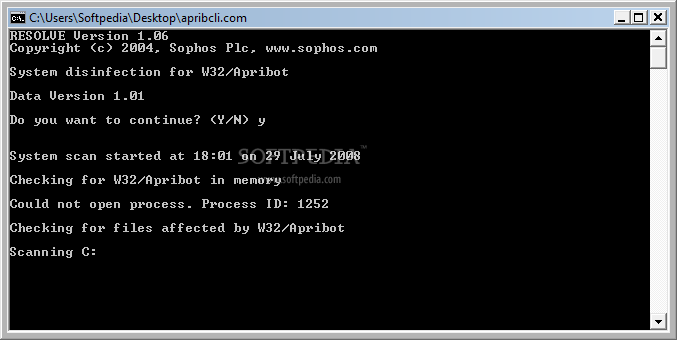
APRIBSFX.EXE is a self-extracting archive containing APRIBCLI, a Resolve command line disinfector for use on Windows networks.
Resolve for W32/Apribot-C 1.06
add to watchlist add to download basket send us an update REPORT- runs on:
- Windows All
- file size:
- 76 KB
- filename:
- apribgui.com
- main category:
- Antivirus
- developer:
- visit homepage
calibre

Windows Sandbox Launcher

Microsoft Teams

IrfanView

Context Menu Manager

7-Zip

ShareX

Zoom Client

4k Video Downloader

Bitdefender Antivirus Free

- Zoom Client
- 4k Video Downloader
- Bitdefender Antivirus Free
- calibre
- Windows Sandbox Launcher
- Microsoft Teams
- IrfanView
- Context Menu Manager
- 7-Zip
- ShareX