
Lightweight and portable application that removes files infected with the W32.Serflog.A worm, that doesn't require user intervention #Removal Tool #Remove infection #Terminate w32 #Removal #Infection #Terminate

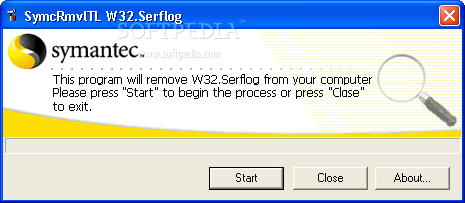
W32.Serflog.A Free Removal Tool is a lightweight and portable application with a pretty self-explanatory name - it eliminates files infected with the W32.Serflog.A worm. It doesn't require user assistance, as it automatically performs the scan-and-removal procedure.
Since installation is not a requirement, you can just drop the executable file anywhere on the disk and click it to run.
There's also the possibility of saving W32.Serflog.A Free Removal Tool to a USB flash drive or similar storage unit, in order to run it on any infected machine, as long as you have administrative privileges.
The interface is based on a regular window with a plain and simple layout, where you can initialize the scanning operation with the simple click of a button. The application deletes the infected files and registry values added by the W32.Serflog.A worm, and fixes the Hosts file.
The tool is very light on the system resources and it takes a reasonable amount of time to finish a scan-and-removal job, depending on the size of your hard drive. No error dialogs have been shown in our tests, and the app dd not hang or crash. Thanks to its intuitive layout and overall simplicity, W32.Serflog.A Free Removal Tool can be handled even by users with no experience in antivirus systems.
W32.Serflog.A Free Removal Tool 1.1.2
add to watchlist add to download basket send us an update REPORT- runs on:
- Windows All
- file size:
- 169 KB
- filename:
- FixSflog.exe
- main category:
- Antivirus
- developer:
- visit homepage
Bitdefender Antivirus Free

4k Video Downloader

Microsoft Teams

7-Zip

ShareX

Context Menu Manager

calibre

Zoom Client

IrfanView

Windows Sandbox Launcher

- Zoom Client
- IrfanView
- Windows Sandbox Launcher
- Bitdefender Antivirus Free
- 4k Video Downloader
- Microsoft Teams
- 7-Zip
- ShareX
- Context Menu Manager
- calibre