
Scan your PC and OS for threats, and clean any found items after booting a storage device containing this powerful application on it. #Rescue Disk #Bootable CD #EScan LiveCD #EScan #Antivirus #LiveCD

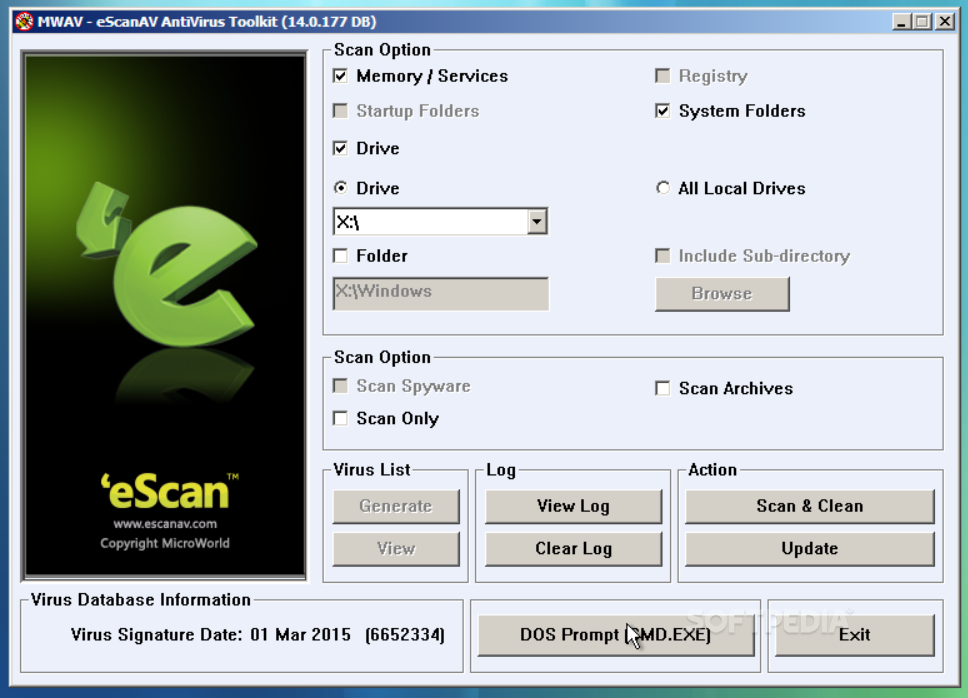
eScan Rescue Disk makes it quite clear what it's all about. It's an application that can only be booted from a storage media device, allowing the user to thoroughly scan one or more machines for potentially dangerous items within the OS. Scanning your PC from such an environment is better, simply because it means that the app will not be forced to skip any areas due to those being in use.
Now, the bootable image comes with a preloaded Windows environment. This means that all commands and functions should look familiar to the user. While in the app menu, one can select what is to be scanned on the machine.
Maybe you have a hunch, or you'd like to double-check a certain area. Check the boxes pertaining to the areas you'd like to inspect. Choose memory, drive, system folders, registry, or startup folders, depending on your final goal. Choose one particular drive if you've got more than one, or the All Local Drives option.
Once you've established your scanning area, proceed to select the type of procedure you'd like to launch. Will you scan for spyware, access scan archives, or conduct a simple, fast scan? This depends on the situation and on what you're after when using this program. Once the scanning procedure is finished, go ahead and generate or view a complete virus or threat list.
Check the log explaining the steps taken by the app until the discovery of a certain threat. Don't forget that every time you need to launch an analysis, the Scan & Clean button needs to be clicked. A CMD terminal is also available for those who need to access more specific actions. The update feature is useful, especially with a growing list of new threats that one might encounter on a daily basis.
eScan Rescue Disk 14.0.177 DB
add to watchlist add to download basket send us an update REPORT- PRICE: Free
- runs on:
- Windows All
- file size:
- 335 MB
- filename:
- escanrd.iso
- main category:
- Antivirus
- developer:
- visit homepage
Microsoft Teams

4k Video Downloader

calibre

IrfanView

Zoom Client

Windows Sandbox Launcher

ShareX

Bitdefender Antivirus Free

Context Menu Manager

7-Zip

- Bitdefender Antivirus Free
- Context Menu Manager
- 7-Zip
- Microsoft Teams
- 4k Video Downloader
- calibre
- IrfanView
- Zoom Client
- Windows Sandbox Launcher
- ShareX