
A tool for converting your Videos to self-running executable files. #Video converter #Create video #Convert video #Converter #Convert #Create

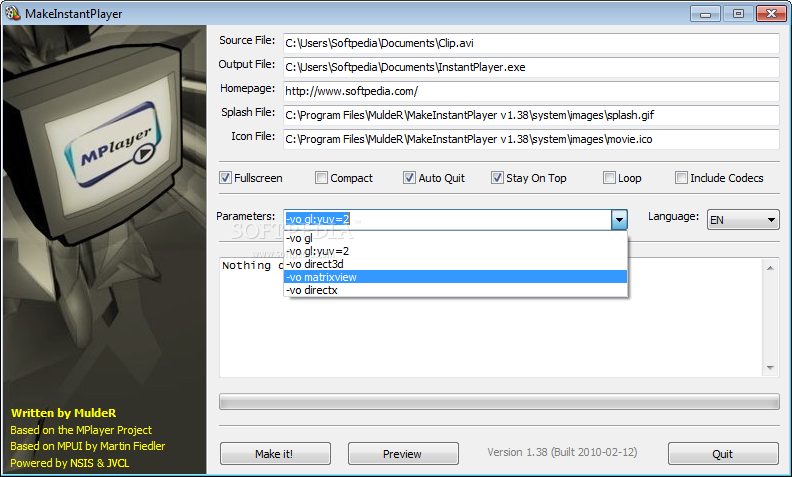
MakeInstantPlayer is a software that allows you to seamlessly convert videos to self-running executable files.
The interface of the program is plain and simple, so there's no way you can get lost here. You can start off by selecting the source video via the file browser.
The "drag and drop" method is not supported, and neither is batch processing.
You can select the output destination and name, change the icon file, select a splash file and write the homepage for the video.
But you can also set the video to full screen mode, enable automatically quit, to stay on top of other application and to loop, as well as include codecs and make it compact.
You can input command-line parameters, select the language, preview the results and finally initiate the conversion process (by pressing the "Make it!" button).
Once the job is done, you can view a log file (e.g. EXE header size, install code and data, total size, saved datablock optimizer).
The program finishes a task in a reasonable amount of time while taking up a low-to-moderate amount of system resources. There is no help file available but that's because MakeInstantPlayer is extremely easy to use.
We haven't come across any problems during our tests and, since MakeInstantPlayer is very easy to handle (even by novices), we strongly recommend it.
Download Hubs
MakeInstantPlayer is part of these download collections: Create Screensavers, Screensaver Makers
MakeInstantPlayer 1.60
add to watchlist add to download basket send us an update REPORT- runs on:
- Windows All
- file size:
- 7.1 MB
- filename:
- MakeInstantPlayer.2011-04-05.exe
- main category:
- Authoring Tools
- developer:
- visit homepage
Bitdefender Antivirus Free

Context Menu Manager

Zoom Client

4k Video Downloader

7-Zip

IrfanView

ShareX

Microsoft Teams

Windows Sandbox Launcher

calibre

- Microsoft Teams
- Windows Sandbox Launcher
- calibre
- Bitdefender Antivirus Free
- Context Menu Manager
- Zoom Client
- 4k Video Downloader
- 7-Zip
- IrfanView
- ShareX