
With PPT to Flash Converter you will be able to convert a PPT file in a single selfrunning Flash presentation. #PPT Converter #PPT to Flash #PPT Conversion #Converter #PPT2Flash #Convert

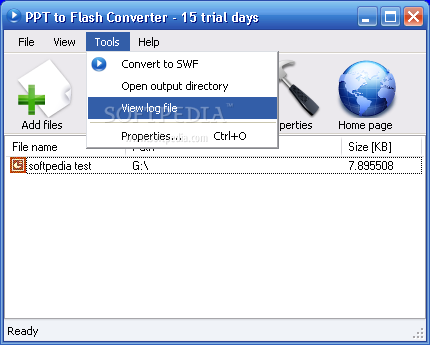
PPT to Flash Converter is an application created to convert Microsoft PowerPoint presentation files to Flash.
There are two different ways to perform a conversion, either by using the main window of the application or by launching the wizard which guides you throughout the entire process.
No matter which one you choose, PPT to Flash Converter works with PPT and PPTX files, both of which can be converted to Flash in a few easy steps.
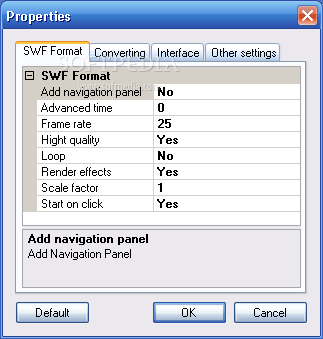
There are only a few configuration options, but all come in very handy because you can enable slide transition, convert both audio and video, use high quality, render effects and set up frame rate, advanced time and X and Y scale.
PPT to Flash Converter isn’t however the fastest app on Earth and it takes some time to convert large presentation files, with a moderate CPU usage experienced during our testing.
On the good side, the program works with PowerPoint 2000, XP and 2003 and doesn’t even require users to install a stand-alone Flash player to perform a conversion.
As a conclusion, PPT to Flash Converter is an interesting mix of easy to use features and eye-appealing design. The application serves its purpose with just a few clicks, that’s true, but it still needs a series of improvements, especially when it comes to the way it handles hardware resources.
What's new in PPT to Flash Converter 2.0:
- FTP/HTTP Publishing of converted presentations.
- Audio and Video support (with generation of FLV - Adobe Flash Video).
- Mail Publishing of converted presentations.
- ZIP compression of converted presentations.
PPT to Flash Converter 2.0
add to watchlist add to download basket send us an update REPORT- runs on:
-
Windows NT
Windows 2003
Windows Vista
Windows XP 32/64 bit
Windows 2K - file size:
- 3.3 MB
- filename:
- PPT2FlashConverter_setup.exe
- main category:
- CD / DVD / Blu-ray Tools
- developer:
- visit homepage
7-Zip

calibre

Context Menu Manager

IrfanView

Zoom Client

Bitdefender Antivirus Free

Windows Sandbox Launcher

4k Video Downloader

ShareX

Microsoft Teams

- 4k Video Downloader
- ShareX
- Microsoft Teams
- 7-Zip
- calibre
- Context Menu Manager
- IrfanView
- Zoom Client
- Bitdefender Antivirus Free
- Windows Sandbox Launcher