
With quite an intuitive interface, this application was developed specifically to help you burn ISO image to discs using multiple methods. #ISO Burner #Burn ISO #Image Burner #Burner #Burn #ISO

Usually burning ISO images is a process which can be performed using the same software that created the compilations, yet sometimes that program may not be available, especially if the data image files are moved to another PC. A solution to this problem is one of the simplest disc writing apps, namely Active@ ISO Burner.
The installation process you are required to go through runs quite seamlessly, without offering to download other third-party products or requiring you to configure settings.
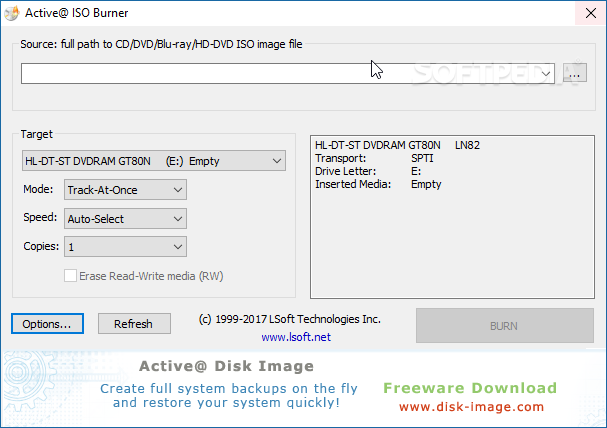
This tool is probably one of the easiest ways of burning ISO images on CDs and DVDs, as the whole procedure can be carried out in minutes from a minimal and clean interface. Thanks to its simple approach, Active@ ISO Burner addresses both beginners and professional users.
The application can work with CD-R, DVD-R, DVD+R, CD-RW, DVD-RW, DVD+RW and even Blu-ray discs which means it can burn ISO images on almost any support currently in existence.
There are multiple burning modes available, namely “Track-At-One,” “Session-At-Once,” “Disc-At-Once PQ” and “Disc-At-Once raw P-W”, yet also some dedicated options to choose the burning speed and the number of copies to be made.
When all the configurations are complete, all you have to do is hit the big 'Burn' button and the process of copying ISO images onto the loaded disc will begin.
Some information regarding the inserted CD, DVD or BD are detected and displayed in the main window, such as drive letter, free space, write and read speeds, and if it writable or erasable.
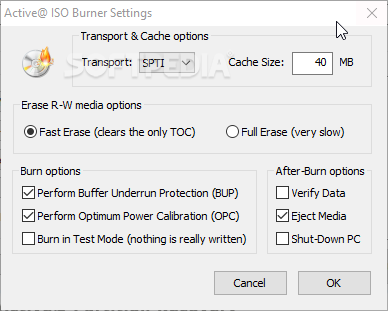
The 'Settings' menu offers you the possibility to configure the erase method for rewritable discs and also choose some burn (e.g. use test mode, perform buffer under protection etc.) and after-burn options (e.g. verify data, eject media, shut down PC).
The amount of resources required is quite high when the burning process is under way, yet this is quite normal for this type of product. All tasks are completed in a timely fashion, without freezing or hanging.
To sum up, Active@ ISO Burner proves to enclose an efficient method of burning ISO images on the fly, without wasting too much time with unnecessary or too complex configurations.
Download Hubs
Active@ ISO Burner is part of these download collections: CD Burner, Burn ISO
What's new in Active@ ISO Burner 4.0.3.0:
- More CD/DVD/BD devices are supported
- Three independent burning transports: SPTI, ASPI, SPTD
- New installer package
- Test Mode burning
Active@ ISO Burner 4.0.3.0
add to watchlist add to download basket send us an update REPORT- PRICE: Free
- runs on:
- Windows All
- file size:
- 2.7 MB
- filename:
- IsoBurner-Setup.exe
- main category:
- CD / DVD / Blu-ray Tools
- developer:
- visit homepage
Zoom Client

Context Menu Manager

calibre

ShareX

IrfanView

4k Video Downloader

7-Zip

Bitdefender Antivirus Free

Windows Sandbox Launcher

Microsoft Teams

- Bitdefender Antivirus Free
- Windows Sandbox Launcher
- Microsoft Teams
- Zoom Client
- Context Menu Manager
- calibre
- ShareX
- IrfanView
- 4k Video Downloader
- 7-Zip