
Intuitive and easy to use CD/DVD burner, integrated with Windows Explorer #Burn CD #CD burner #Write DVD #Burn #Burner #Write


Explore&Burn is a CD/DVD burning software solution, but instead of adopting a standard interface, the program comes with integration to Windows Context Menu for instant access.
This is actually the thing that makes Explore&Burn so special, providing a very quick method for burning your files to a disc.
Just select the files you want to include in your new project, right click them and choose the “Burn files to disc” option in the Context Menu to launch the Explore&Burn wizard.
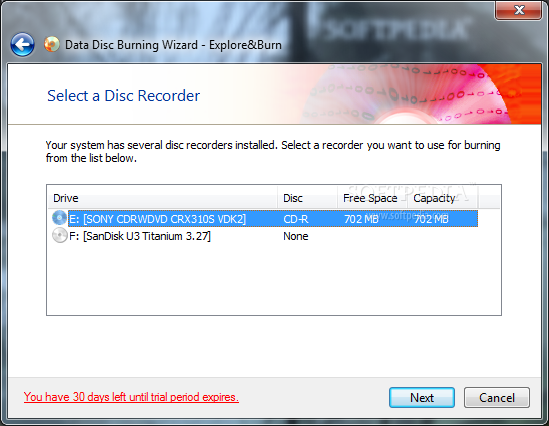
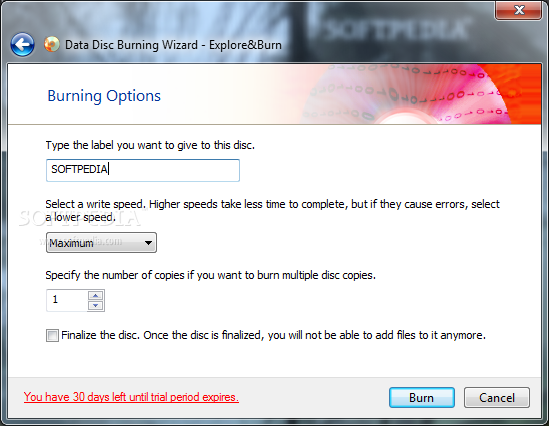
After that, the application launches a typical wizard in which you’re allowed to pick the disc recorder, volume label, burning speed and the number of copies to be created.
Explore&Burn can create not only data CDs and DVDs, but also video DVDs by burning disc-ready VIDEO_TS folders. Plus, it can work with disc images, as long as they’re hosted on your local drives with the ISO format.
The program can create both single-session and multi-session discs, while also supporting ISO-9660, Joliet and UDF file systems.
As you can see, Explore&Burn is quite a straightforward application and it’s very unlikely to get lost in its settings since everything’s so easy to use.
The only drawback is the lack of support for audio CDs and disc image creation, so aside from burning data discs and images, you can’t do much else with it.
All in all however, Explore&Burn is a handy piece of software that comes with an innovative approach in this particular software segment. It can be safely used by beginners and those with a bit more computer knowledge, regardless of the Windows version running on their computer.
What's new in Explore&Burn 1.7.2:
- Fixed the issue when on Windows XP the installer created registry values AllocateCDRoms and AllocateDASD of incorrect type, thus prohibiting access to media burning devices for non-administrative users.
Explore&Burn 1.7.2
add to watchlist add to download basket send us an update REPORT- runs on:
- Windows All
- file size:
- 6.1 MB
- filename:
- ExploreBurnSetup-1.7.2.exe
- main category:
- CD / DVD / Blu-ray Tools
- developer:
- visit homepage
calibre

4k Video Downloader

Windows Sandbox Launcher

Context Menu Manager

Zoom Client

7-Zip

IrfanView

Bitdefender Antivirus Free

Microsoft Teams

ShareX

- Bitdefender Antivirus Free
- Microsoft Teams
- ShareX
- calibre
- 4k Video Downloader
- Windows Sandbox Launcher
- Context Menu Manager
- Zoom Client
- 7-Zip
- IrfanView