
Simple-to-use software application designed for helping you mount CD or DVD images, mount the last mounted or created image, as well as eject it. #Virtual CD #Mount image #Virtual disc #Mount #Backup #Disc

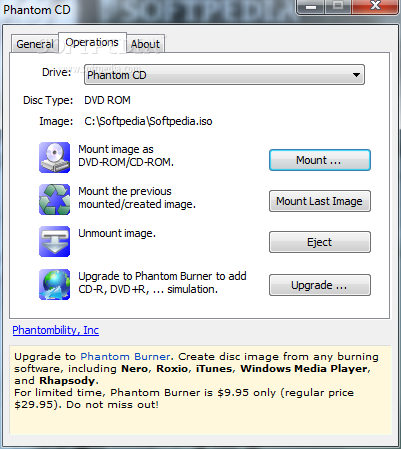
Phantom CD is a lightweight software application that can mount the CD or DVD images that you have already created.
Everyone knows that CDs and DVDs wear out in time and there's always a possibility of accidentally scratching or losing them till then. That's why virtual discs are more reliable and Phantom CD provides some assistance in this regard.
You should keep in mind that you cannot use this software application to create images, so you will need a different tool for that. But what Phantom CD can do is reveal the contents of an image. This is very easily done.
The interface of the program consists of a small window in which you can select a drive, mount an image as a CD-ROM or DVD-ROM, mount the last mounted or created image, as well as eject it. It supports the ISO, CUE and VDD formats. And that's pretty much all that it can do.
Phantom CD takes up a low amount of system CPU and memory, but also provides brief descriptions for each aforementioned command. We haven't encountered any problems in running images of the three formats.
The software application may not come with as many functions as the ones in similar, more powerful products, such as Daemon Tools (for example, you don't have quick access to mount/unmount via the system tray), but it gets the job done. We recommend Phantom CD to all users.
Phantom CD 2.0.0.0
add to watchlist add to download basket send us an update REPORT- runs on:
-
Windows 10 32/64 bit
Windows 2008
Windows 2003
Windows 8 32/64 bit
Windows 7 32/64 bit
Windows Vista 32/64 bit
Windows XP
Windows 2K - file size:
- 7.6 MB
- filename:
- phantomcd_setup.exe
- main category:
- CD / DVD / Blu-ray Tools
- developer:
- visit homepage
IrfanView

Zoom Client

7-Zip

ShareX

4k Video Downloader

Context Menu Manager

calibre

Microsoft Teams

Windows Sandbox Launcher

Bitdefender Antivirus Free

- Microsoft Teams
- Windows Sandbox Launcher
- Bitdefender Antivirus Free
- IrfanView
- Zoom Client
- 7-Zip
- ShareX
- 4k Video Downloader
- Context Menu Manager
- calibre