
Extract internal files from Inno Setup installers, create ZIP or SFX files, open files without extraction, run VirusTotal checkups, and decompile code. #Unpack installer #Setup extractor #Inno Setup extractor #Extractor #Inno #Extraction

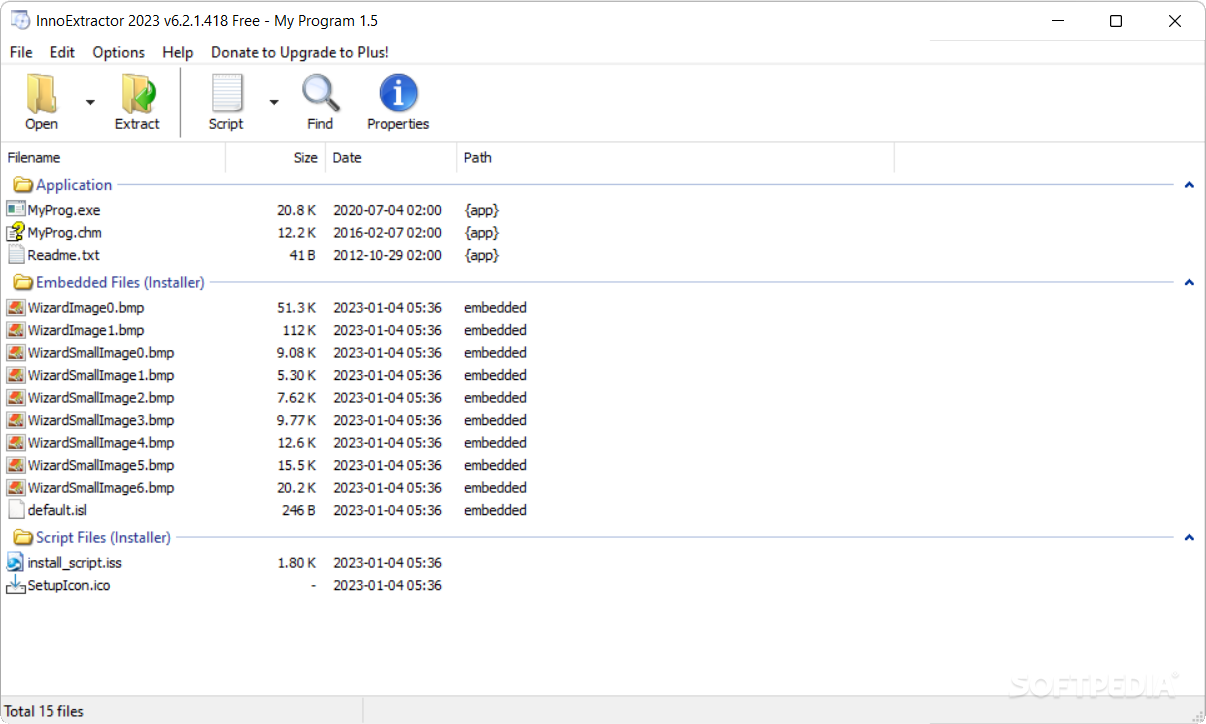
Geared toward all user levels, InnoExtractor is an advanced and approachable application that gives you the possibility to extract resource files from Inno Setup installers.
This way, it's not necessary to unpack everything only to get your hands on specific files. Otherwise, you can find out the exact items that will be copied on your computer at a program's installation. It's also useful for scenarios when you don't have the required admin privileges for installing a tool.
It's wrapped in a user-friendly interface made from a normal window with a neatly structured layout, where you can drop an .exe to preview all internal files. Alternatively, you can instruct the tool to auto-scan a folder for all Inno Setup packs.
You can check out the name, size, timestamp, full path and containing folder of each file, as well as extract one or more selected objects to a custom location on the disk. Apart from extracting their files with their original format, you can compress them into ZIP archives or self-extracting modules (SFX).
InnoExtractor's functionality doesn't end here, though. For example, it enables you to launch files with their associated program without extracting them first. It also has built-in text viewer with associated file extensions that can be customized, a script viewer with syntax highlighting support, basic search function with case matching, along with an engine that automatically checks files for malware using VirusTotal.
You can extract the setup file's icon, identify and decrypt password-protected installers, view a list with decompiled code and save it to file, clear cache, run files with folder dependencies, as well as integrate the program into the Windows Explorer right-click menu for quick access.
It carried out tasks swiftly in our tests and had minimal impact on the machine's performance. No error dialogs popped up and it didn't hang or crash. To sum it up, InnoExtractor offers a simple and effective solution for opening Inno Setup packs to extract files, backed by handy options.
InnoExtractor 7.3.2.535
 Softpedia Editor's Pick
add to watchlist
add to download basket
send us an update
REPORT
Softpedia Editor's Pick
add to watchlist
add to download basket
send us an update
REPORT
- runs on:
-
Windows 11
Windows 10 32/64 bit
Windows 8 32/64 bit
Windows 7 32/64 bit
Windows Vista 32/64 bit
Windows XP 32/64 bit
Windows 2K - file size:
- 2.7 MB
- filename:
- IE_Install.zip
- main category:
- Programming
- developer:
- visit homepage
Zoom Client

Microsoft Teams

Bitdefender Antivirus Free

Context Menu Manager

4k Video Downloader

ShareX

Windows Sandbox Launcher

7-Zip

calibre

IrfanView

- 7-Zip
- calibre
- IrfanView
- Zoom Client
- Microsoft Teams
- Bitdefender Antivirus Free
- Context Menu Manager
- 4k Video Downloader
- ShareX
- Windows Sandbox Launcher