
Strictly dedicated to extracting archives, this powerful utility will help you get ahold of any file and folder in the blink of an eye. #File extractor #Extract file #File extraction #Extract #Extractor #Extraction

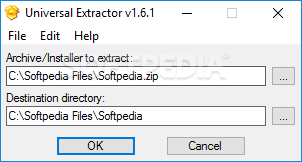
Universal Extractor is an application destined to extract virtually any type of archive available in today’s market: RAR, ZIP, 7Z, EXE, TAR, NRG, ISO, DLL, you name it; this program is able to process all of them at incredible speed.
There’s no other purpose to this program than extracting the contents of archives. As such, you cannot rely on it to create archives. Also, the number of files it can process simultaneously is restricted to one, so batch decompressing is not possible.
On the upside, it integrates itself into the Explorer’s context menu for easy and comfortable access. This feature is configurable during installation where, at one point, you can select the shortcuts to be bundled in the right-click menu: “Add UniExtract Files”, “Add UniExtract Here”, and “Add UniExtract to Subdir”.
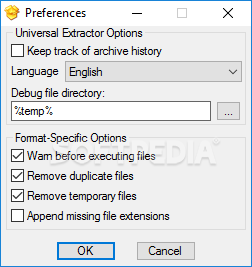
The application’s interface is incredibly simple with just two visible fields: one for the source file and one for the destination folder. The Preferences section allows you to set up the language of the application and the debug file directory. Plus, you can check options for enabling warnings before executing files, removing duplicate files, removing temporary files, or for appending missing file extensions.
Universal Extractor doesn’t pass as a competitor for much evolved software such as WinZip, WinRar or 7-Zip, since it lacks archiving abilities. Please bear in mind that it’s only meant to be used as a decompression utility. There is also a portable edition available.
Although Universal Extractor's features don’t quite make the list, the purpose it was built for is carried out nicely with each task. It's ready for use from the moment it is deployed on your system, also integrating in the context menu for enhanced ease of access.
Download Hubs
Universal Extractor is part of these download collections: Open ZIP, ZIP Viewers, Open Archive
What's new in Universal Extractor 1.6.1 Revision 11:
- Updated InnoUnp to 0.44
Universal Extractor 1.6.1 Revision 11
 Softpedia Editor's Pick
add to watchlist
add to download basket
send us an update
REPORT
Softpedia Editor's Pick
add to watchlist
add to download basket
send us an update
REPORT
- portable version
- Portable Universal Extractor
- runs on:
- Windows All
- file size:
- 5.3 MB
- filename:
- uniextract161.exe
- main category:
- Compression tools
- developer:
- visit homepage
Context Menu Manager

7-Zip

Windows Sandbox Launcher

Zoom Client

Microsoft Teams

Bitdefender Antivirus Free

calibre

ShareX

4k Video Downloader

IrfanView

- ShareX
- 4k Video Downloader
- IrfanView
- Context Menu Manager
- 7-Zip
- Windows Sandbox Launcher
- Zoom Client
- Microsoft Teams
- Bitdefender Antivirus Free
- calibre