
A simple tool that comes packed with basic features for helping you place an analogue clock on your screen with skin support and alarm tools #Analog clock #Desktop clock #Display time #Clock #Desktop #Display


Alwact Clock is a lightweight Windows analog desktop clock that comes with skin support and alarm tools.
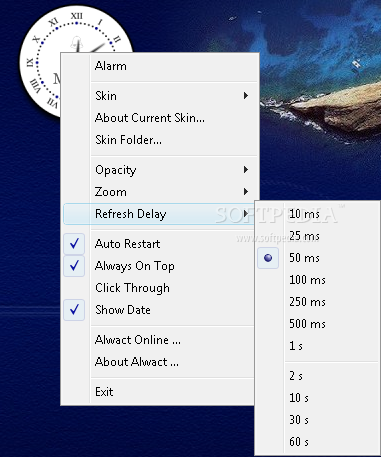
With a dedicated option to also show date right in the main window, Alwact Clock boasts a rather simple interface which can be easily customized by any user thanks to the built-in skin support.
Since it packs only a few features, Alwact Clock is all about simplicity, but it still boasts some nice customization options to better fit any desktop.
First of all, the skin support. Alwact Clock comes with several integrated skins, so you can easily switch to a new look by right clicking the main window or by using the left and the right arrows on your keyboard.
What's more, Alwact Clock also gives you the power to adjust opacity, which can be either set up from the same right click menu or using the up and down keys.
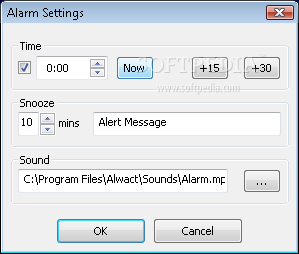
The built-in alarm tool is just basic and comes with a few options to set up desired time, configure snooze and the sound to be played at the user-defined time.
Since it's supposed to perform such a simple task, but also thanks to the fact that it's all such a basic application, Alwact Clock runs on low resources and doesn't affect computer performance at all.
Overall, Alwact Clock is a simple desktop clock that comes with some nice customization options. Still, it needs a bunch of updates, such as the possibility to add new skins, more configuration tools and a much more advanced alarm utility to enable you perform certain actions at the defined time.
Download Hubs
Alwact Clock is part of these download collections: Desktop Clocks
What's new in Alwact Clock 1.3:
- Alarm using customizable mp3 sound, snooze duration and alert message.
- Support for multi-touch touchpads and mouse wheel: Zoom In/Out using multi-touch touchpads. Use mouse wheel to alternate between skins, press 'Ctrl' while using the wheel to change the zoom level.
- Use of keyboard shortcuts: Left/Right arrow keys to switch skin, Up/Down for opacity, +/- for zoom, Space/Backspace for refresh delay. The corresponding keypad keys are also available ('4'/'6' to switch skins, '8'/'2' for opacity, '1'/'3' for refresh delay).
- Better Vista (un)install experience.
Alwact Clock 1.3
add to watchlist add to download basket send us an update REPORT- runs on:
-
Windows NT
Windows 2003
Windows Vista
Windows XP
Windows 2K - file size:
- 214 KB
- filename:
- AlwactClock_1_3_Setup.exe
- main category:
- Desktop Enhancements
- developer:
- visit homepage
Windows Sandbox Launcher

Context Menu Manager

Zoom Client

IrfanView

Bitdefender Antivirus Free

calibre

ShareX

7-Zip

4k Video Downloader

Microsoft Teams

- 7-Zip
- 4k Video Downloader
- Microsoft Teams
- Windows Sandbox Launcher
- Context Menu Manager
- Zoom Client
- IrfanView
- Bitdefender Antivirus Free
- calibre
- ShareX