
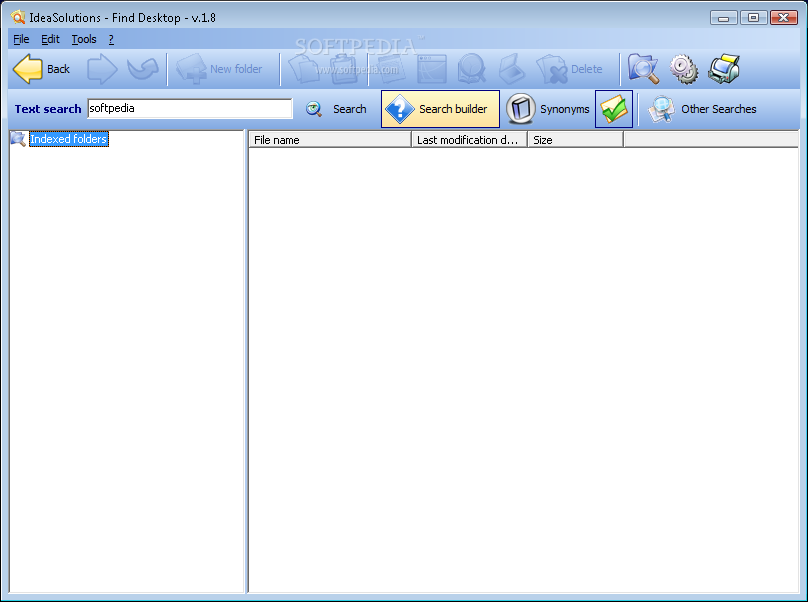
Find Desktop makes it easy to retrieve whatever you need!
It allows you to drammatically decrease the time needed to find, view and elaborate documents.
Find Desktop is integrated with a powerful "full-text" retrieval technology supported by O.C.R. engine.Find Desktop is a tool that allows you to search for desktop files.
This allows you to search directly in the text, starting from one word or exact phrase contained in electronic or image documents.
Other functions are the mail indexing system, the enhanced scanning functions (with virtual annotation capabilities) as well as the management of the classification fields associated with documents render Find Desktop the fast and economic solution for document management.
Find Desktop is equipped of technology "Highlight" that evidences directly on the original document (image file or electronic file) the search results and supports the most common electronic document formats (PDF,Ms. Word, Ms. Excel, etc..) with search capabilities also in ZIP file. Automatic Update functions available.
Here are some key features of "Find Desktop":
Find Desktop allows to index the most common file types placed on local computers or on the Intranet. At the first start, Find Desktop shows a wizard to help users to choose which directory to index. Users can always add or remove directory from the index. All the most common file types are supported. Find Desktop manage indexes up to 7 Gb
Find Desktop supports all Twain driver scanners. It is possible to use the scanner native driver interface or the Find Desktop simplified interface. In the scan option panel, users can set: ■ Page size, with possibility to manually set the sizes ■ Resolution (96, 150, 200, 300 dpi) ■ Scanning options (B/W, Grey scale, Colours) ■ ADF Scan (Automatic documents feeder)
Find Desktop is equipped by a multipage tif file viewer that can manage single page or multipage image files. The page browsing is simplified by the thumbnail menu. By using the right mouse button on a thumbnail, Find Desktop shows the contextual menu. On each image, users can: ■ Acquire one or more page before or after the selected thumb. ■ Cut pages ■ Copy pages ■ Paste pages ■ Delete pages ■ Rotations (90�, 180�, 270�) ■ Deskew image ■ Despeckle image ■ Print image (Selected page, all pages, range of pages)
Find Desktop allows to insert virtual annotations on image files. This annotations doesn't modify "physically" the file. The search for annotations tools allows users to perform searches in the annotations text. Is possible to insert two types of annotations: ■ Text annotations ■ Graphicals annotations
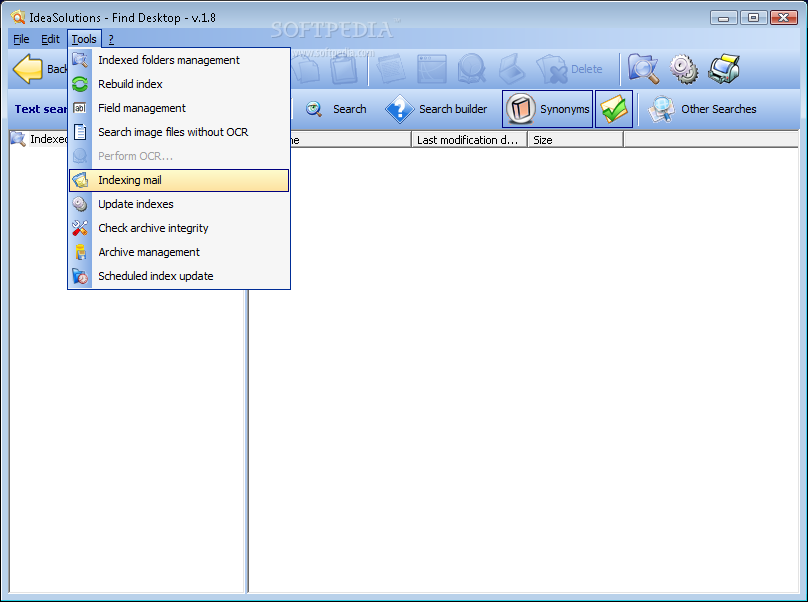
The built-in OCR engine allows to extract the text from the image tif files acquired by the scanner. The OCR engine is automatically started after each scan. Users can also choose to perform OCR in "Batch mode" by starting the "Search image files without OCR" tool. It is also possible to process image file on the intranet. Finally, if you have more than one OCR engine installed on the Intranet, you can let them work together to reduce the time needed to process your image file.
This tool allows to verify the archive integrity. If a file is missing in the index, users can choose the new path for that file or can choose to delete that file from the index.
To perform more detailed searches, it is possible to use a lot of logical operators. It is also possible to tie two or more sentences with a logical operator. You can have, for example, a string like "(car during race) OR (racing car)" that gives back all documents that contains one or both phrases.
After you perform a Full-Text or a Field search, Find Desktop returns a list of results. You can choose a file from this list to see the results directly highlighted on the file (electronic or image file). For every file, Find Desktop gives back the path and the number of hits for the searched terms
The Print List allows you to create a virtual folder for your searches. This virtual folder can be created directly after a search by clicking the right mouse button on the image files. The print list options are: ■ Insert in print list with highlight and with /without file path ■ Insert in print list without highlight and with /without file path The first option allows you to insert the image file with the search text higlighted. You can also choose to insert or not the file path.
Find Desktop allows to index files contained in zip archives. It is not necessary to extract the files. This options is also available for zip files attached to emails.
Find Desktop has a tool that allows to index e-mail databases. This feature makes it possible to perform searches in the e-mail and also in the attachment files (even if compressed in Zip format). Users can choose which mail folder want to index. This feature is compatible with Outlook (97, 2000, Xp, 2003) Outlook Express and Eudora.
Find Desktop allows users to create custom database fields to better classify documents. The available Field types are: ■ Text ■ Integer ■ Decimal ■ Date ■ Memo The "Search in field" option allows to perform searches in fields values. The field value is shown directly on the right side of each classified document.
Find Desktop is integrated with a Synonym dictionary. This allows to search for a word and also for its synonyms.
It is possible to convert PDF image file in TIF image files. This feature is necessary to perform OCR on PDF image files.
Online contextual Help on "F1", Flash tutorials to learn how to use the software.
Requirements:
■ Cpu 300Mhz ■ Ram 64Mb ■ HDD 30Mb (setup) ■ Video Board 800x600 true colors ■ Monitor 800x600 true colors ■ Browser Internet Explorer 5.0
Limitations:
■ 30 uses trial ■ Nag screen
Filed under
- Latest version:
Find Desktop 1.84
- runs on:
- Windows All
- file size:
- 29.5 MB
- filename:
- fdsetup.exe

- main category:
- Desktop Enhancements
- developer:
Context Menu Manager

4k Video Downloader

calibre

Bitdefender Antivirus Free

Microsoft Teams

7-Zip

Windows Sandbox Launcher

ShareX

Zoom Client

IrfanView

- ShareX
- Zoom Client
- IrfanView
- Context Menu Manager
- 4k Video Downloader
- calibre
- Bitdefender Antivirus Free
- Microsoft Teams
- 7-Zip
- Windows Sandbox Launcher