
A simple application that frees users from repetitive click work by simulating left, right and middle mouse button clicks on any window. #Mouse Clicker #Auto Clicker #Macro Recorder #Mouse #Clicker #Automate
There are many applications that can help you automate various computer tasks so as to optimize your work and save time. Auto Mouse Clicker is one such utility.
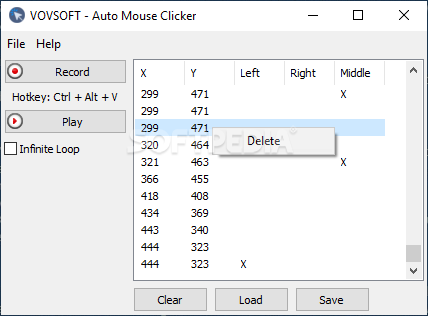
The application comes with an intuitive, straightforward interface that helps you focus on recording macros, rather than be distracted by many buttons or panels.
You can basically start recording your mouse movements as soon as you launch the app, by pressing the Record button. The Play button allows you to playback the captured mouse activity to make sure it matches your expectations.
Alternatively, you can start capturing using the predefined hotkey (unfortunately, you cannot change it to a custom combination, so if you have already assigned the hotkey to another software solution, it will surely be a conflict).
Once you have double-checked the recorded macro, you can set it to be played in an infinite loop or you can easily save it to CSV and load it at a later time.
After you load a macro, the app can simulate left, right or middle mouse button clicks to automate a wide range of actions, including in games, Office suites or complex rendering programs.
You can easily review the recorded macro and remove individual clicks if you are not satisfied with the outcome (simply right-click an entry and remove it from the list).
Auto Mouse Clicker can help you automate your repetitive tasks so as to speed them up or save time and effort. You can save the macros for later use or analysis, without any effort on your side, by simply accessing the dedicated menu.
What's new in Auto Mouse Clicker 2.3:
- Added “Stay on Top”
- Improved “Clear”
- Improved “Insert Wait”
Auto Mouse Clicker 2.3
add to watchlist add to download basket send us an update REPORT- runs on:
-
Windows 11
Windows 10 32/64 bit
Windows 8 32/64 bit
Windows 7 32/64 bit
Windows Vista 32/64 bit
Windows XP 32/64 bit - file size:
- 2.3 MB
- filename:
- auto-mouse-clicker.exe

- main category:
- System
- developer:
- visit homepage
Context Menu Manager

calibre

Zoom Client

ShareX

Bitdefender Antivirus Free

Microsoft Teams

4k Video Downloader

IrfanView

7-Zip

Windows Sandbox Launcher

- IrfanView
- 7-Zip
- Windows Sandbox Launcher
- Context Menu Manager
- calibre
- Zoom Client
- ShareX
- Bitdefender Antivirus Free
- Microsoft Teams
- 4k Video Downloader