
Multi Screen Emulator for Windows (MSEW) helps to solve this problem and arranges all these windows on virtual screens #Screen Emulator #Virtual screen #Arrange window #Screen #Emulator #Virtual
Multi Screen Emulator for Windows (MSEW) helps to solve this problem and arranges all these windows on virtual screens to get rid off any disorder and chaos on your Windows desktop. MSEW creates up to eight virtual screens and each of them can be used for specific aims. For example, you can launch all working tools such as text editors, spreadsheets and engineering tools on the first screen; use the second one for launching games and the third one to launch slideshow or CD-player with pleasant music. Switching of the virtual screens can be performed by using MSEW panel or by hot keys. This can be explained on small example:
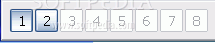
You can run any applications while running under the first desktop. Click the 2 button to switch to the second desktop:
Switching desktops (before and after)
Now you have a brand-new desktop where you can start other applications.
When you are switching between desktops, all applications that are running in chosen desktop appear with restored positions. Desktop navigation is realized by pressing specified button on the MSEW panel. The MSEW panel can be dragged to any desktop corner by holding mouse button down on panel outside the buttons.
You can see the preview of specified desktop and all applications running on it by selecting the menu item in MSEW popup menu (activates by right mouse button click on MSEW).
Here are some key features of "Multi Screen Emulator for Windows":
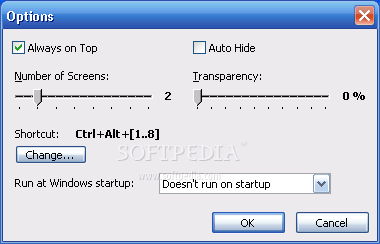
· Auto-hide form · MSEW allows hiding it automatically when mouse goes from its panel, the same behavior as auto-hide behavior of Windows task-bar. · Always on top · MSEW allows keeping its panel always above all running applications. · Number of desktops · MSEW allows you to configure the number of virtual desktops from 1 up to 8. · Desktop's preview · MSEW allows you to see the whole desktop appearance and applications running on it without switching to this desktop. · MSEW · Keyboard shortcuts · You can switch the desktop using your keyboard. Press Ctrl+Alt+ (default settings), where X is the number of the desktop you want to activate. There is possible to configure which keyboard shortcut to use for switching virtual desktops. · Configure shortcut · Persistent desktops · You can make the applications from one virtual desktop stay visible on all desktops. · Move windows across desktops · You can move a window from another virtual desktop to the active desktop without leaving it. · Transparency · You can move configure MSEW to be transparenced in order to a little hide it from your eyes.
Multi Screen Emulator for Windows 1.4
add to watchlist add to download basket send us an update REPORT- runs on:
- Windows All
- file size:
- 755 KB
- filename:
- msew.zip
- main category:
- Desktop Enhancements
- developer:
- visit homepage
ShareX

Bitdefender Antivirus Free

Context Menu Manager

Windows Sandbox Launcher

Microsoft Teams

7-Zip

IrfanView

4k Video Downloader

calibre

Zoom Client

- 4k Video Downloader
- calibre
- Zoom Client
- ShareX
- Bitdefender Antivirus Free
- Context Menu Manager
- Windows Sandbox Launcher
- Microsoft Teams
- 7-Zip
- IrfanView