
Hide program windows with a press of a hotkey combination. #Hide window #Password protection #Lock computer #Hide #Hider #Lock

Sometimes, the things you look at on the Internet, the games you play or documents you use are private and shouldn’t be seen by other people. Quick Hide Windows is a small utility that can help you hide all types of windows.
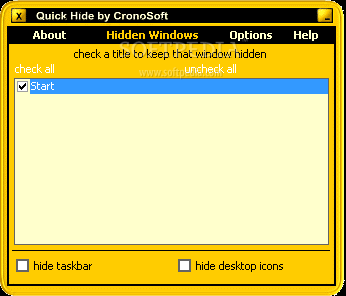
The app has a simple interface that should be quite easy to figure out, thanks to the intuitive layout.
The program enables you to hide programs with only a press of a hotkey combination. It can hide the open windows, taskbar, desktop icons and keep away unwanted users from accessing the desktop.
You may hide only the active window or all of them by pressing similar key combinations. Bringing them back to the screen is done through a set of hotkeys as well.
By ticking the checkboxes in the app’s interface, you may hide the desktop icons and the taskbar. Also, if you only want to restore some of the windows, this can be done by checking the items in the interface.
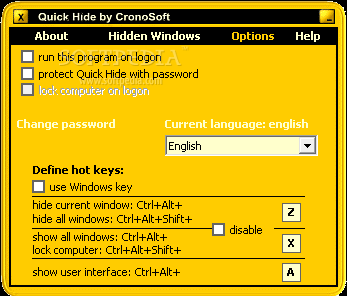
Quick Hide Windows can be set to run on system startup. You can set password protection for the app and have it lock computer on logon.
While the program comes with several hotkey combinations, you can easily change them from the Options area.
Quick Hide Windows is a small tool that can be quite helpful, despite the fact that newer versions of Windows have a similar feature, but which only temporarily hides the apps. Less experienced users should find it easy to handle, thanks to the intuitive layout.
Quick Hide Windows 2.0.1
add to watchlist add to download basket send us an update REPORT- runs on:
- Windows All
- file size:
- 957 KB
- filename:
- qhw.zip
- main category:
- Desktop Enhancements
- developer:
- visit homepage
Bitdefender Antivirus Free

4k Video Downloader

IrfanView

7-Zip

Zoom Client

calibre

ShareX

Microsoft Teams

Windows Sandbox Launcher

Context Menu Manager

- Microsoft Teams
- Windows Sandbox Launcher
- Context Menu Manager
- Bitdefender Antivirus Free
- 4k Video Downloader
- IrfanView
- 7-Zip
- Zoom Client
- calibre
- ShareX